Offer a beauty or skincare subscription in your Shopify shop
A day cream, a cleanser and a serum do not run out at the same time, and a routine changes with the season. Loyalo gives beauty brands on Shopify subscriptions that move with that: refilling at the right moment, swapping without cancelling and a subscription you can give as a gift.
Why a beauty subscription has to do more than repeat
Skincare products are used every day, but not all at the same speed. A jar of day cream lasts six weeks, a cleanser four. A subscription with one fixed rhythm delivers one too early and the other too late, and after a few rounds the bathroom cabinet is full.
On top of that, a routine does not stand still. In winter a customer wants something richer, after summer something else, and sometimes a product does not suit her skin after all. When swapping means cancelling and ordering again, she often does not come back.
Kinds of beauty and skincare subscription
A beauty subscription can be a refill, a beauty box or a gift. These are the forms a beauty or skincare brand can choose from.
| Kind of subscription | How it works | Fits |
|---|---|---|
| Refill | The same product on the rhythm of its use, for example every 4, 6 or 8 weeks | Day cream, cleanser and other products that run out |
| A beauty box the customer puts together | With the box builder the customer fills a box from a collection you choose, one-off or as a subscription | A wide range and customers with a routine of their own |
| Box of the month | One product for which you choose the contents each month; subscribers get the new box | Brands that want customers to try something new every month |
| The routine in one delivery | Products with the same rhythm that a customer orders at once end up in one subscription and are delivered together | Customers who use a fixed set |
| Gift subscription | Prepaid, with a recipient, a message and a start date | Holidays and birthdays |
How Loyalo solves this
Refilling at the right moment
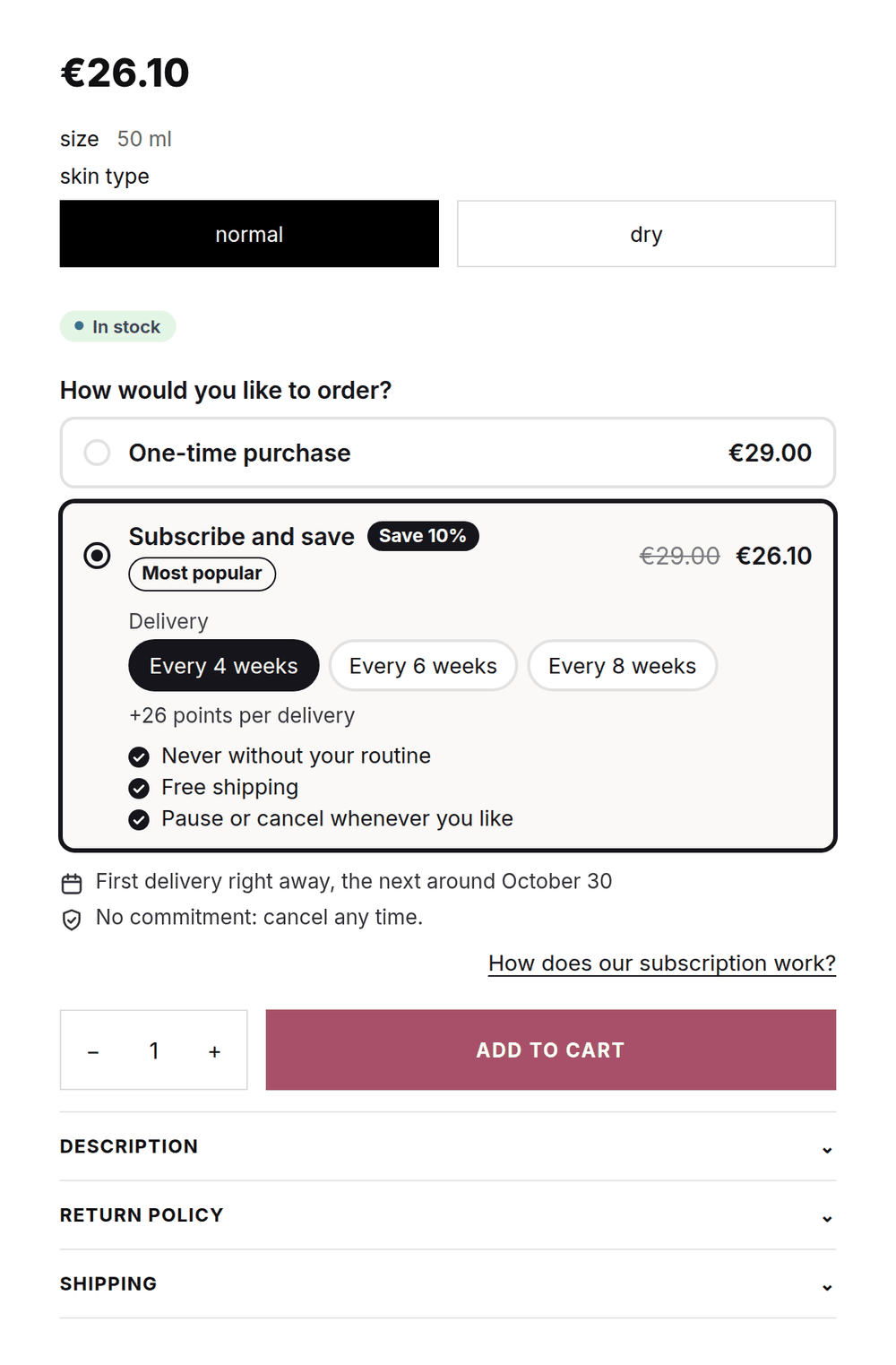
Give every product the frequencies that match its use, for example every 4, 6 or 8 weeks. The customer chooses in the widget and changes it later herself.
Swapping within the routine
In the portal the customer swaps variant or product within the same plan, for example from normal to dry skin. The discount stays.
Gift subscriptions
Giving a skincare subscription works with a recipient, a personal message and a start date. The recipient enters no payment details.
Campaigns through Klaviyo
Subscription events and profile fields go to Klaviyo, so you email subscribers about a new line or a seasonal campaign.
What your subscriber sees
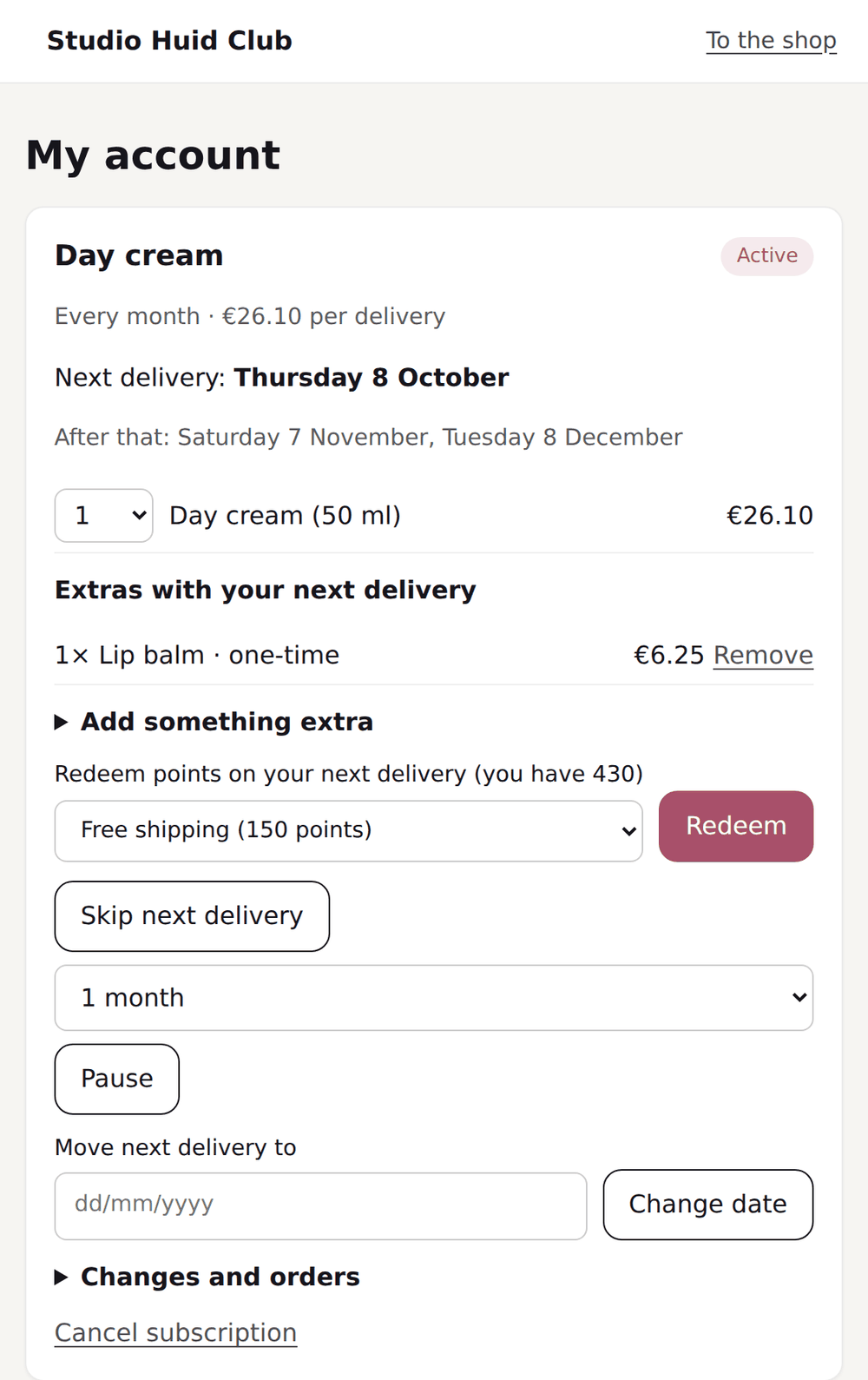
The portal is in your brand style and asks for no password. The customer sees the next delivery, adds a lip balm or a mini once and moves the date when the jar is still half full. When she wants to stop, she picks a reason and is offered an alternative once.
Starting a beauty subscription: the choices first
Before you set anything up, you decide five things. They determine whether the subscription fits how your customers use their products.
| Choice | What to look at |
|---|---|
| Which products | Start with products that run out and that customers already reorder. A product a customer rarely replaces fits less well |
| The rhythm | Give each product the frequencies that match its use; not every product runs out equally fast |
| Swapping | Put products that customers swap between in the same plan, for example the same cream for every skin type |
| The discount | Work from your margin per delivery, after shipping and payment costs. You set the discount per frequency |
| Gift | Decide whether you switch on the gift option and for how many deliveries a gift is prepaid |
How a beauty brand sets it up
An example of settings that suit skincare. You set everything up without code and change it while your subscriptions are running.
| Part | Example |
|---|---|
| Frequencies | Every 4, 6 or 8 weeks, with a 10% or 5% discount |
| Swapping | Day and night cream for every skin type in one plan, so customers can swap freely |
| One-time extras | A lip balm or a mini, with a discount for subscribers |
| Gift | 3 months up front, with a message and a start date |
| Cancellation reason 'I still have enough' | Offer: deliver less often, with the same discount |
| Bonus points | For a review, on the birthday and for following on Instagram |
| Reward | A free mini, only redeemable from the second tier |
Live in four steps
- Plans for your refillsCreate a subscription plan with the frequencies that match how your products are used, and put products customers swap between in the same plan.
- Place the widget and labelsPut the block with the subscription choice on the product page and the subscription label on the product tiles of your collections.
- Switch on giftingSwitch on the gift option in the widget. The buyer enters the recipient, the message and the start date on the product page.
- Connect KlaviyoConnect Klaviyo and choose per email whether Loyalo or your own flow sends it. With a test event you check your flow beforehand.
What happens when
| Situation | Approach in Loyalo |
|---|---|
| A customer wants to go from day to night cream | Swap products within the same plan |
| The jar is still half full | Skip or reschedule the delivery, from the email too |
| Someone wants to give a subscription | The gift option, with recipient, message and start date |
| A customer wants to try something new | A one-time extra with the next delivery |
| You want a seasonal campaign for subscribers | A flow in Klaviyo on Loyalo's events and profile fields |
| A customer wants to cancel | She picks a reason and gets a fitting offer once |
| A customer moves house | She changes the delivery address herself in the portal |
You decide how much freedom customers get
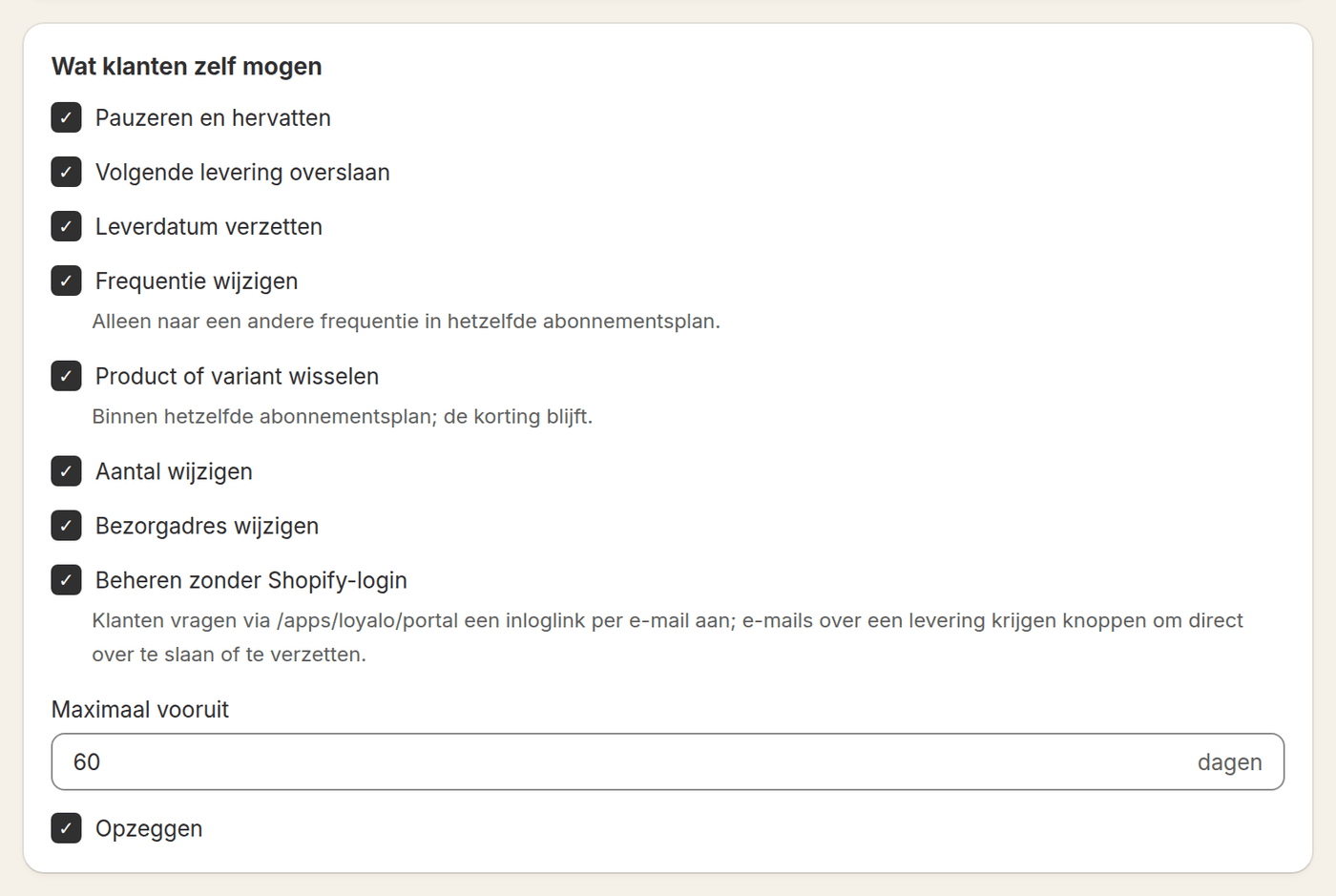
Not every brand wants to allow the same. Under Subscriptions > Settings you switch on or off, per item, what customers may do themselves: pause, skip, reschedule, the frequency, the product, the quantity and the address.
Whatever you switch off, you still do for the customer in the dashboard. That keeps you in control of a routine that suits your products, without your support team making every change.
Points for reviews, birthdays and followers
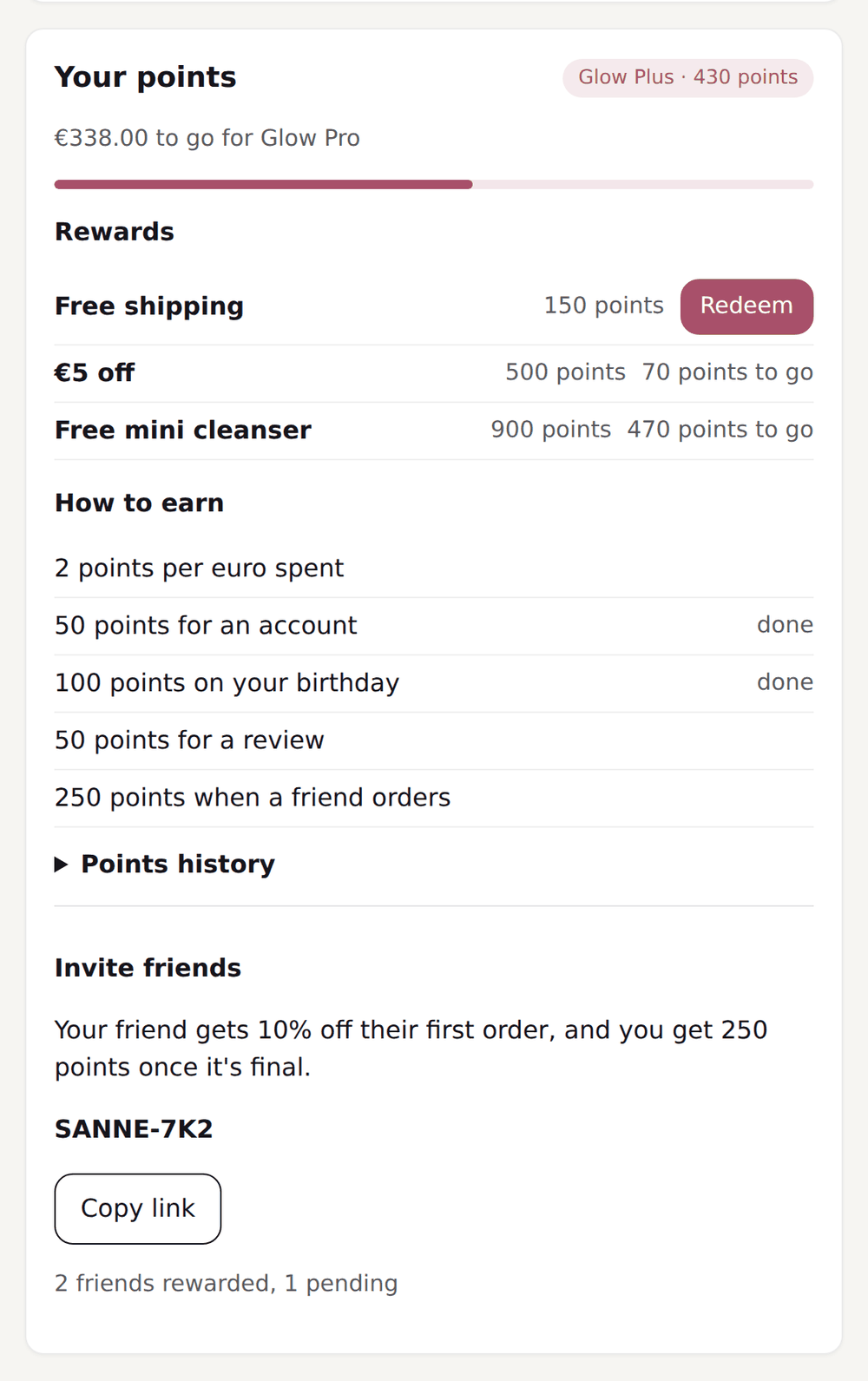
Beauty lives on recommendations. With the Customer Loyalty add-on you give points for a review, with a bonus for a photo, and for following on Instagram or TikTok. On her birthday a customer gets bonus points. You can reserve rewards for a tier, such as a free mini from the second tier, and customers invite friends with a personal link.
Launch checklist
- A subscription plan with frequencies per kind of product
- Products customers swap between in the same plan
- The widget on the product page and the label on your product tiles
- The gift option on, with recipient, message and start date
- Klaviyo connected, with a test event sent
- The colours, the logo and the texts of portal and emails in your brand style
What it costs
Subscriptions are in every plan: Growth costs € 99 per month up to 250 active subscriptions, Scale € 299 above that. Customer Loyalty, for points and tiers, is an add-on of € 199 per month. You pay nothing per order and try everything free for 14 days.
Frequently asked questions
How do you start a beauty subscription in your online shop?
Choose the products that run out, give each product the frequencies that match its use, set the discount and put the subscription choice on the product page. Put products that customers swap between in the same plan.
Can customers put together their own beauty box?
Yes. With the box builder the customer puts together a box from a collection you choose, in the sizes you set and with a discount per size. You sell the box one-off, as a subscription or both.
Can a customer swap between products within the routine?
Yes. In the portal the customer swaps variant or product, as long as the product is in the same subscription plan. She keeps her discount.
How exactly does a gift subscription work?
The buyer chooses a subscription, ticks that it is a gift and enters the recipient, a message and the start date. The recipient gets an email with the message on the start date and enters no payment details.
Can we automate seasonal campaigns?
Yes. Every subscription event arrives as a Klaviyo event, and Loyalo keeps profile fields such as the number of active subscriptions and the next delivery date. You build your own flows and segments on those in Klaviyo.
Can we adapt the widget to our brand style?
Yes. You set the colours, corners, texts and layout of the widget without code. You test a new version as a draft first, or with an A/B test against the current one.
Can a customer have several products in one subscription?
Yes. When a customer orders several products with the same rhythm at once, they end up in one subscription and are delivered together. Products with a different rhythm get a subscription of their own.
Do customers get points for a review?
Yes, with the Customer Loyalty add-on. Loyalo reads reviews from its own review module, Judge.me or Kiyoh and adds the points, with a maximum per month that you set.
Setting up subscriptions for your beauty brand?
See in a demo how refills, gift subscriptions and points work for your shop.
Request a demoReady to sell subscriptions inside Shopify?
No per-order fee, no redirect, no hassle. Just native subscriptions.