Fewer cancellations, more active subscribers
Most subscribers leave for two reasons: they have too much stock, or their payment fails. Loyalo handles both with a cancellation flow that offers alternatives, automatic payment retries and a win-back for those who leave anyway.
Two kinds of cancellation, two approaches
A subscriber who clicks 'cancel' has a reason. Often it is not an objection to your product but to the rhythm or the price: there is still enough in the cupboard, this month is a bad time, or it has just become too expensive. That is voluntary churn, and you solve it with an alternative at the right moment.
The other half you do not even notice. A card expires, a direct debit bounces and the subscription stops without anyone wanting that. That is involuntary churn, and you solve it with new attempts and a customer who hears about it in time. This page goes through both, in the order in which you set them up.
Record the reasons
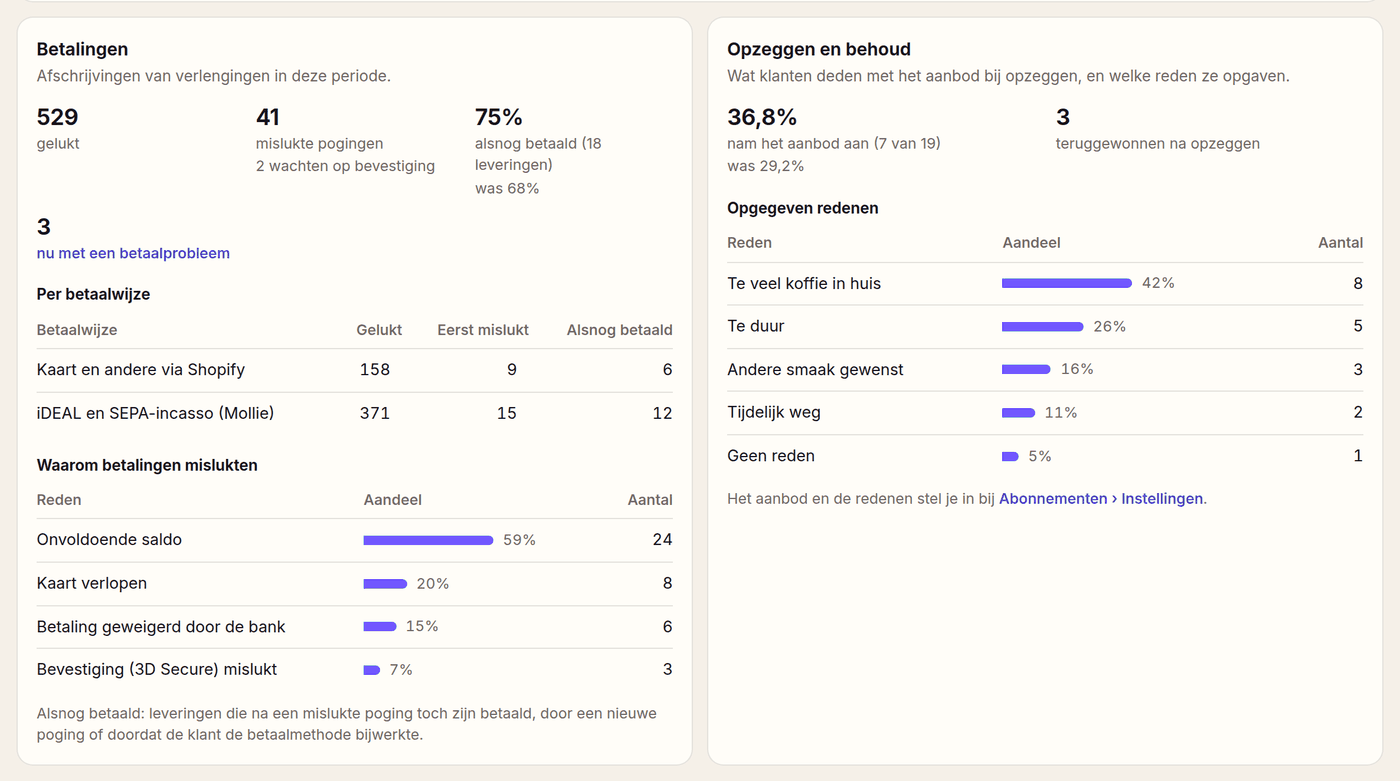
Every cancellation gets a reason, so Analytics shows you where your product or price pinches.
Pausing and skipping
A pause of one or more months, or skipping one delivery, keeps the customer without forcing a delivery on them.
Delivering less often
Going from every month to every two months is often enough to save the subscription. The discount stays the same.
A discount offer
A discount on the next deliveries, only for customers who would otherwise leave, and only once per period.
Cancelling is a conversation, not a button
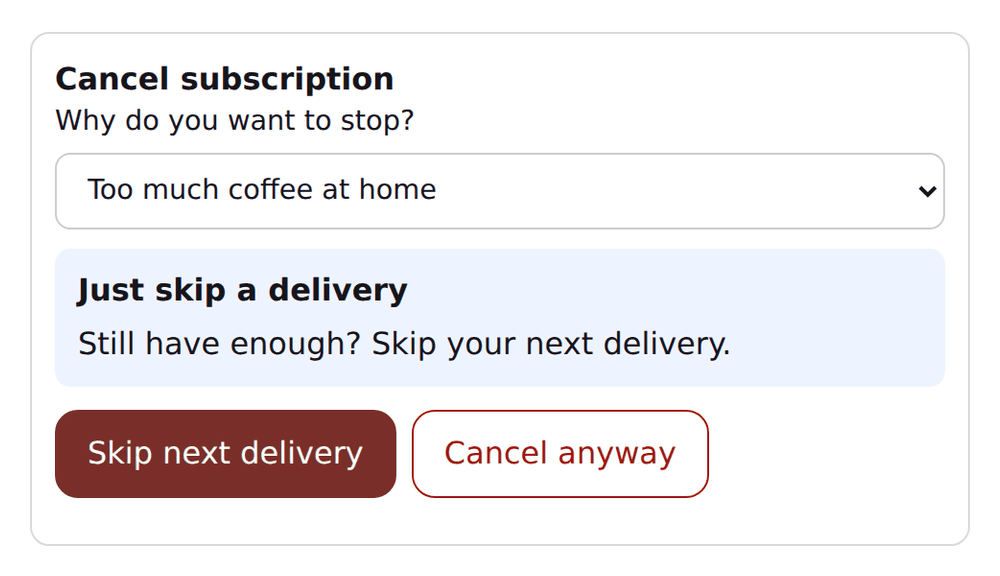
When a customer clicks cancel, the portal first asks for the reason. Based on that they get one alternative that fits. When they accept, the subscription continues. When they still choose to cancel, the subscription is cancelled, and you know why.
Which reason, which offer
You set up to ten reasons and choose per reason what the customer is offered. This is a division that works for many stores.
| Cancellation reason | Fitting offer | Why |
|---|---|---|
| Too much at home | Skip the next delivery | The problem is stock, not the product |
| Keeps having too much left | Deliver less often | The rhythm does not match the usage |
| Too expensive | A discount on the next deliveries | The customer doubts the price, not the product |
| Away for a while | Pause for a few months | The customer wants to come back, just not now |
| Wants another flavour or product | No offer | The customer can swap in the portal themselves |
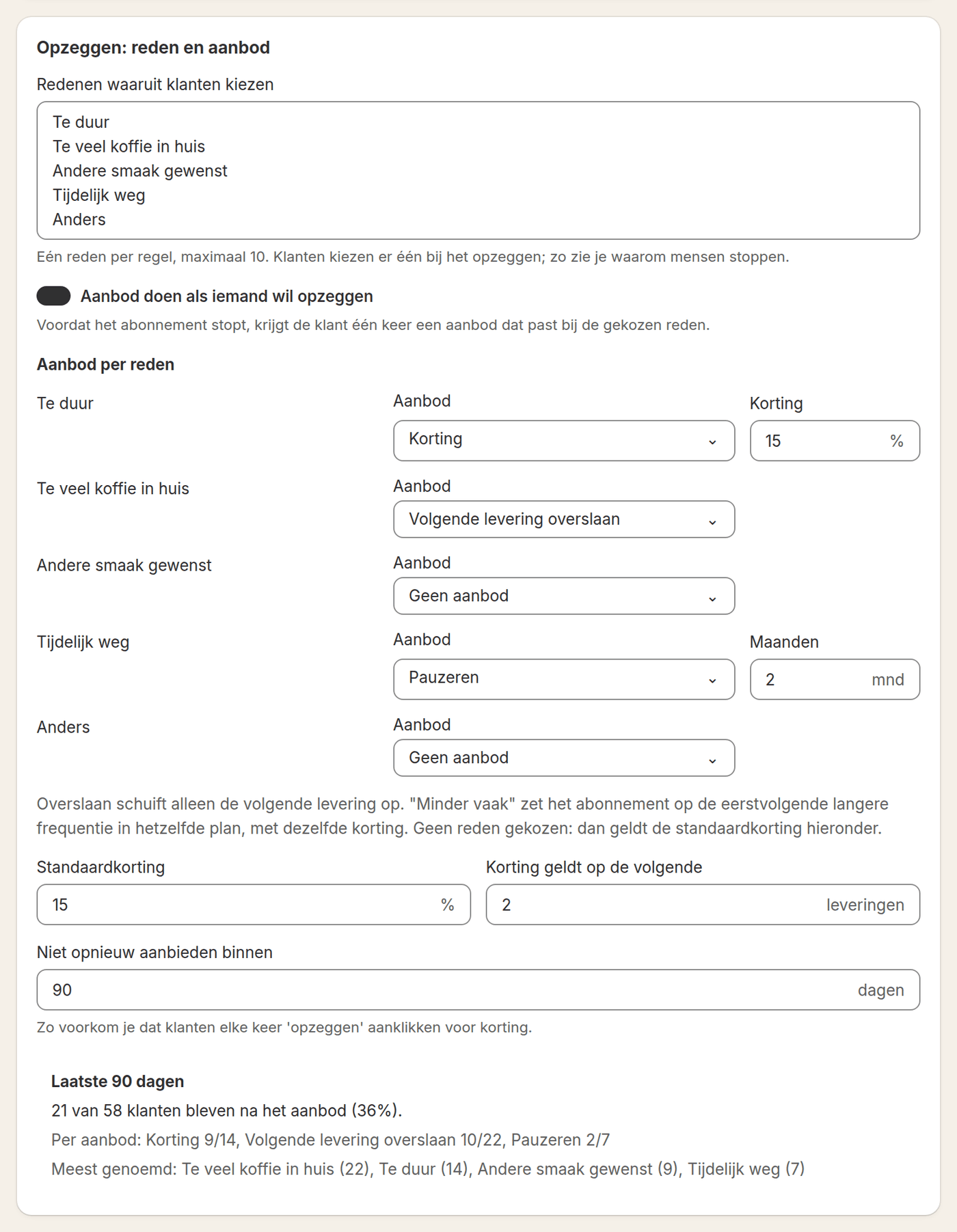
You set a period in which the same subscription gets no new offer, for example ninety days. So a customer who clicks cancel every month does not get a discount every month.
Recovering failed payments
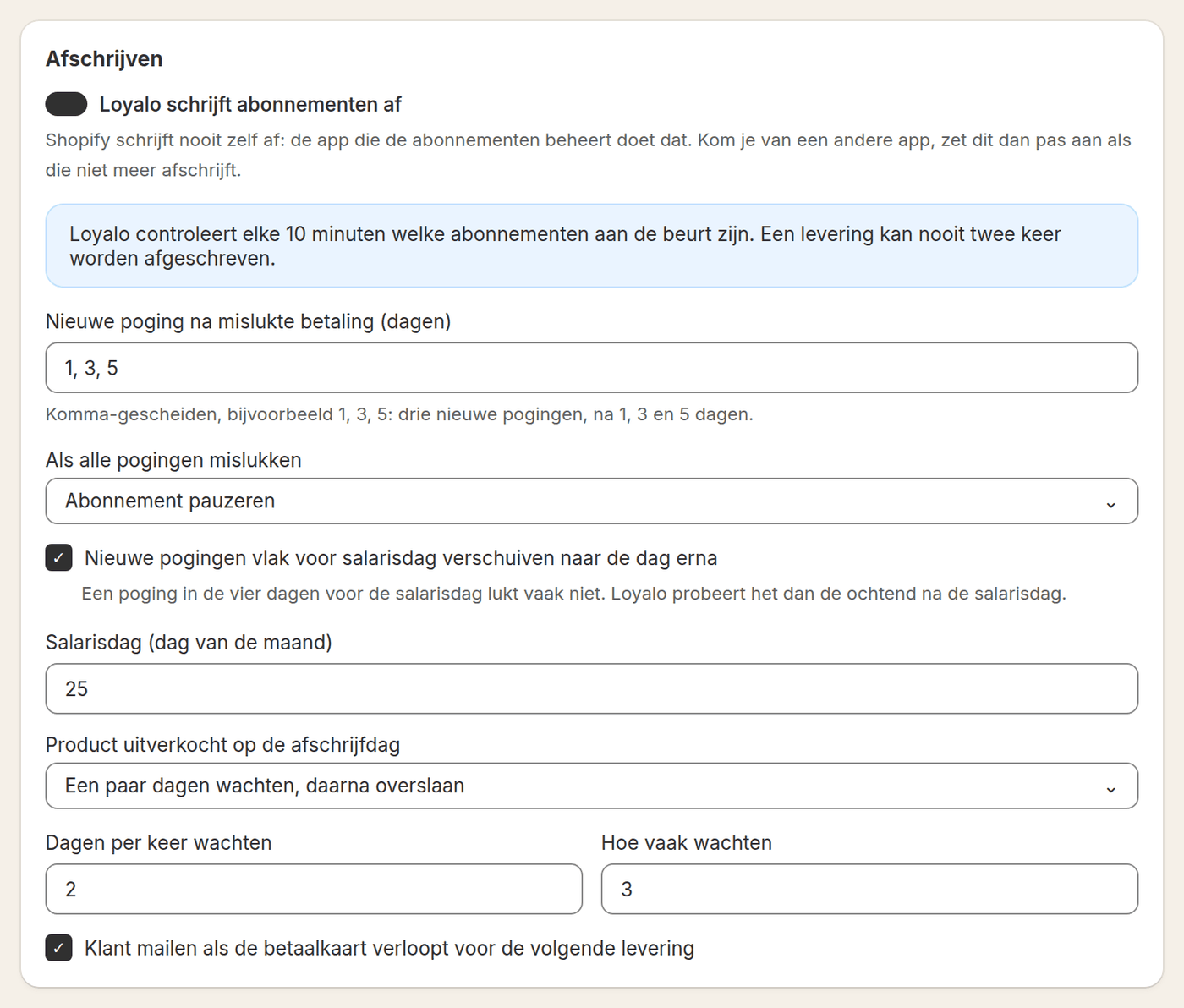
When a collection fails, Loyalo retries automatically on your schedule, for example after 1, 3 and 5 days. The customer gets an email with every attempt. When it still does not work after that, what you chose happens: the subscription pauses, stops or stays.
- Up to six new attempts, on days you enter yourself
- Attempts just before payday move to the morning after
- For iDEAL a payment link in the email, which renews the mandate at once
- An email beforehand when the customer's card is about to expire
- Subscriptions with a payment problem at the top of your list
- One button to collect again right away from the dashboard
Stepping in without logging in
The email about the next delivery has buttons to skip or reschedule the delivery, without logging in. That prevents a customer cancelling because they never got round to changing something. The link works once, and you choose how many days before the delivery the email goes out.
Win-back after cancelling
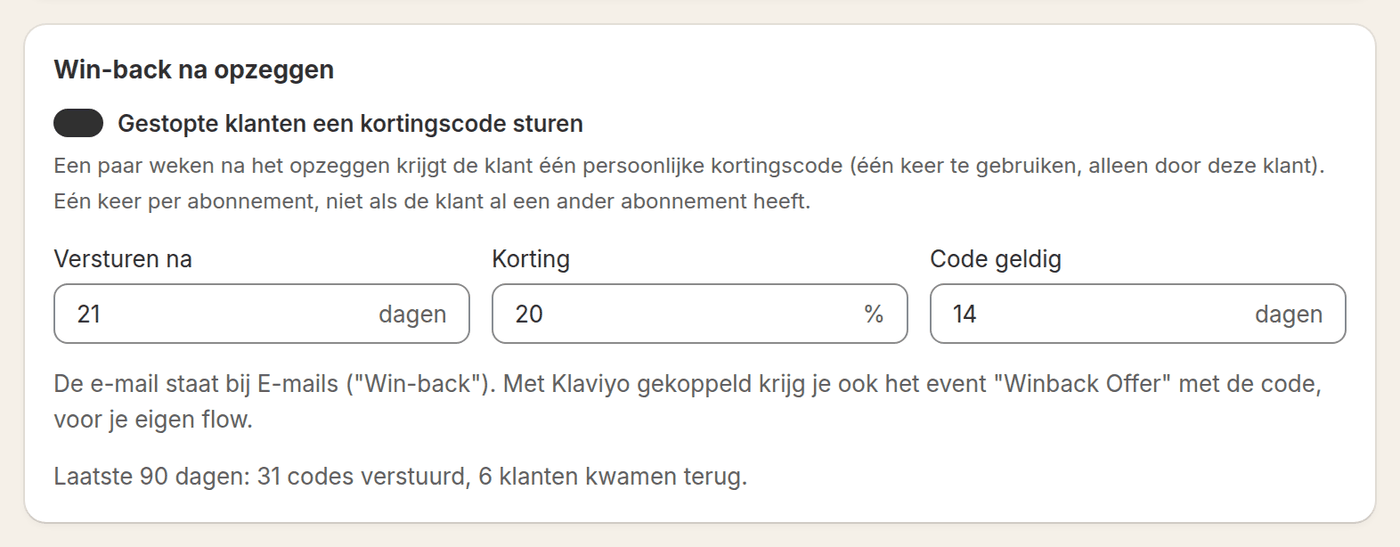
A number of days after cancelling, which you set, the customer gets an email with a personal discount code. The code can be used once and only by that customer. It happens once per subscription, and not when the customer still has another subscription. The same moment goes to Klaviyo as an event, for your own flow.
Measuring whether it works
You only improve retention when you see what happens. Analytics shows which share of customers stayed after an offer, which reasons are chosen most often and which share of the failed payments was paid after all. Per start month you also see which part of the subscriptions is still running after 1, 2, 3, 6 and 9 months.
Set up in five steps
- Set your cancellation reasonsStart with four or five reasons in your customer's words. 'Too much at home' says more than 'stock'.
- Choose an offer per reasonA discount, a skip, a pause, delivering less often or no offer. Also set the waiting period before a customer gets an offer again.
- Set the schedule for new attemptsChoose the days, switch on payday if your customers pay around that day, and choose what happens when everything fails.
- Switch on the win-backChoose after how many days the code goes out, how much discount it gives and how long it is valid.
- Look at the figures after a monthChange the offer for the reasons where few customers stay. The figures are below the settings and under Analytics.
What it costs
The cancellation flow, payment retries, win-back and the figures that go with them are in every Loyalo plan, from € 99 per month. You pay nothing per order or per customer kept.
Frequently asked questions
Can I decide which alternatives are shown?
Yes. Per cancellation reason you set which offer appears and whether a discount goes with it. You can switch the offer off entirely as well; then the customer cancels without an offer.
How often is a failed payment retried?
By default after 1, 3 and 5 days, but you decide the number of attempts and the days, up to six attempts. After that you choose whether the subscription pauses, stops or stays.
Does the win-back work with Klaviyo?
Yes. Cancellations arrive as a Klaviyo event with the cancellation reason, and the win-back sends an event of its own with the code. You build your own flow on those in Klaviyo. You can have Loyalo send the email as well.
Do I see the effect of cancellation prevention in figures?
Yes. Analytics shows how many customers stayed after an offer and which reasons are chosen most often. Below the settings you see the result per kind of offer.
Can a customer still simply cancel?
Yes. After the offer the button to cancel anyway is right next to it. The offer comes once; there is no series of screens between the customer and the cancellation.
Can I set a minimum term?
Yes. You set a minimum number of deliveries and a notice period of at most a month. When a customer cancels earlier, the subscription stops after the term or the notice period and they get a confirmation of that.
Want to see where your subscribers drop off?
In a demo we go through the cancellation flow, the payment retries and the figures.
Request a demoReady to sell subscriptions inside Shopify?
No per-order fee, no redirect, no hassle. Just native subscriptions.