Per company and location
A standing order belongs to a location of a company in Shopify B2B. Every location has its own orders, address and rhythm.
Shopify subscriptions do not work for business buyers. So Loyalo keeps the schedule itself: on the agreed day the order is ready in Shopify, at the prices and the payment terms of that company.
A café, an office or a reseller usually orders the same things, at a fixed moment. With a standing order the buyer no longer has to think about it, and you know what is coming.
A standing order belongs to a location of a company in Shopify B2B. Every location has its own orders, address and rhythm.
The order is placed with the payment terms of the location, for example 30 days. Shopify sends the invoice; no direct debit is needed.
Prices and minimum quantities come from the company's catalog in Shopify. When you change a price, it applies to the next order.
In the customer account the buyer changes quantities, adds a product, skips once, pauses or picks another rhythm. You decide whether that is allowed.
Standing orders sit next to the subscriptions of consumers, in the same dashboard in your Shopify admin.
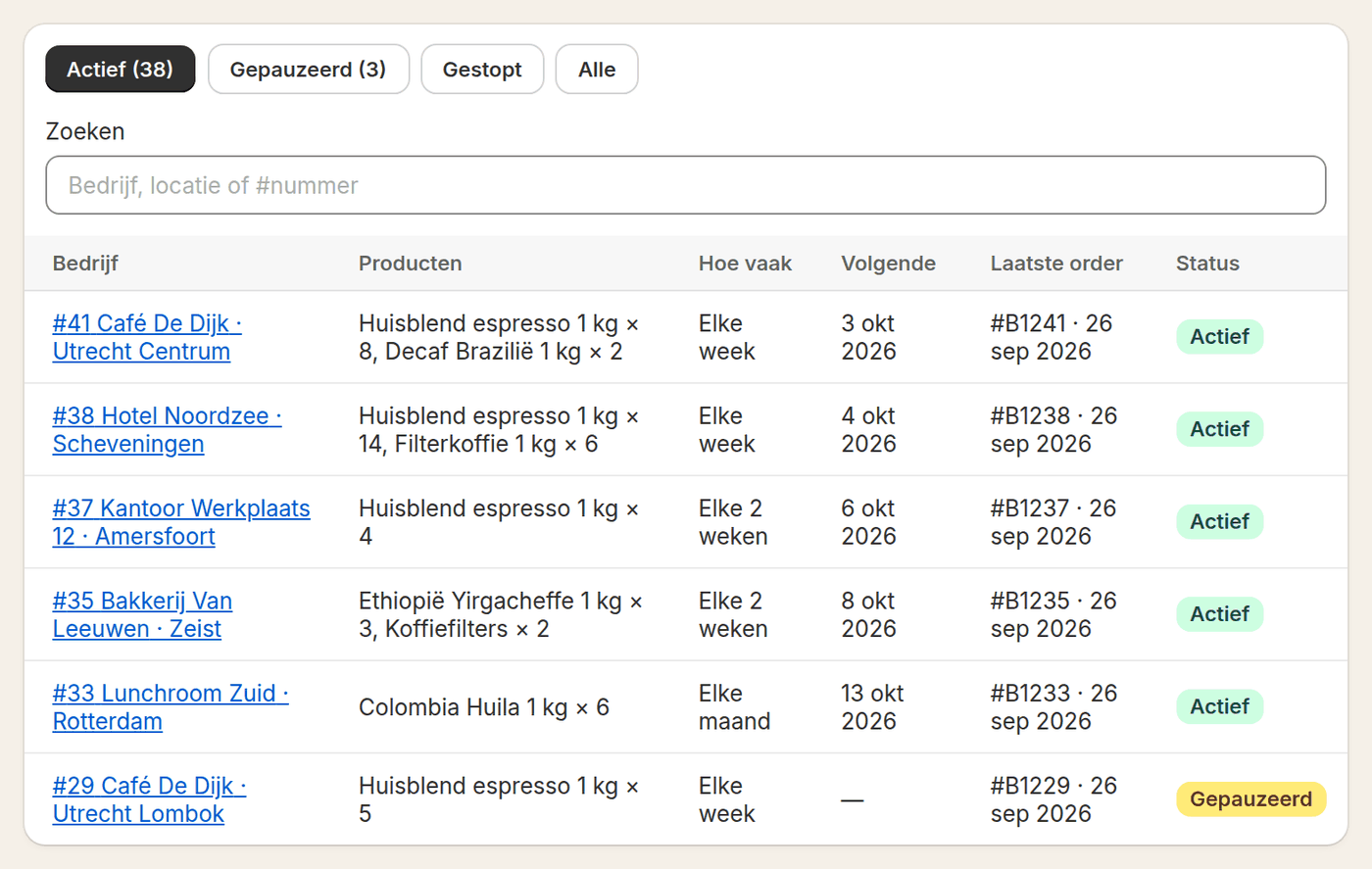
The list shows per company and location the products, the rhythm, the next date and the latest order. You search by company, location or number.
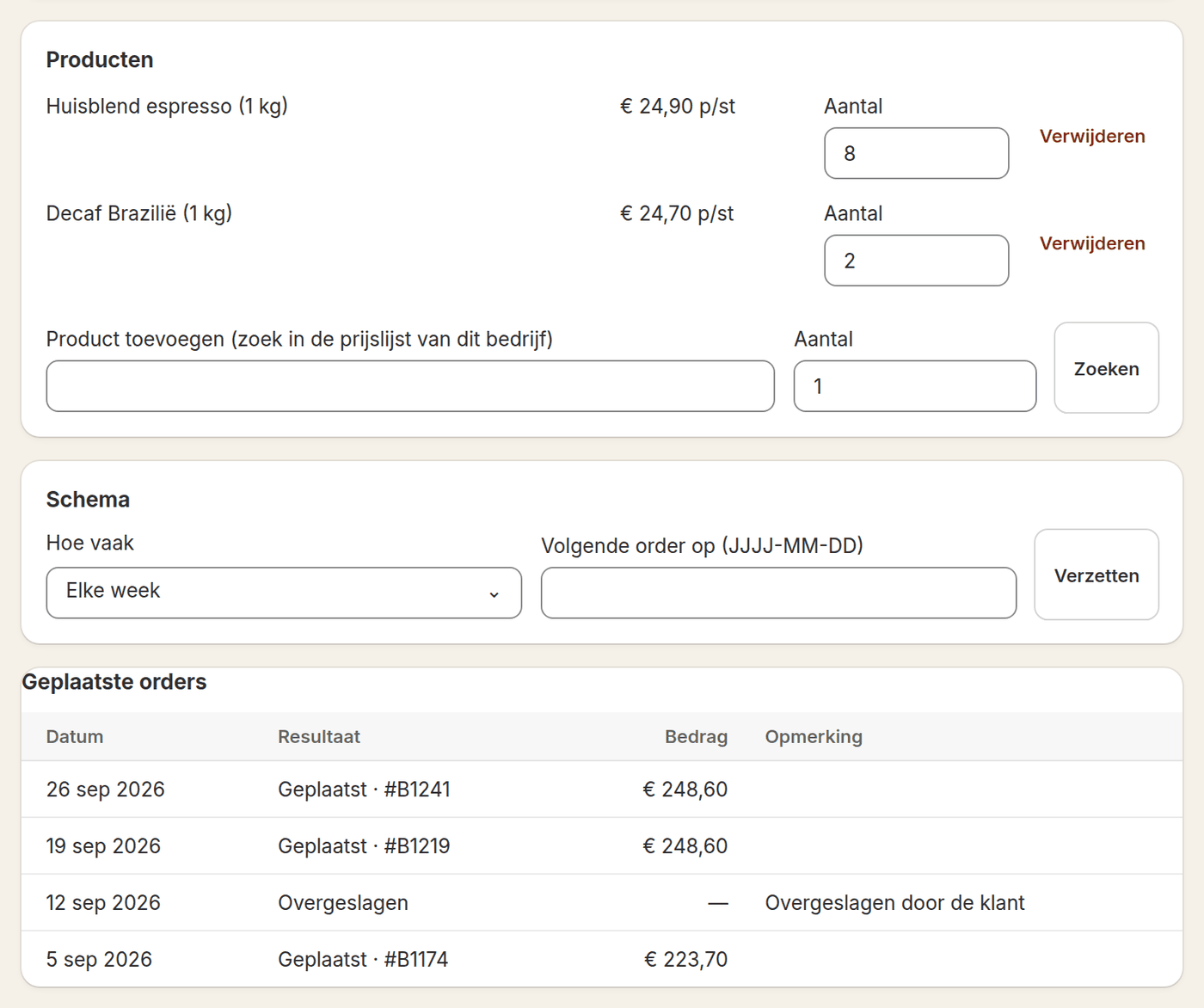
On a standing order you change quantities, add a product from that company's price list and move the next date. Below is every order that was placed or skipped.
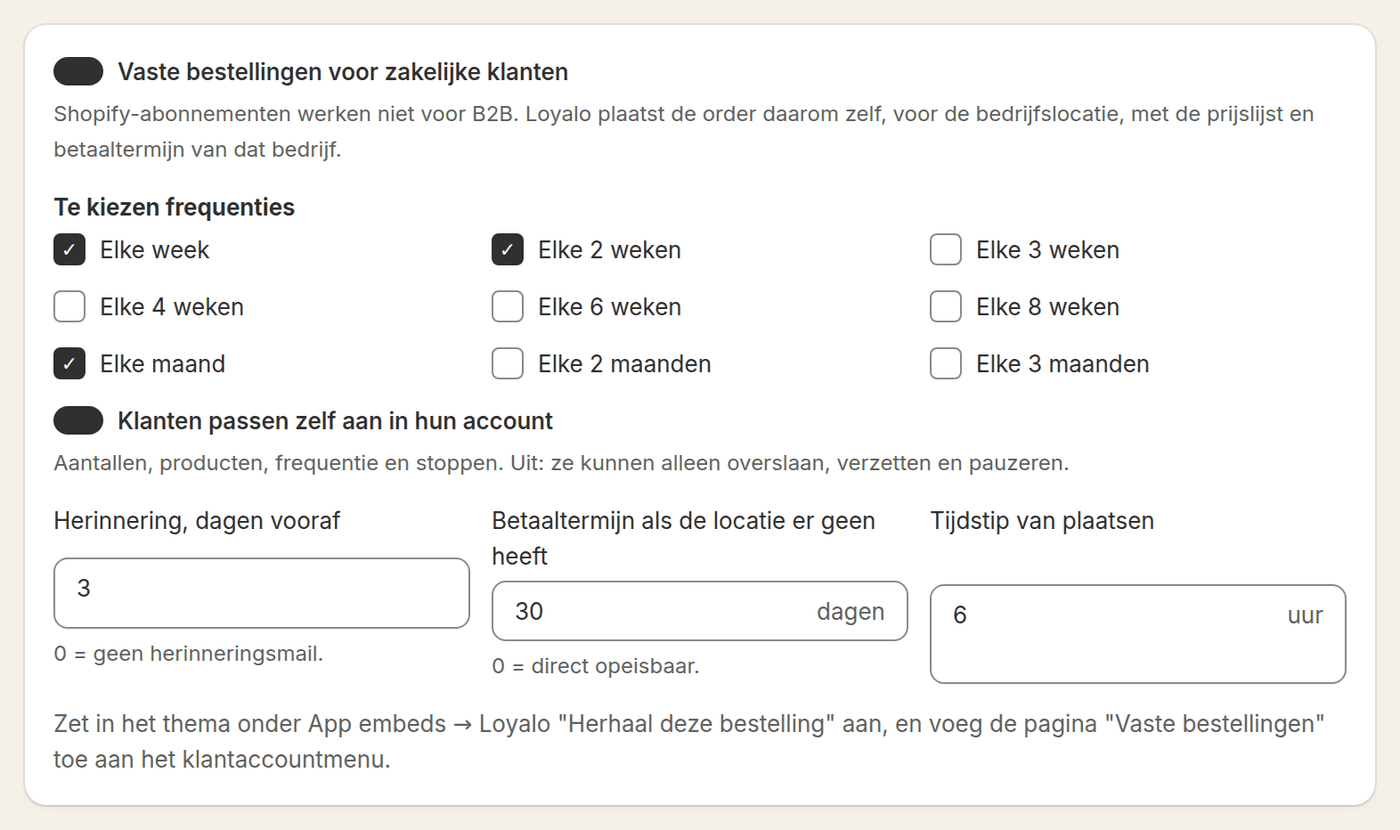
You choose which rhythms you offer and whether customers may make changes themselves. The reminder, the default payment terms and the hour Loyalo places the orders are set here too.
In the cart the buyer chooses how often the order should repeat: every week, every two weeks or a rhythm you offer.
An earlier order in the customer account has a button to repeat it. From the dashboard you can do it for the customer as well.
On the day itself the order is in Shopify, at the hour you choose. A few days before, the customer gets a reminder to change something.
Both produce a recurring order. The difference is in who orders and how it is paid.
| Subscription | Standing order | |
|---|---|---|
| For whom | Consumers | Companies and locations in Shopify B2B |
| Price | The product price with the plan's discount | The price from the company's catalog |
| Payment | Collected up front, by card or iDEAL | On account, with the payment terms of the location |
| Starting | On the product page, through the widget | In the cart, from an earlier order or by you in the dashboard |
| Self-service | In the customer portal | In the customer account, under Standing orders |
| Plan | Every plan | Scale B2B |
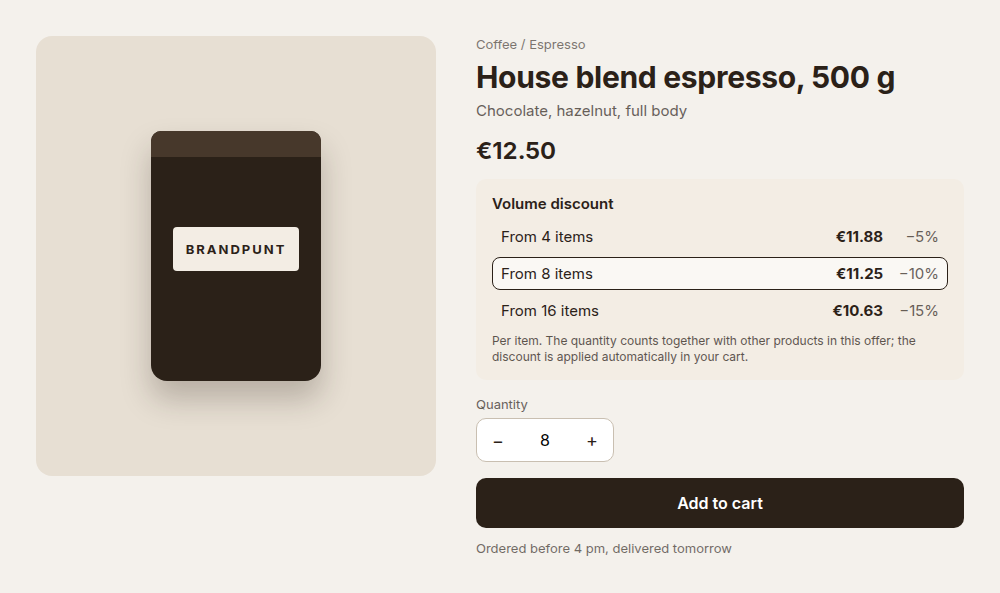
Business customers look at the unit price. With a volume discount that price drops as they order more, on top of the price from their catalog. Volume discount is part of every plan and works for consumers too.
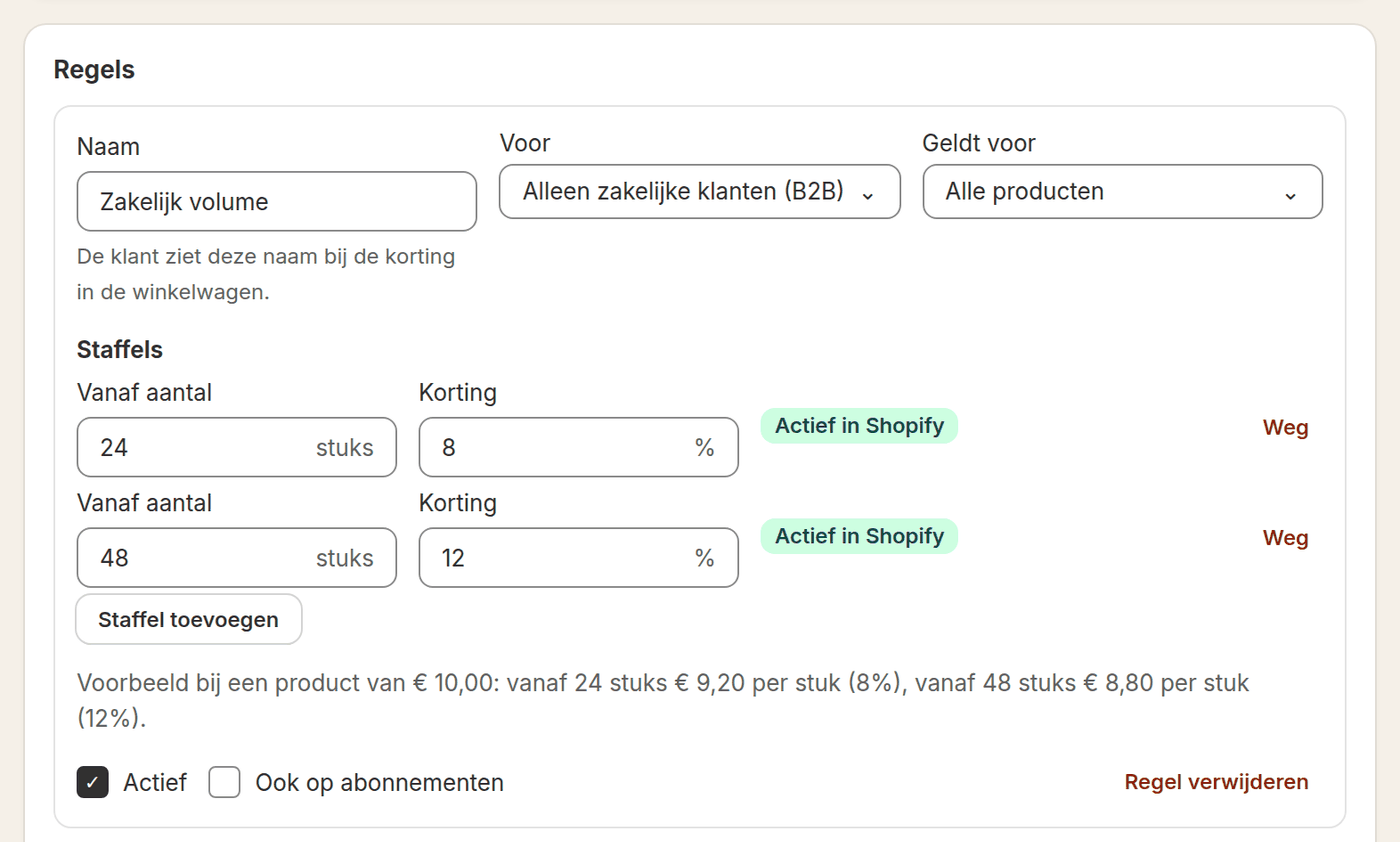
Per rule you fill in the steps, for example 8% from 24 items and 12% from 48 items. A rule applies to everyone, to consumers only or to business customers only.
The block Loyalo staffelkorting shows the price per item for each step and highlights the step for the chosen quantity. The discount itself is applied automatically in the cart.
Business customers often order the same things. Loyalo uses that history and keeps B2B and consumers apart where needed.
Read more about Customer LoyaltyThe Scale B2B plan (€ 499 per month) and companies in Shopify B2B. Loyalo uses the companies, locations, catalogs and payment terms you have set up there.
Shopify does not allow subscriptions for business buyers. A standing order does the same in another way: Loyalo places a regular B2B order on the agreed day.
On account, with the payment terms of the location. If a location has no terms, the default terms you choose in Loyalo apply.
Yes, if you allow it: quantities, products, the rhythm and stopping. When it is off, the customer can only skip, reschedule and pause.
On the day of the standing order, at the hour you set. A number of days before, which you set as well, the customer gets a reminder so they can still change something.
Every week, every 2, 3, 4, 6 or 8 weeks, and every 1, 2 or 3 months. You tick which rhythms the customer may choose.
Yes. In the dashboard you turn an existing order into a standing order by entering the order number. Loyalo takes over the products, the company and the location.
Yes. Consumers take a subscription through the Shopify checkout, business customers a standing order on account. Both are in the same dashboard.
Yes. Under Volume discount in the menu you create a rule for business customers only, with up to four steps. The discount comes on top of the catalog price and also applies to standing orders. Volume discount is part of every plan.
Yes, with the Customer Loyalty add-on. You give business customers a points rate and tiers of their own, and choose per campaign whether it applies to consumers, companies or both.
Read on: Help center: setting up standing ordersHelp center: setting up volume discountsBlog: calculating and setting up volume discountsPrices and plansCustomer LoyaltySubscriptions
In half an hour we show you how Loyalo works in your shop, or we send you an install link right away. The trial runs for 14 days and needs no credit card.
In a demo we show how a standing order starts, how the buyer changes it and how the order arrives in Shopify.