Why separate events beat one generic 'subscription changed' event
A subscription has several statuses, and each status calls for a different message. One generic event like 'subscription changed' forces you to distinguish cases inside Klaviyo based on properties, which is error-prone. Specific events per situation make Klaviyo flows easier to build and debug, and prevent the wrong email reaching the wrong customer.
Which events you need at minimum
| Event | Trigger | Typical flow |
|---|---|---|
| Subscription started | First successful charge | Welcome series explaining the customer portal |
| Subscription paused | Customer pauses in the portal | Confirmation, no marketing email |
| Subscription resumed | Customer resumes after a pause | Confirmation and optional welcome-back |
| Delivery skipped | Customer skips a cycle | Short confirmation, no escalation |
| Subscription cancelled | Customer cancels | Winback series based on cancellation reason |
| Payment failed | Mollie charge fails | Dunning series with payment link |
| Upcoming delivery | X days before the next charge | Reminder with options to change |
| Loyalty milestone | X deliveries or points threshold reached | Reward email |
In Loyalo the events are called 'Loyalo …', for example Loyalo Subscription Started, Loyalo Payment Failed and Loyalo Upcoming Delivery. There are 31, spread over subscriptions, payments and points. Per event you switch on or off whether it goes to Klaviyo, so your account does not fill up with events you do not use.
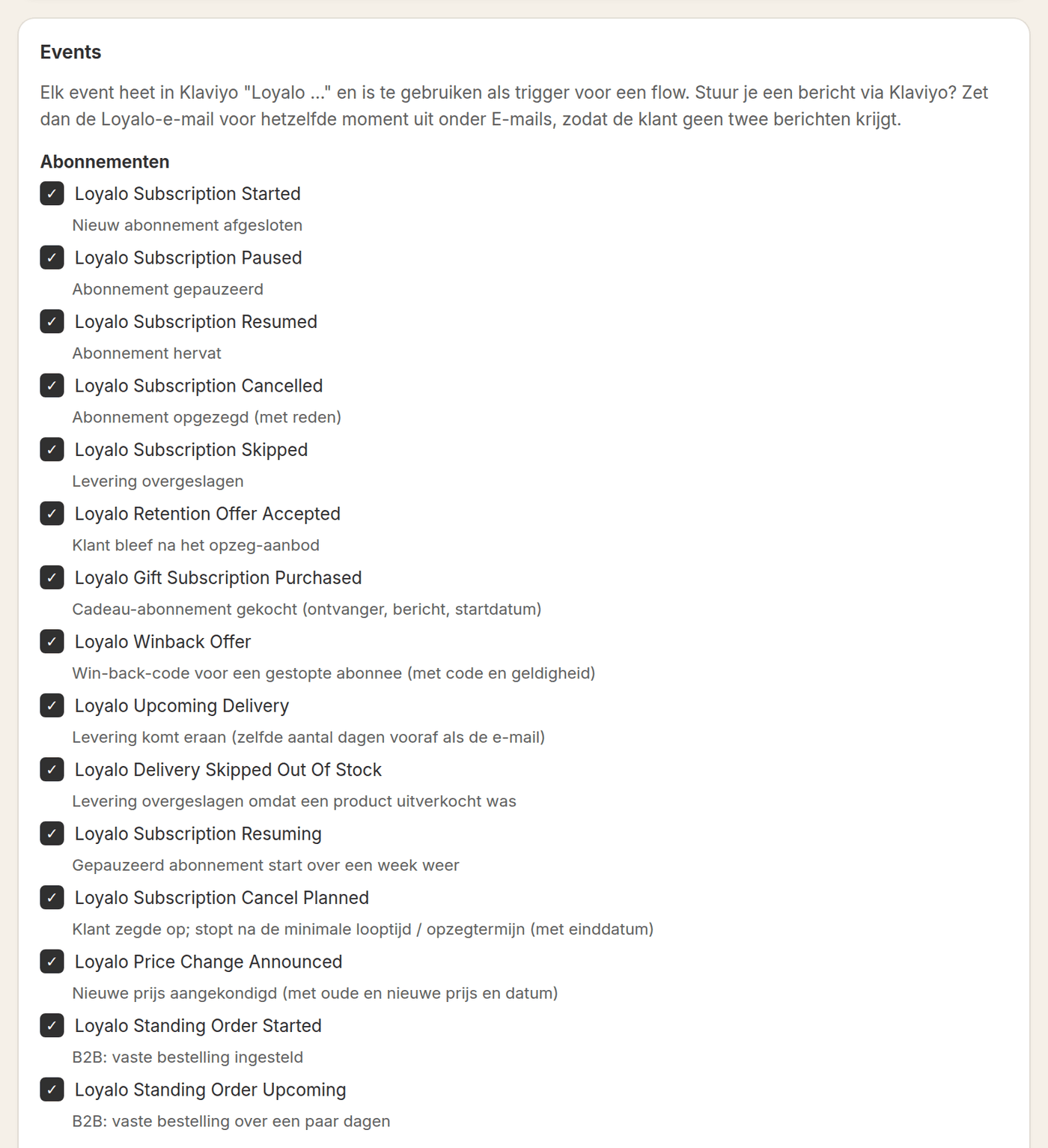
Profile fields instead of tags
Tags suit one-off labels, but a subscription status changes continuously. Use profile fields such as subscription status, next delivery date, frequency and point balance instead of tags you'd have to add and remove on every change. Profile fields are directly usable in segmentation and flow filters, and they avoid a pile-up of outdated tags on a customer profile.
- Store subscription status (active, paused, cancelled) as a profile field, not a tag
- Track next delivery date and frequency as profile fields for segmentation
- Avoid tags for statuses that change more than once per customer
- Use events for the moment of change, profile fields for the current state
Loyalo keeps the fields on the profile up to date itself. They start with loyalo_, such as loyalo_subscription_status, loyalo_next_delivery_date, loyalo_mrr, loyalo_points_balance and loyalo_tier. You use them in segments ('all customers with a paused subscription') and in the filters of a flow ('only when the customer has had at least three deliveries').
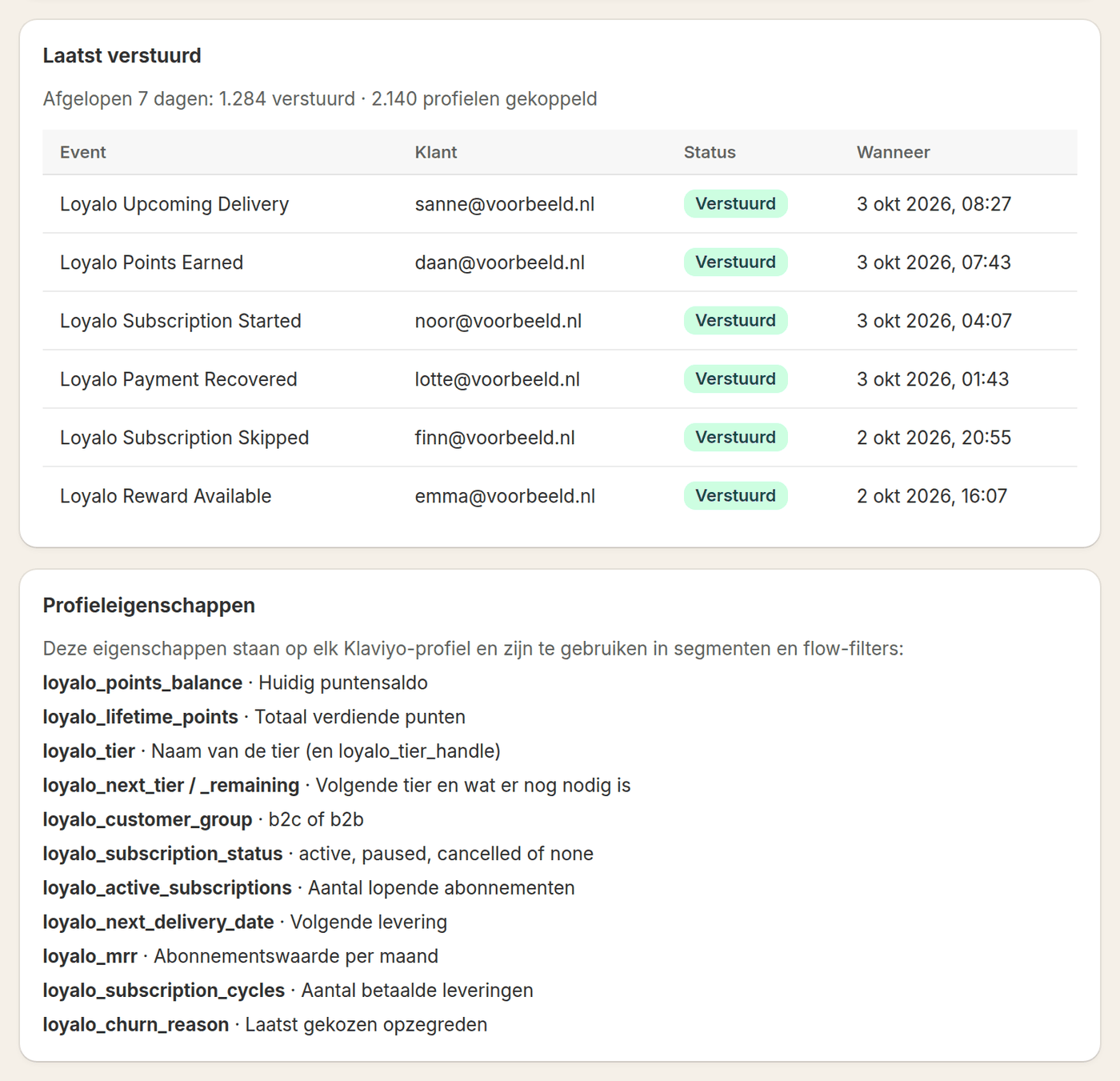
Matching identity: Shopify customer ID with email as fallback
Klaviyo profiles are reliably matched based on the Shopify customer ID. That prevents duplicate profiles when a customer orders with a different email address or changes it. Only when no customer ID is available, for example on a manually created profile, do you fall back to email address as the matching key. This order matters especially during a CSV migration, where existing subscriptions need to be linked to existing customer profiles.
Who sends which email: Loyalo or Klaviyo
Not every email belongs in Klaviyo. Transactional confirmations that follow directly from an action in the customer portal, such as confirming a pause or a date change, can be sent by Loyalo itself as soon as the action happens. Marketing and retention flows, such as winback and reminders with freedom in design and timing, belong in Klaviyo, driven by the events Loyalo forwards. Agree which system sends which email to avoid duplicate emails.
- Decide the owner per momentRecord per event whether Loyalo or Klaviyo sends the email.
- Set up events and profile fieldsConfigure the events from the table and link the profile fields.
- Build flows per eventCreate a separate flow per event instead of one broad flow with filters.
- Test with a test eventSend each event once as a test event to your own email address before turning the flow live.
Five Klaviyo flows to start with
You do not have to build a flow for every event right away. These five cover the moments when an email does the most.
| Flow | Trigger in Klaviyo | What it says |
|---|---|---|
| Welcome | Loyalo Subscription Started | What the customer can expect and how they manage their subscription |
| Delivery coming up | Loyalo Upcoming Delivery | The reminder for the next delivery, a few days ahead |
| Payment failed | Loyalo Payment Failed, then Loyalo Dunning Final Notice | What went wrong and what the customer can do; a clear warning on the last attempt |
| Win-back | Loyalo Winback Offer | The personal discount code and until when it is valid |
| Reward available | Loyalo Reward Available | That the customer has enough points, and for what |
Testing before going live
Before a flow reaches all customers, you want to simulate events without real emails going to customers. In Loyalo you send a test event to an email address you choose, for example your own. That lets you check the full chain: is the right event sent, do the fields come through, and does the right flow trigger. The test event is marked, so you can exclude it in a flow. For every new flow, run through at least the events in the table above once.
If both Loyalo and a Klaviyo flow react to 'payment failed', a customer can receive two similar emails. Let one system send the first reminder and the other the follow-up steps, or send everything from Klaviyo based on the event.
Frequently asked questions
Do I need a separate event for every status change?
Yes, that makes flows easier to build and maintain than one generic event with many properties.
What happens if a customer has no Shopify customer ID?
Email address is used as a fallback to match the profile until a customer ID becomes available.
Can I test without customers noticing?
Yes. A test event goes to the email address you enter yourself, not to customers, so you can safely check whether a flow works.
Who sends the payment reminder on a failed charge?
You agree this upfront: Loyalo can send the first reminder and Klaviyo the follow-up steps, or you run the entire dunning series from Klaviyo based on the event.
How many events does Loyalo send to Klaviyo?
There are 31 events, for subscriptions, payments and points. You choose per event whether it goes to Klaviyo. In Klaviyo every event is called 'Loyalo' followed by its name, for example Loyalo Subscription Paused.
Can I segment on point balance or tier?
Yes. Loyalo keeps fields on every profile such as loyalo_points_balance, loyalo_tier and loyalo_subscription_status. You use those in segments and in the filters of a flow.
Want to see how the Klaviyo integration works?
In a demo we show the events, the profile fields and the testing for subscriptions in your shop.
Request a demo