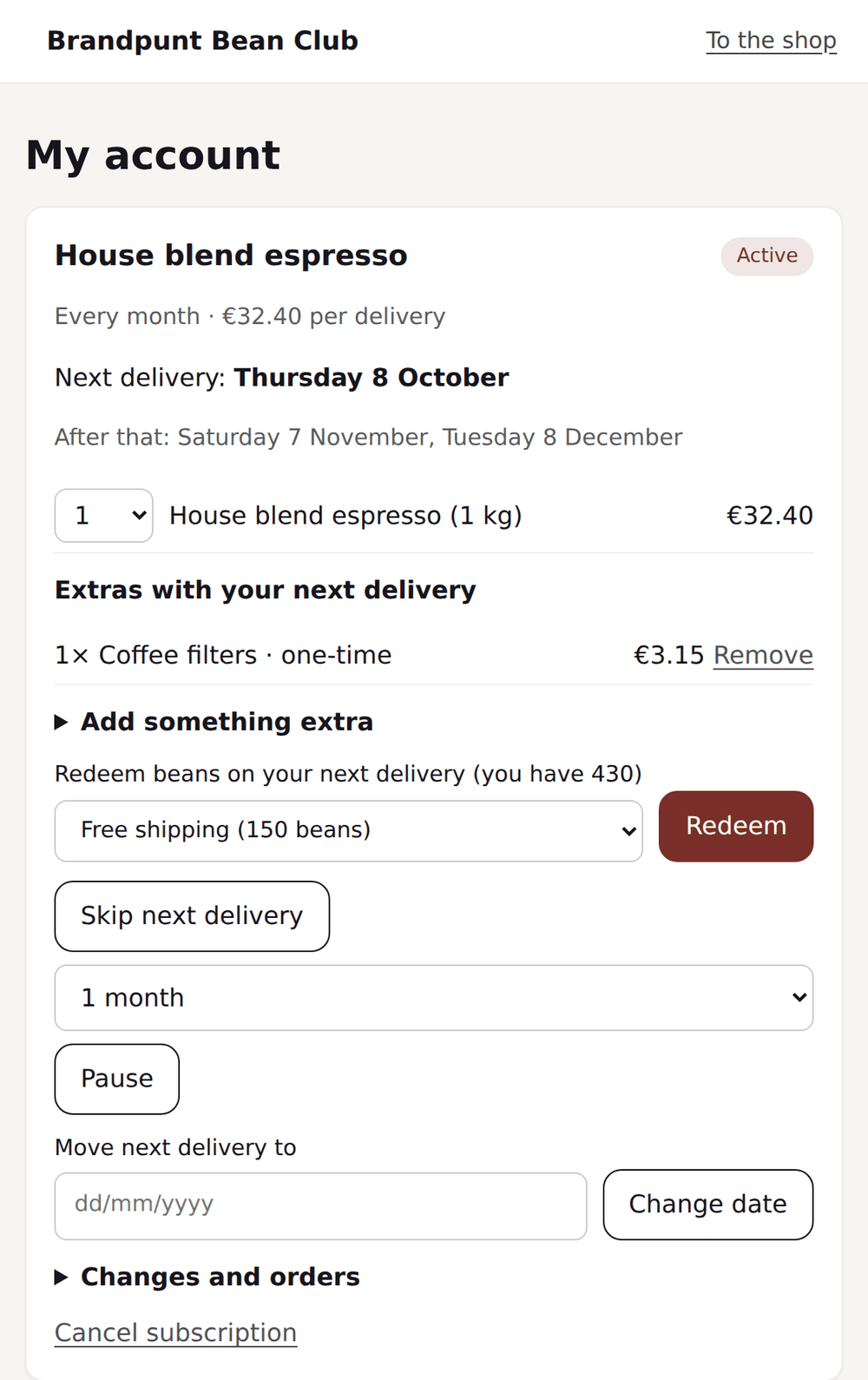
A customer portal is the place where a customer logs in and manages their subscription themselves: pausing, skipping a delivery, moving the date, cancelling. Many subscription stores underestimate it. It's treated as a technical detail, while it actually determines whether customers are in control themselves or every change has to go through support. A portal that converts is one people can use without thinking: no password to remember, no separate app, no ticket for something as simple as moving a date.
What subscribers should be able to do themselves
The foundation of a good portal is covering the most requested actions. If a customer still has to email for something simple, the portal loses its purpose. The actions below belong in a customer portal without exception.
- Pause a subscription and resume it later
- Skip a single delivery
- Move the next delivery date
- Change the frequency
- Update the delivery address
- Update the payment method
- Swap a product or variant in the subscription
- Cancel the subscription
Passwordless login
Passwords are the biggest barrier in a customer portal. Customers who adjust their subscription a few times a year don't remember a password for a store. A magic link solves that: the customer enters their email address, receives a login link and is straight in. No reset flow, no support ticket about a forgotten password.
Even better is access from the existing Shopify customer account. Through the Shopify customer account extension, customers see their subscription management right next to their order history, without logging in separately on another domain. That matches what customers are already used to from the webshop and doesn't feel like a separate, standalone tool.
Arranging it from the email
The shortest route to a change is not a portal but the email the customer already opens. The reminder for the next delivery should have buttons to skip or reschedule that delivery. One click, without logging in, and it is done. The link works once and only for that action, so a forwarded email gives no access to the whole subscription. Many customers then only see the portal for bigger changes, such as another product or a new address.
Branding and trust
A portal that looks different from the webshop raises suspicion, especially around payment details. The portal's colours, logo and typography should match the webshop, so the customer never doubts whether they're still in the right place. A white-label portal without the vendor's visible brand name is part of that: the customer experiences the portal as part of the store, not as an external service.
The address is part of that too. A portal on a subdomain of your own website, such as my.yourstore.com, feels like part of your store. Technically it is one CNAME record with your domain provider. In Loyalo you switch on the own portal for it; until the domain is connected, the portal works on a Loyalo address.
Multilingual support
If you sell in multiple countries, the portal needs to follow the customer's language. A portal that only offers Dutch to a German or French customer feels unprofessional and leads to questions that weren't necessary. Support for Dutch, English and German covers a large part of the European audiences of Shopify stores with subscriptions.
| Language | Typical audience |
|---|---|
| Dutch | Customers in the Netherlands and Flanders |
| English | International customers and the UK |
| German | Customers in Germany, Austria and Switzerland |
What you deliberately keep closed
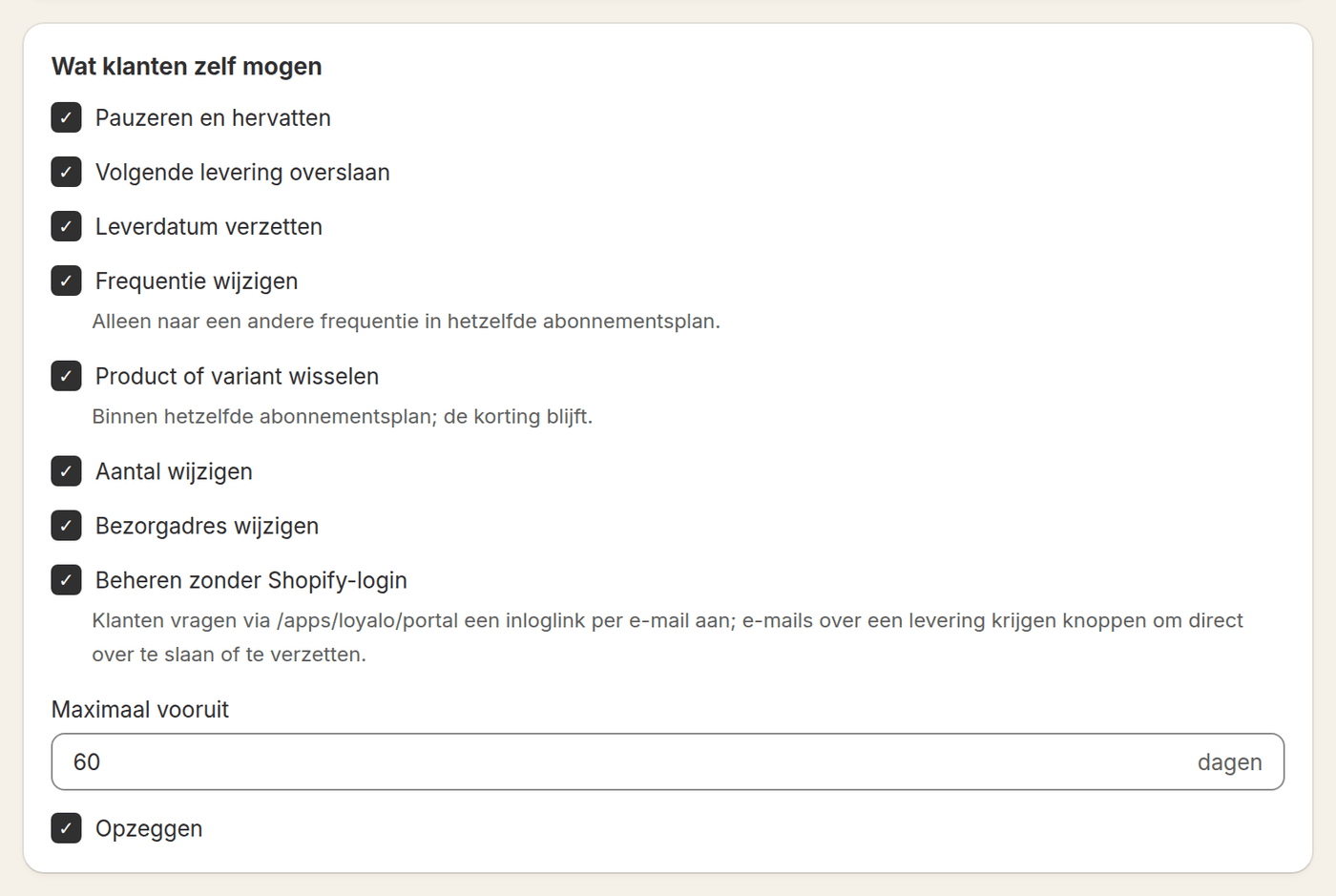
Self-service is not a goal in itself. Not every store wants customers to reschedule without limit or swap products. A good portal lets you choose per action what is allowed: pausing, skipping, rescheduling, the frequency, the product, the quantity, the address and cancelling. Also set a limit on how far ahead a delivery can move, sixty days for example. And a prepaid subscription is different: the deliveries are paid already, so pausing and skipping do not belong there.
Fewer support tickets
The ultimate goal of a good portal is less work for support. Every action a customer can perform themselves is a ticket that never comes in. That effect is biggest for the most common actions: skipping a delivery around a holiday, updating an address after a move, or updating a payment method after an expired card.
- Review your most common questionsCheck your support mailbox for which subscription changes are requested most often.
- Put those actions directly in the portalMake sure pausing, skipping, date, frequency, address and payment method can all be managed by the customer.
- Remove the password barrierOffer magic link login and access from the Shopify customer account.
- Measure the effect on ticketsAfter launch, track whether support questions about subscription changes go down.
Frequently asked questions
Does a customer need a separate account for the portal?
No, customers log in with a magic link to their email address or through their existing Shopify customer account.
Can the portal match the webshop's branding?
Yes, the portal follows the colours, the rounding and the name of your programme from your brand style, and can live on your own domain if you want.
Which languages does the portal support?
The portal is available in Dutch, English and German and follows the customer's language.
Can customers also switch product or variant?
Yes, customers can choose a different product or variant within their running subscription in the portal.
Can the portal be on my own domain?
Yes. You switch on the own portal and connect a subdomain of your website with a CNAME record. Until then it works on a Loyalo address.
Can a customer change something without logging in?
Yes. The email about the next delivery has buttons to skip or reschedule right away. The link works once and asks for no login.
Curious what the portal looks like?
In a demo we show the customer portal, including branding and the Shopify customer account extension.
Request a demo