A loyalty program and subscriptions in one system
Separate apps for points and subscriptions do not know each other's customers. In Loyalo they share the same customer profiles: subscribers earn on every delivery, redeem their points on the next delivery and move up to a higher tier.
Why the combination works
A subscription gives predictable revenue. A loyalty program gives customers a reason to stay. Together they reinforce each other: every delivery earns the customer something, and the longer they stay, the more they have built up. A subscriber has something to look forward to with every delivery.
That only works when both run on the same data. With two separate apps you have to link points and subscriptions on email address, and the customer sees their subscription in one place and their points in another. In Loyalo it is one customer, one portal and one set of settings.
Points on every delivery
Every paid subscription order earns points, just like a one-off order. You switch that on or off with one toggle.
Redeeming on the next delivery
A subscriber does not have to enter a discount code. They choose a reward and it is applied to their next delivery.
Tiers for loyal customers
Customers who order often move up to a higher tier with a discount, free shipping or faster earning. Subscribers get there by themselves.
One portal
Subscription, balance, tier, rewards and codes are on the same page, in your brand style and without a password.
What a subscriber sees
In the customer portal the subscription and the points are together. Below the next delivery the customer sees how many points they have and which reward they can put on that delivery. That is the moment earning pays off: just before the next delivery comes.
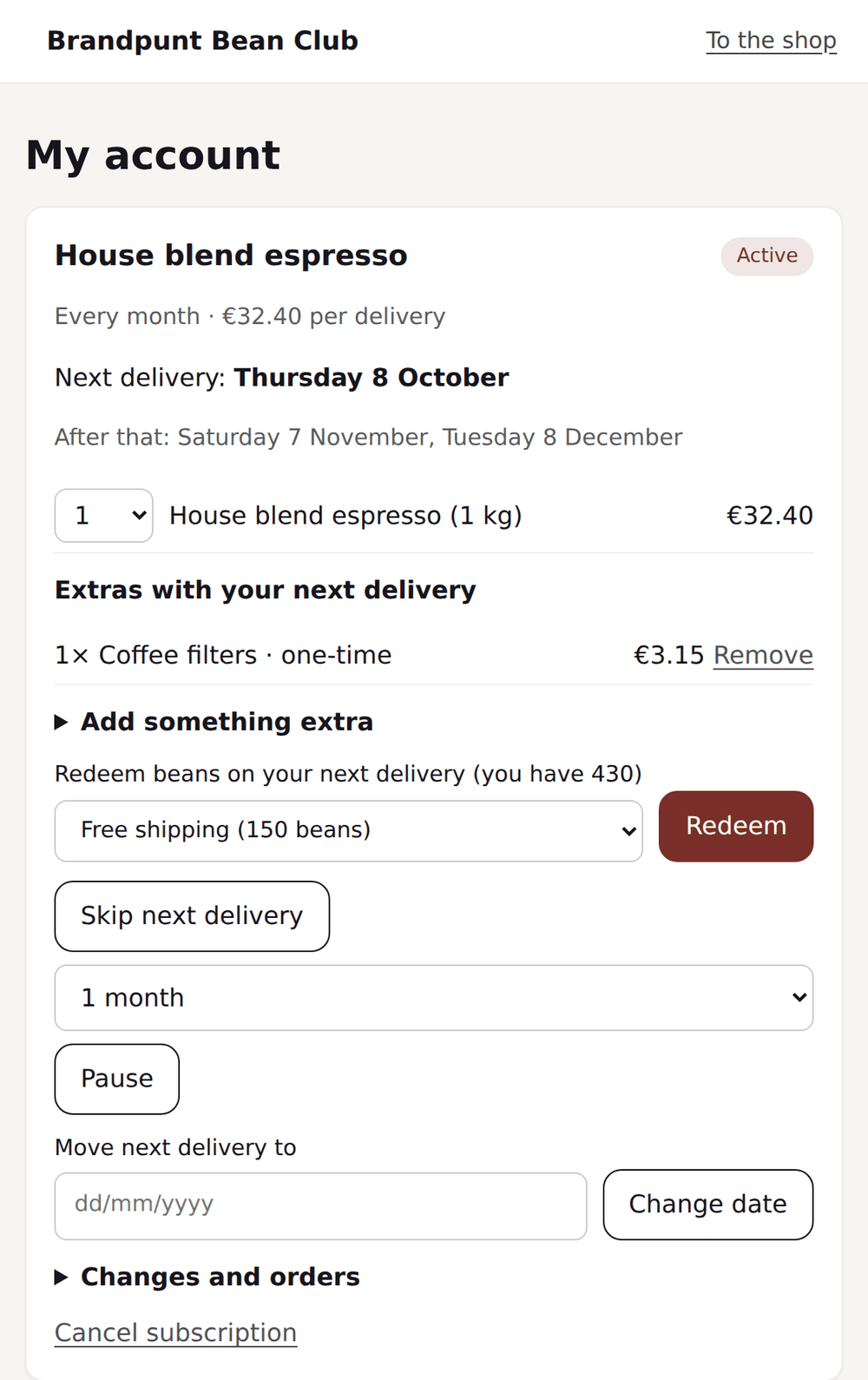
- The customer starts a subscriptionThe widget on the product page can show how many points every delivery earns. That way the programme already counts when choosing a subscription.
- Every paid delivery earns pointsLoyalo calculates over the product amount after discount, without shipping. When a delivery is refunded, the points are taken back proportionally.
- Enough points for a rewardThe customer gets an email and picks a reward in the portal: a discount, free shipping or a free product with the next delivery.
- Moving up to a higher tierCustomers who stay reach a higher tier. In the portal the customer sees how far the next tier is.
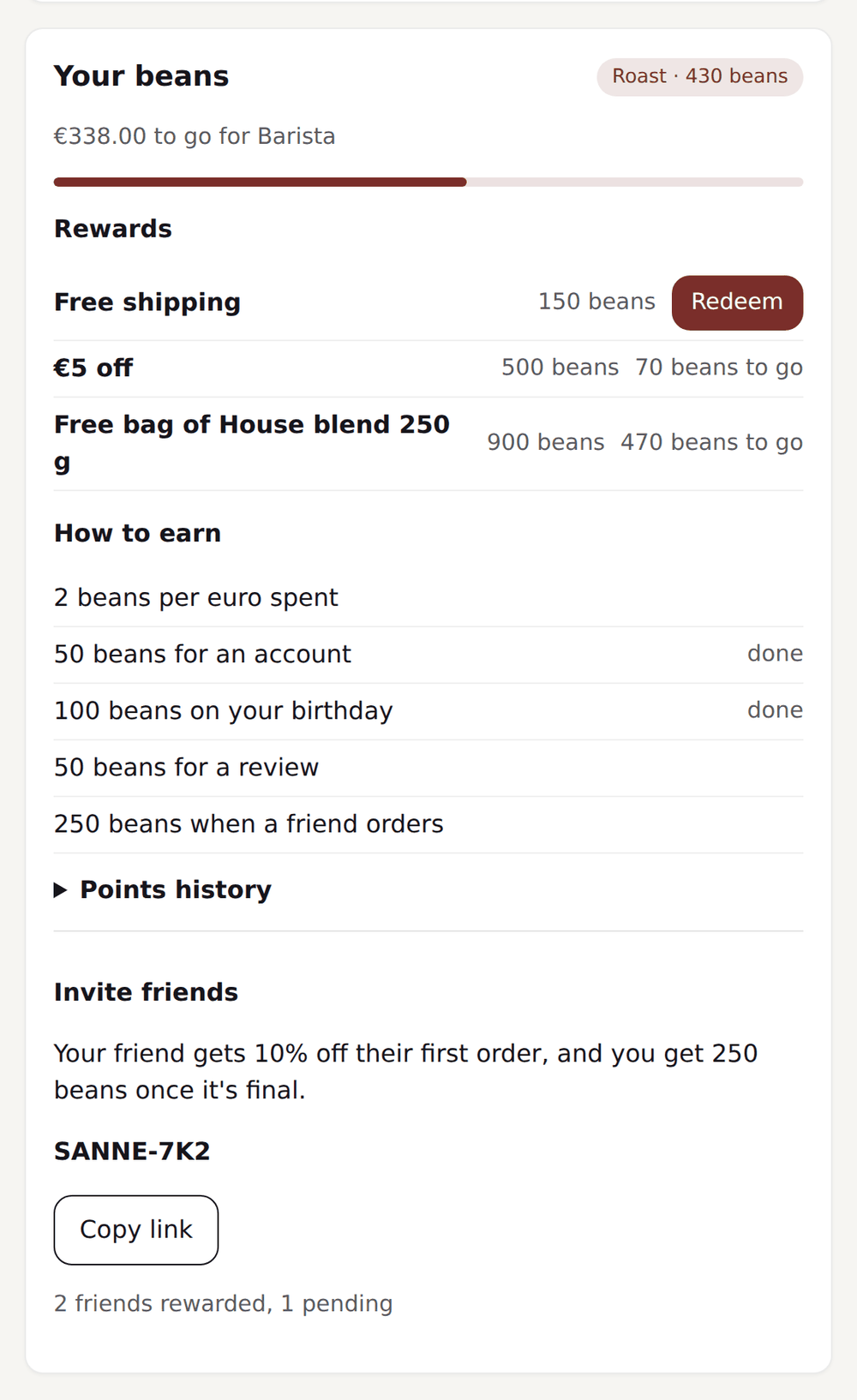
What you set up
You set everything up without code, in the same dashboard as your subscriptions. These are the settings that make the difference for subscribers.
- Points per euro spent, on or off for subscription orders
- A name of your own for your points, such as 'beans' or 'drops'
- Rewards subscribers can put on their next delivery
- Tiers on amount spent, number of orders, points or number of items
- Tier discount on subscription products too, if you want
- An expiry period for points, with an email beforehand
- Campaigns with double or triple points in a period you choose
Two separate apps or one system
| Topic | With two separate apps | With Loyalo |
|---|---|---|
| Customer data | Two profiles, which you link on email address | One customer, with subscription and points in the same profile |
| Points for deliveries | Depends on the link between the apps | Every paid delivery counts, with one toggle |
| Using a reward | A discount code the customer has to enter themselves | Applied to the next delivery, without a code |
| Where the customer sees it | The subscription in one place, the points in another | One portal for subscription, points and rewards |
| Emails and Klaviyo | Two sets of events and two brand styles | One set of events and profile fields, in one brand style |
| Costs | Two subscriptions, sometimes with an amount per order | A fixed monthly price, without an amount per order |
The comparison describes separate apps in general. Check what exactly your current apps offer.
Example rules
| Situation | Reward | Goal |
|---|---|---|
| A new customer creates an account | Welcome points | Lower the barrier |
| Every paid delivery | Points per euro | Keep rewarding |
| A subscriber has enough points | A discount or a free product with the next delivery | A reason to stay |
| Customer reaches a higher tier | A discount, free shipping or faster earning | Increase value per customer |
| Campaign week | Double points | Extra orders |
| Customer refers a friend | Points for the referrer, a discount for the friend | New customers |
What it costs
Subscriptions are in every plan, from € 99 per month. Customer Loyalty is an add-on of € 199 per month that you can switch on with any plan. You pay nothing per order, per member or per point issued. In the 14-day trial you try both.
Frequently asked questions
Can I use loyalty without subscriptions?
Yes. The points programme works for all your customers, including those who order one-off. Subscriptions are in every plan; you decide whether you use them.
Do subscribers get points for every delivery?
Yes, for every paid delivery, when you have points for subscription orders switched on. You can switch it off as well, for example when subscribers already get a fixed discount.
How does a subscriber redeem points?
In the portal they choose a reward and have it applied to their next delivery. For a one-off order a customer gets a personal discount code that is valid once.
Do customers see their points in the store?
Yes. The balance is on the product page, in the cart, on the loyalty page and in the customer portal. You can include it in emails and Klaviyo flows too.
Does this work with existing Shopify discounts?
Yes. A redeemed reward becomes a discount code in Shopify, so your discounts stay in one place. Per reward you set a minimum order amount and a validity.
What happens to points when a delivery is refunded?
The points for that delivery are taken back proportionally. With a partial refund that is part of the points.
Want to see both parts?
In a demo we show how points and subscriptions work together, in the portal and in the dashboard.
Request a demoReady to sell subscriptions inside Shopify?
No per-order fee, no redirect, no hassle. Just native subscriptions.