From Recharge or Appstle to Loyalo
Your existing subscribers don't have to order again. You copy your plans, import the live subscriptions, see per row what will happen and only then switch over.
Switching without your subscribers noticing
Changing subscription apps feels risky. You worry that customers have to order again, that payments are collected twice or that mandates get lost. Those are fair concerns, which is why the migration in Loyalo is set up so that nothing happens before you have seen what will happen.
Nobody orders again
Every subscription comes over with the same products, price, frequency and next delivery date.
See first, then act
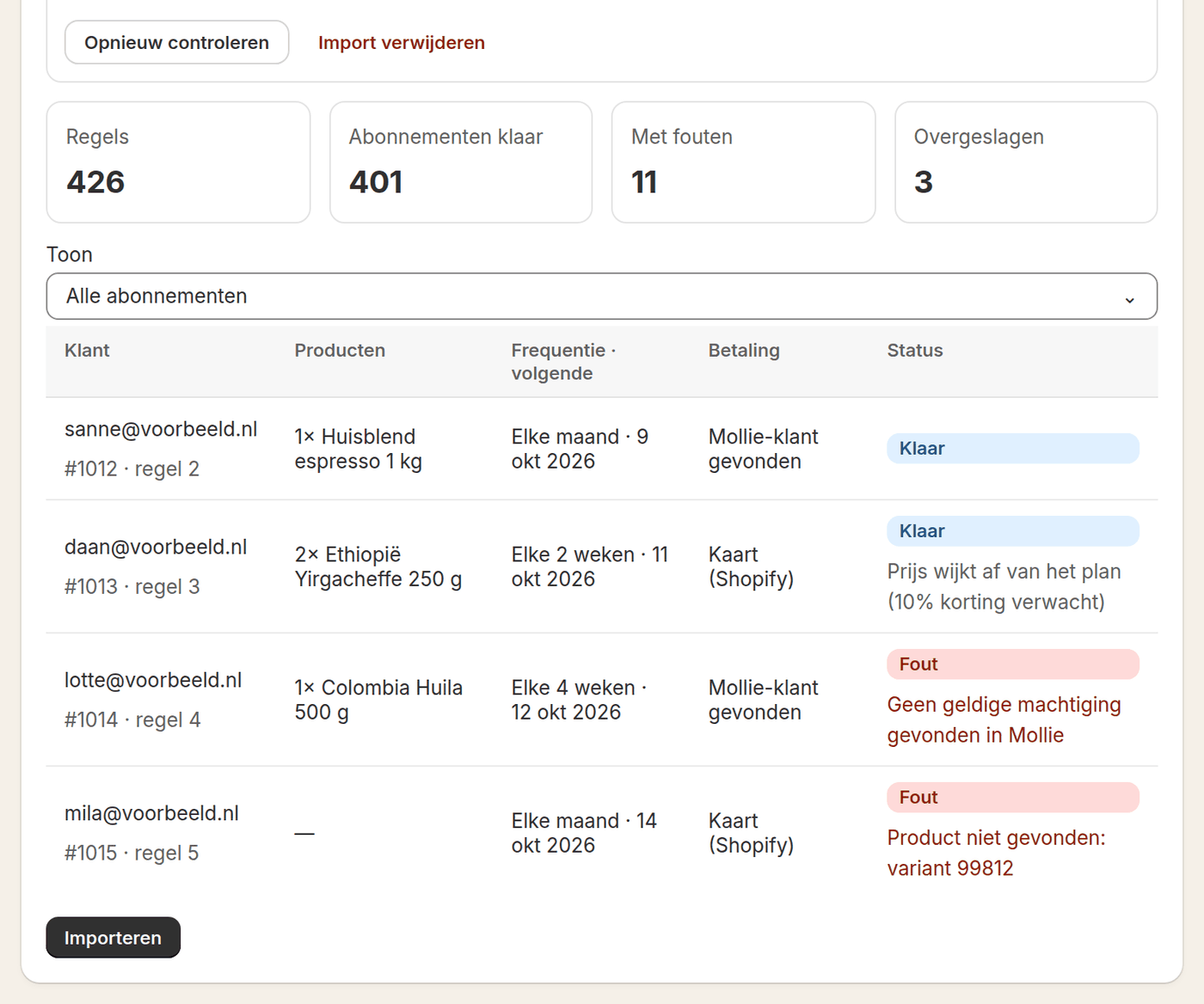
Loyalo checks every row of your file and shows what will be created. Nothing happens until you click Import.
No emails, no collection
The import sends no welcome email and collects nothing. You switch on collecting yourself once the old app has stopped.
Payment methods carry on
Loyalo reuses a card stored in Shopify and an iDEAL mandate in your own Mollie account.
How the migration runs
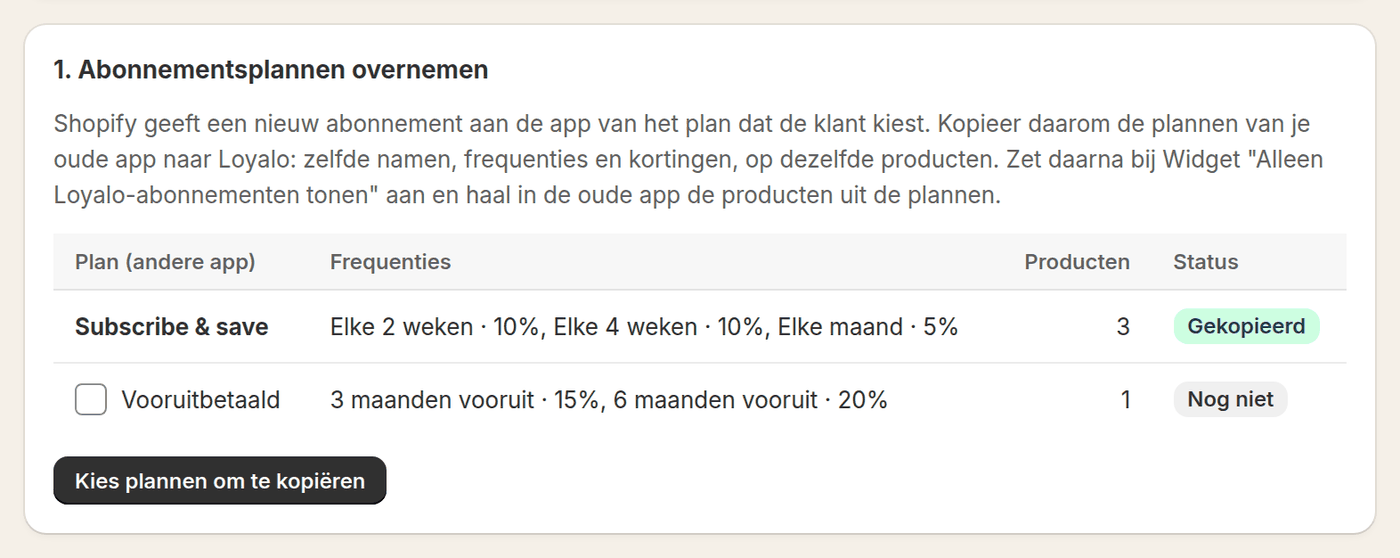
- Copy the plansLoyalo finds the subscription plans of your old app on your products. You copy them with the same names, frequencies and discounts, so new subscribers come in through Loyalo from that moment.
- Export from your current appYou export the live subscriptions as CSV. Loyalo recognises the usual column names of apps like Recharge, Appstle and Juo by itself.
- Map the columnsOn the Migrate page you see which column belongs to which field, such as customer, variant, frequency, amount and next delivery date. Where it is wrong, you change it.
- CheckFor every row Loyalo looks up the product, the plan and the payment method. You see how many subscriptions are ready and which rows have an error, with the reason.
- Import and switch overYou import, check a few customers, stop the collections in your old app and switch on collecting in Loyalo. You follow the first round under Subscriptions.
What comes along per subscription
| Part | Comes along | Note |
|---|---|---|
| Customer and delivery address | Yes | Linked to the customer in Shopify, on email address |
| Products, quantity and price | Yes | Without a price in the file the product's regular price applies |
| Frequency and next date | Yes | The next delivery comes on the day that was already planned |
| Subscription number | Yes, when it is free | Your support team searches by the number the customer knows |
| Minimum term | Yes | With the number of deliveries so far |
| Card, Shop Pay or PayPal | Yes, when the payment method is in Shopify | Otherwise Loyalo can ask the customer to give a mandate |
| iDEAL mandate | Yes, when it is in your own Mollie account | Through the customer ID and the mandate ID in your file |
| Order tags | Yes | The same scheme, so your Shopify Flows keep working |
What to arrange beforehand
- A full export of the active subscriptions, including the next delivery date
- The plans of your old app copied into Loyalo, with the same frequencies and discounts
- For iDEAL subscriptions: your Mollie account connected on the iDEAL page
- A moment outside your busiest collection days
- A short message to customers about what changes, and above all what does not
A payment method only comes along when Loyalo can reach it. A card has to be stored in Shopify and an iDEAL mandate has to be in your own Mollie account. When it sits with another party, Loyalo can ask the customer once for a new mandate, with a payment of € 0.01 through iDEAL. Tell customers beforehand that this email may come.
After the switch
The first collection round is the moment of truth. In the list under Subscriptions, subscriptions with a failed payment are at the top, with the next attempt next to them. The Status page shows whether any tasks went wrong. Customers mostly notice that they can do more themselves: in the portal they pause, skip a delivery or swap products.
- Spot-check whether product, price and date match your old app
- Follow the first collections under Subscriptions
- Take the products out of the old app's plans once everything runs well
Frequently asked questions
Do customers have to order again?
No. The subscriptions themselves are imported with the same products, price, frequency and next delivery date. Only the payment mandate may need a one-time confirmation.
Can I test first?
Yes. After uploading, Loyalo checks every row and shows what would happen, with the errors, without creating anything. Only then do you import.
How do I prevent customers paying twice?
The import collects nothing. You first stop the collections in your old app and then switch on collecting in Loyalo. Loyalo itself never collects a delivery twice.
What if my export has a different format?
You map the columns yourself on the Migrate page. As long as the customer's email address, the product or variant, the frequency and the next date are there, you can import.
What happens to rows that are wrong?
They are not imported. Every row shows the reason, for example a variant that no longer exists. You fix it in the file or in Shopify and have the file checked again.
Can I import the same file twice?
Yes, when the subscription ID of your old app is in the file. Loyalo uses it to recognise what was imported already and skips it. So you can move part first and the rest later.
Want to go through the migration?
We go through your export together and set the migration plan for your shop.
Request a demoReady to sell subscriptions inside Shopify?
No per-order fee, no redirect, no hassle. Just native subscriptions.