Prepaid and gifts
A bundle of several deliveries or a gift subscription is paid at once with iDEAL as well.
Shopify does not show iDEAL in the checkout once there is a subscription in the cart. Loyalo solves that with an iDEAL button of its own and your own Mollie account: the customer pays the first order with iDEAL, the next deliveries are collected automatically.
Dutch customers want to pay with iDEAL, for a subscription too. With Loyalo they do that in your own store and your own checkout. The money arrives straight in your Mollie account.
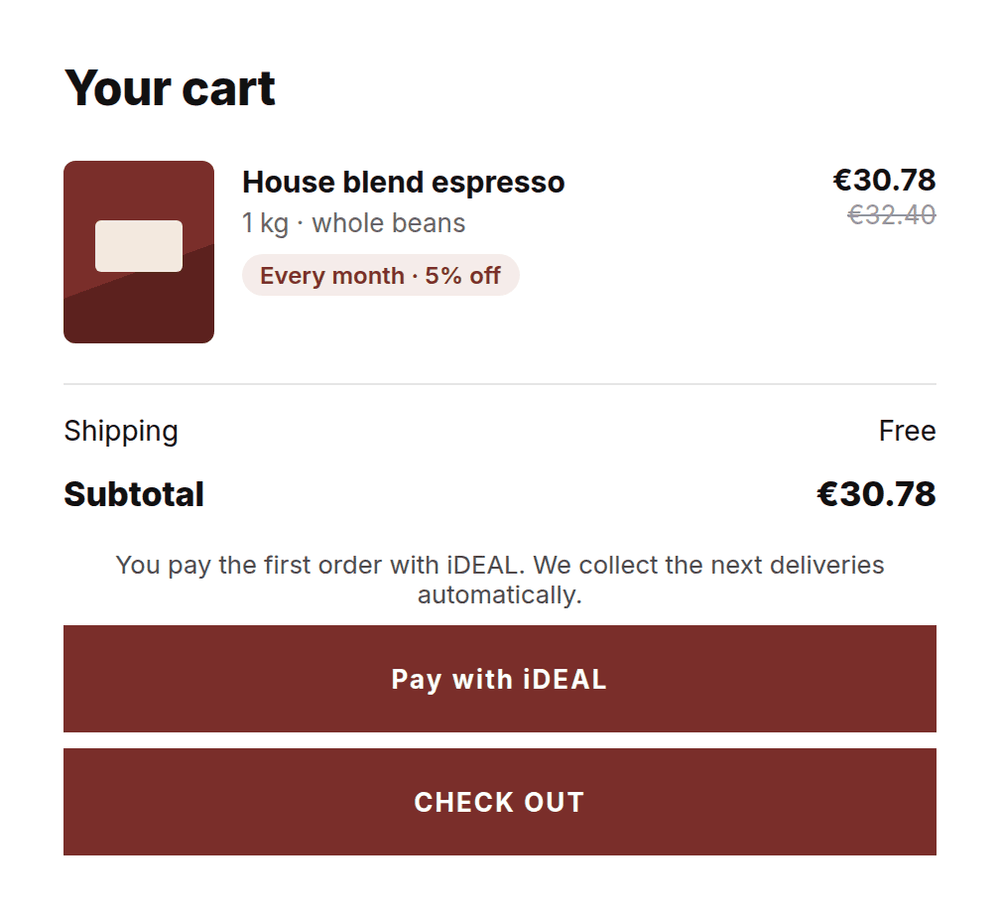
When there is a subscription in the cart, the 'Pay with iDEAL' button sits above your theme's checkout button. It takes the customer to the Shopify checkout, where they pay the first order with iDEAL.
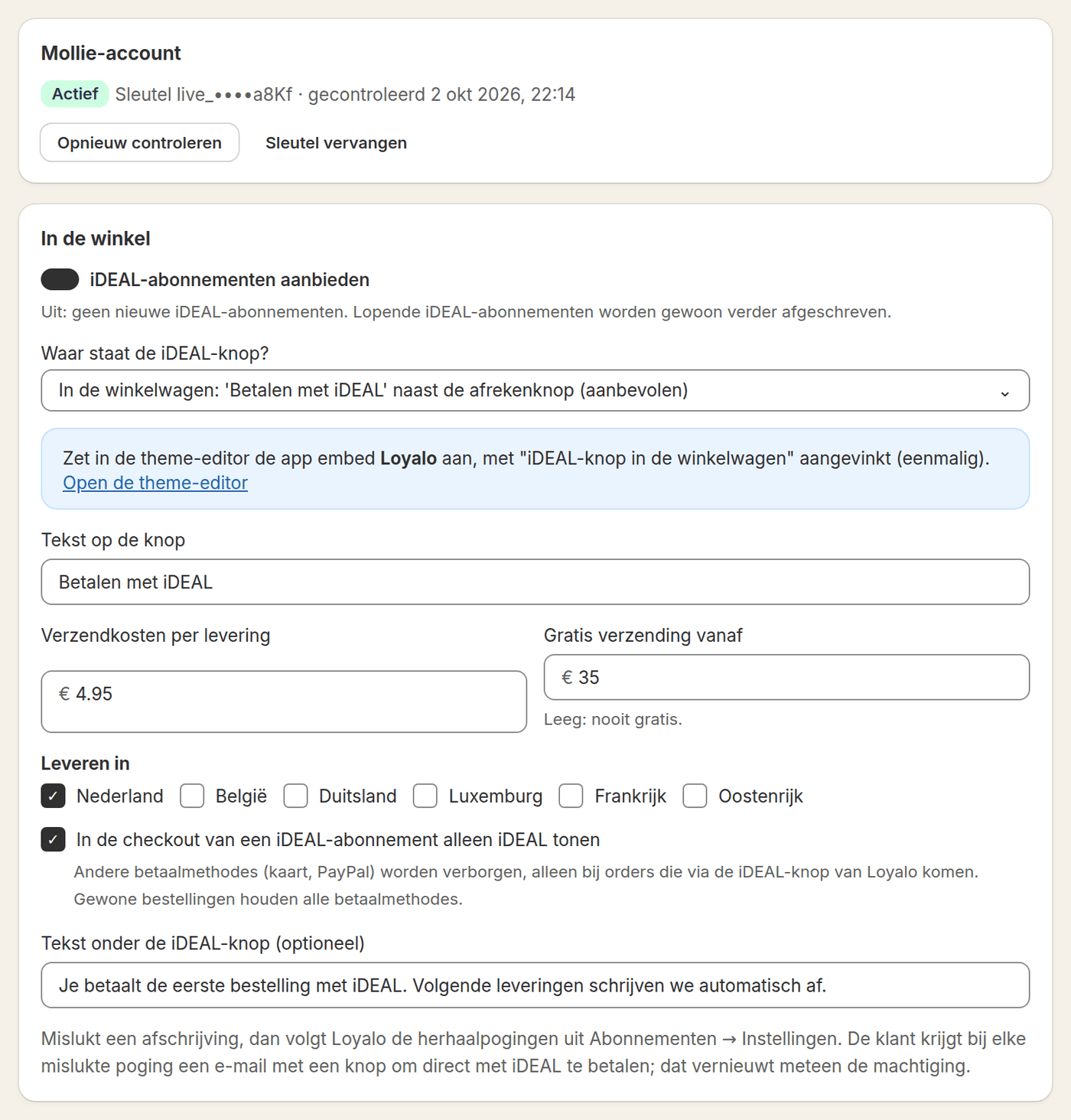
You enter the API key from Mollie and choose where the button goes. With a test key you try everything without real payments. The key is stored encrypted.
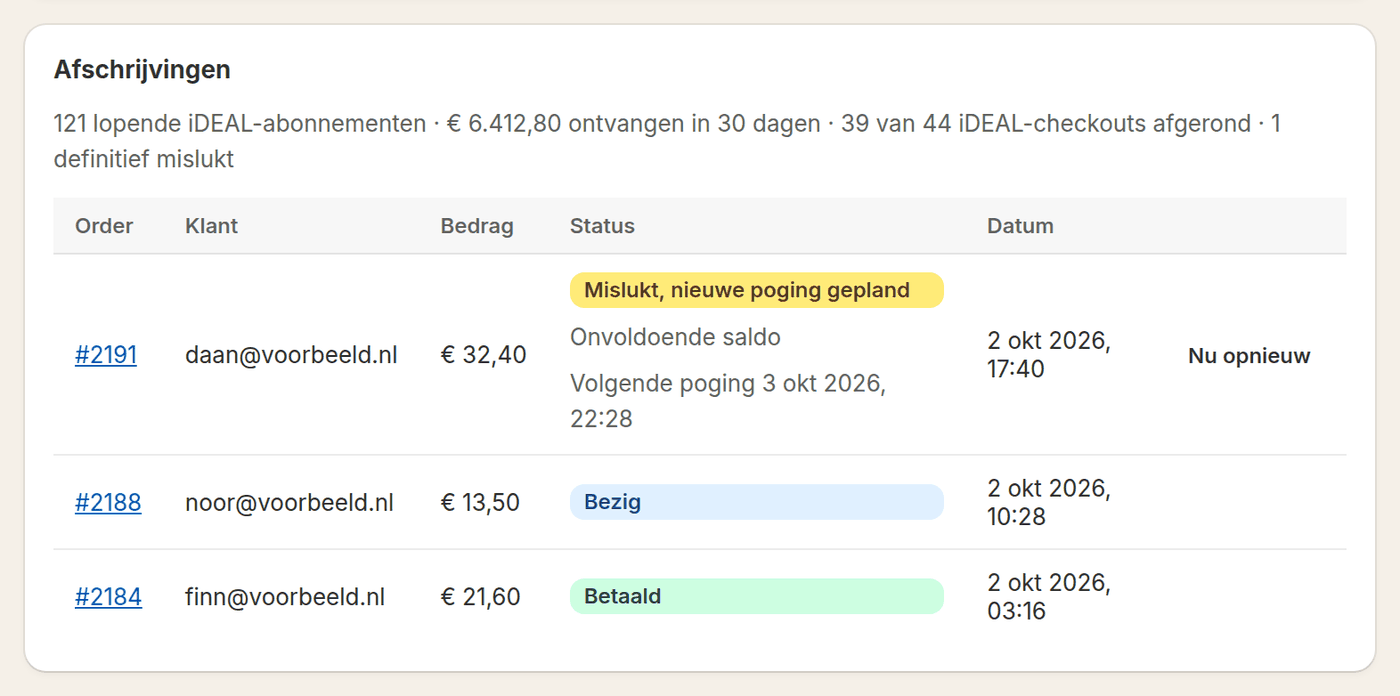
The same page lists the collections, with the amount, the order and the status. You see how many iDEAL subscriptions are running, what was received in the last thirty days and how many iDEAL checkouts were completed.
With the 'Pay with iDEAL' button the customer goes to the Shopify checkout and pays the first order with iDEAL through Mollie.
From that payment Loyalo creates a SEPA mandate in your Mollie account and starts the subscription. The first order is the first delivery.
On the collection date Loyalo creates the order in Shopify and collects the amount through the mandate. When the collection succeeds, the order is marked paid.
Loyalo tries again on the days you set. The customer gets an email with a payment link; paying through it renews the mandate at once.
You offer both. For you and for the customer the subscription works the same afterwards: one dashboard, one portal.
| By card, through Shopify | By iDEAL, through Mollie | |
|---|---|---|
| First payment | In the Shopify checkout, with your own payment provider | In the Shopify checkout, with iDEAL through Mollie |
| Next deliveries | Loyalo collects through the payment method Shopify stores | Loyalo collects through the SEPA mandate in your Mollie account |
| Failed payment | New attempts on your schedule; the customer updates their card in the portal | New attempts on your schedule; the email has a payment link that renews the mandate |
| Renewing the payment method | A new card, through the portal | A new mandate with a payment of € 0.01 |
| Payout | Through your payment provider in Shopify | Straight to your Mollie account |
| Pause, skip, cancel | In the portal and the dashboard | In the portal and the dashboard |
You connect your own Mollie account. That makes the mandates yours, and they stay yours if you ever change apps.
Step by step: connecting iDEAL and MollieA bundle of several deliveries or a gift subscription is paid at once with iDEAL as well.
An extra product with the next delivery is collected with that delivery through the same mandate.
When you move from another app, the import takes over the Mollie customer and the mandate. Customers without one get an email to give one.
Read moreAnother bank account? The customer gives a new mandate in the portal with a payment of € 0.01.
Read moreSomeone who clicks the iDEAL button has to choose iDEAL in the checkout too. That is why you can hide other payment methods there. It only applies to orders that come through the iDEAL button.
Yes, through Mollie. With the first order the customer pays with iDEAL and Loyalo records a SEPA mandate from it in your Mollie account. After that every delivery is collected automatically. Shopify itself does not show iDEAL once there is a subscription in the cart.
Yes. You connect your own account, so the money comes straight to you and the mandates are yours. Mollie charges its own rate per transaction; Loyalo charges nothing per transaction.
Yes. Shopify requires an active payment provider to sell subscriptions. One-time purchases and subscriptions by card go through your regular Shopify checkout; only the recurring iDEAL payment runs through Mollie.
Loyalo tries again on the days you set, by default after 1, 3 and 5 days. With every attempt the customer gets an email with a button to pay with iDEAL right away. That renews the mandate at once. When all attempts fail, the subscription is paused, cancelled or left as it is, whichever you chose.
Yes. In the portal the customer renews their mandate with a payment of € 0.01 through iDEAL. The next deliveries are then collected from that account.
A SEPA direct debit through Mollie, with the name of your store and the order number in the description.
Yes. With a test key from Mollie you walk through the whole order and the collection without real payments. After that you replace the key with your live key.
Yes. The regular checkout button stays for those who want to pay by card; the iDEAL button sits above it. You can also choose to run every subscription through iDEAL.
Read on: Connecting iDEAL and MollieShopify subscriptions with iDEALBlog: subscriptions with iDEALBlog: SEPA Direct Debit for recurring payments
In half an hour we show you how Loyalo works in your shop, or we send you an install link right away. The trial runs for 14 days and needs no credit card.
In a demo we show the order with iDEAL, the mandate and the collection.