Subscription retention: the mirror image of churn
Subscription retention is the share of your subscribers that stays. It is the mirror image of churn, the share of your customers or subscriptions that stops in a period: at 6% churn in a month, retention for that month is 94%. So raising retention means reducing churn, and that starts at the moment a customer wants to cancel.
Not every cancellation is meant to be final
Customers who cancel a subscription rarely want to stop for good. Often the reason is temporary: too much stock left, being on holiday, a tight budget for now, or wanting a different frequency. If the only option in the customer portal is 'cancel', you push everyone down the most permanent path. By offering pause and skip prominently before customers reach the cancel button, you catch part of these customers without forcing anything.
Voluntary and involuntary churn
Churn has two causes, and each asks for a different approach. Voluntary churn is a customer who cancels. Involuntary churn is a subscription that stops because a payment fails: the card expired or the balance was just too low. That customer did not want to leave at all. This article is about the first kind; for the second you need a schedule of new payment attempts. Measure them separately, because you do not fix high churn from failed payments with a better cancellation offer.
Pausing and skipping as a first step
With a customer portal that supports pausing, skipping, rescheduling and swapping product or variant, a customer can adjust things themselves without calling support. That lowers the barrier to staying. The order in which you show options matters: place pause and skip above cancel so they feel like a genuine alternative, not a hidden detour.
| Action | When suitable | Effect on churn |
|---|---|---|
| Skip a delivery | Temporary excess stock | Avoids cancellation for one cycle |
| Pause | Holiday, temporary budget issue | Customer stays active without being charged |
| Reschedule date | Delivery timing is inconvenient | Prevents frustration and missed delivery |
| Swap product or variant | Wrong flavour, size or quantity | Prevents cancellation due to mismatch |
A cancellation flow that asks why
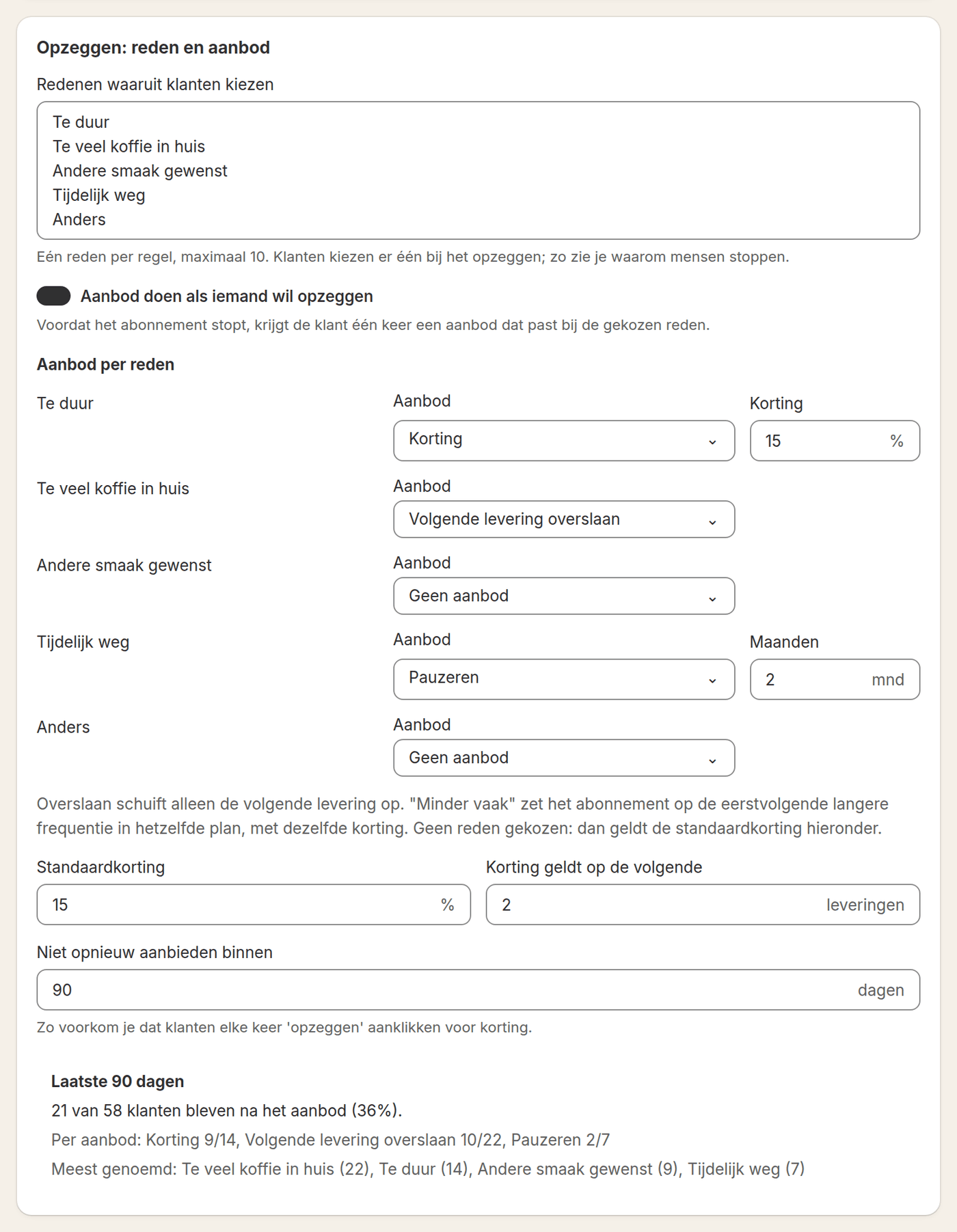
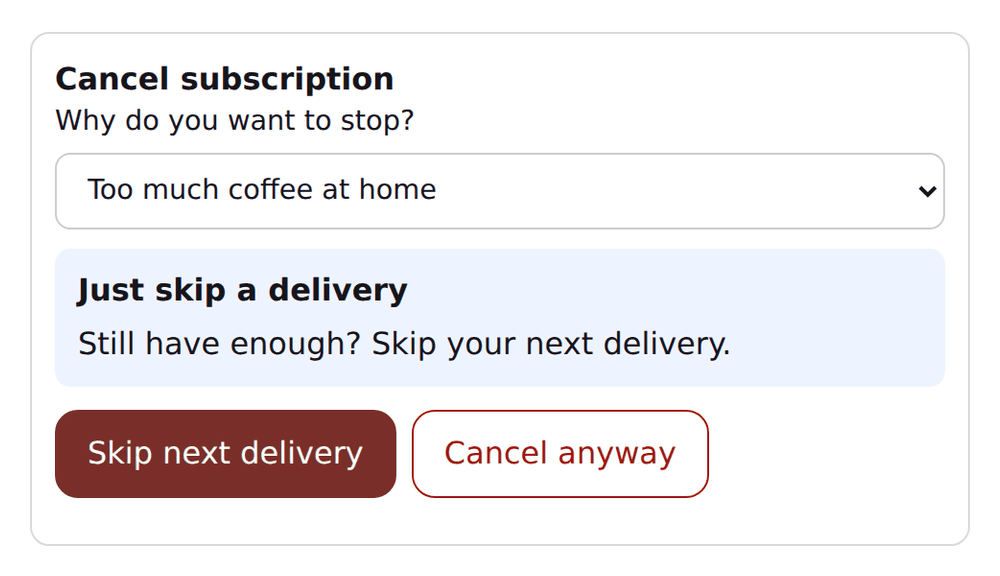
If a customer still proceeds to cancel, that's the moment to ask why. A short list of reasons (too expensive, product doesn't fit, too frequent, no longer needed, other) costs the customer little time and gives you usable data. Group reasons by period and link them to the relevant products or frequencies so you see patterns instead of isolated complaints.
- Show pause and skip before the cancel option in the customer portal
- Ask for a cancellation reason with a short, fixed list of options
- For 'too frequent', automatically offer a lower frequency instead of only cancelling
- For 'too expensive', offer a winback discount instead of letting the customer cancel immediately
- Report cancellation reasons by product and period
The winback offer and the winback email
A winback offer works best when it matches the stated reason. For 'too expensive', a temporary discount makes more sense than for 'product doesn't fit', where a product swap solves more. Avoid giving every cancellation the same discount automatically: that teaches customers that cancelling pays off and increases churn over time. Limit winback offers to a set number of uses per customer and record when an offer has already been used.
- Customer starts the cancellation flowShow pause, skip and frequency change first as alternatives.
- Ask for a reasonLet the customer briefly indicate why they want to stop.
- Show a targeted offerMatch the offer to the reason: discount for price, frequency change for 'too frequent', product swap for mismatch.
- Record the cancellationIf the customer still cancels, log the reason and offer for later analysis.
If the customer has cancelled anyway, you can still win them back later. Send one winback email a number of days after the cancellation, with a personal discount code that only that customer can use once. Keep it to one message per subscription, and leave out customers who still have another subscription running. In Loyalo you set after how many days that email is sent.
Worked example: what one percentage point less churn is worth
Say you have 500 subscribers who pay € 25 per month on average, and 6% cancel every month. The expected lifetime of a subscription is then one divided by 0.06: almost 17 months. Over that time a subscriber brings in about € 417. Bring churn down to 5% and the lifetime becomes 20 months and the value per subscriber € 500. That is 20% more revenue per customer, without winning a single new one.
| Churn per month | Expected lifetime | Value per subscriber |
|---|---|---|
| 6% | 16.7 months | € 417 |
| 5% | 20 months | € 500 |
| 4% | 25 months | € 625 |
The numbers are an example; work it out with your own monthly amount and churn. The pattern stays the same: the lower your churn already is, the more every percentage point is worth.
Timing of reminders
Reminders before a delivery give customers the chance to pause or skip in time, instead of complaining afterwards or cancelling right away. Send a reminder a few days before the next charge, with direct links to pause, skip and reschedule. That avoids surprises and keeps the cancel button in the background rather than the first action people see.
A customer who skips once hasn't automatically cancelled the subscription. Treat skipping and pausing as normal behaviour, not a warning signal that immediately triggers a winback email.
Frequently asked questions
What is subscription retention?
Subscription retention is the share of your subscribers that stays in a period. It is the mirror image of churn: at 6% churn in a month, retention is 94%. You measure it as the share of the subscriptions running at the start of the period that are still running at the end.
How do you reduce subscription churn?
Give customers an alternative to cancelling: skip a delivery, pause, reschedule or swap the product. When someone cancels, ask for the reason and make an offer that fits it. Also send a reminder before every delivery, and deal with failed payments separately with new payment attempts.
Should I always offer a discount on cancellation?
No. A discount only makes sense if it matches the stated reason, such as price. For other reasons, a different adjustment, like frequency or product, works better.
How do I prevent customers from abusing winback offers?
Record per customer whether and when a winback offer has already been used, and limit how many times the same offer is valid.
Does pausing reduce churn more effectively than skipping?
It depends on the situation. Skipping suits one missed delivery, pausing suits a longer period. Both prevent a final cancellation.
Where do I record cancellation reasons so I can analyse them?
Record the reason at the moment of cancellation and link it to the customer profile, so you can later combine it with product, frequency and period.
How do I calculate the churn of my subscriptions?
Divide the number of subscriptions that stopped in a period by the number that were running at the start of that period. With 500 running subscriptions of which 30 stop in a month, churn is 6%.
Does a paused subscription count as churn?
No. A pause is not a cancellation: the subscription still exists and starts again later. It brings in no revenue in that period though, so it does not count in your recurring revenue per month.
Want to reduce churn structurally?
In a demo we show how pause, skip, cancellation reasons and winback work together in Loyalo's customer portal.
Request a demo