What is dunning?
Dunning is the process of automatically retrying a charge after it fails, spread over a number of days, while keeping the customer informed and giving them the chance to pay themselves. The word comes from the verb 'to dun': to press someone for payment. In subscription billing it is also called failed payment recovery, and dunning management is the work of setting that process up: the retry schedule, the emails and the cutoff.
The goal is twofold: recover as much revenue as possible that would otherwise be lost to a temporary payment issue, and avoid bothering the customer with too many attempts or overly aggressive communication.
Why payments fail
With a recurring iDEAL subscription through Mollie, a new payment is automatically created on the due date based on the previously captured SEPA mandate. That charge can fail for several reasons: insufficient balance, an expired or blocked card, a revoked mandate, a temporary outage at the bank or Mollie, or a customer who has closed their account. Some of these failures are temporary: enough balance a few days later, or an outage that resolves itself. That's exactly why you don't cancel a subscription after a single failed attempt, but instead set up a dunning process with multiple attempts.
A practical retry schedule
A common approach is a schedule with a few attempts spread over roughly a week, giving temporary causes (balance, outage) a real chance to resolve themselves without leaving the customer in limbo too long.
- Day 0: first attempt failsThe scheduled charge fails. The customer immediately gets an email explaining what happened, with a payment link to settle it themselves.
- Day 1: first retryLoyalo automatically retries the charge through Mollie. If it succeeds, the subscription continues and the order is marked paid.
- Day 3: second retryIf payment still hasn't succeeded, a second attempt runs along with a reminder email. From now on the subscription is at the top of your subscription list, so you can keep an eye on it.
- Day 5: third retry and final warningThe last automatic attempt, paired with an email that clearly states the subscription will be paused or ended if payment doesn't succeed now.
- After day 5: stop or pauseIf the charge keeps failing, pause the subscription instead of cancelling it outright, so the customer can grant a new mandate through the customer portal.
Too many retry attempts can look suspicious to banks and put pressure on the customer relationship. A clear cutoff keeps the process predictable for both the customer and the merchant.
Timing: payday and expiring cards
The moment of a new attempt matters. An attempt on the 22nd for a customer who is paid on the 25th often fails for the same reason as the first. In Loyalo you can set attempts in the four days before payday to move to the morning after. Card subscriptions have another issue: a card that expires before the next delivery. That customer gets an email beforehand to update their payment method, so the payment does not have to fail first.
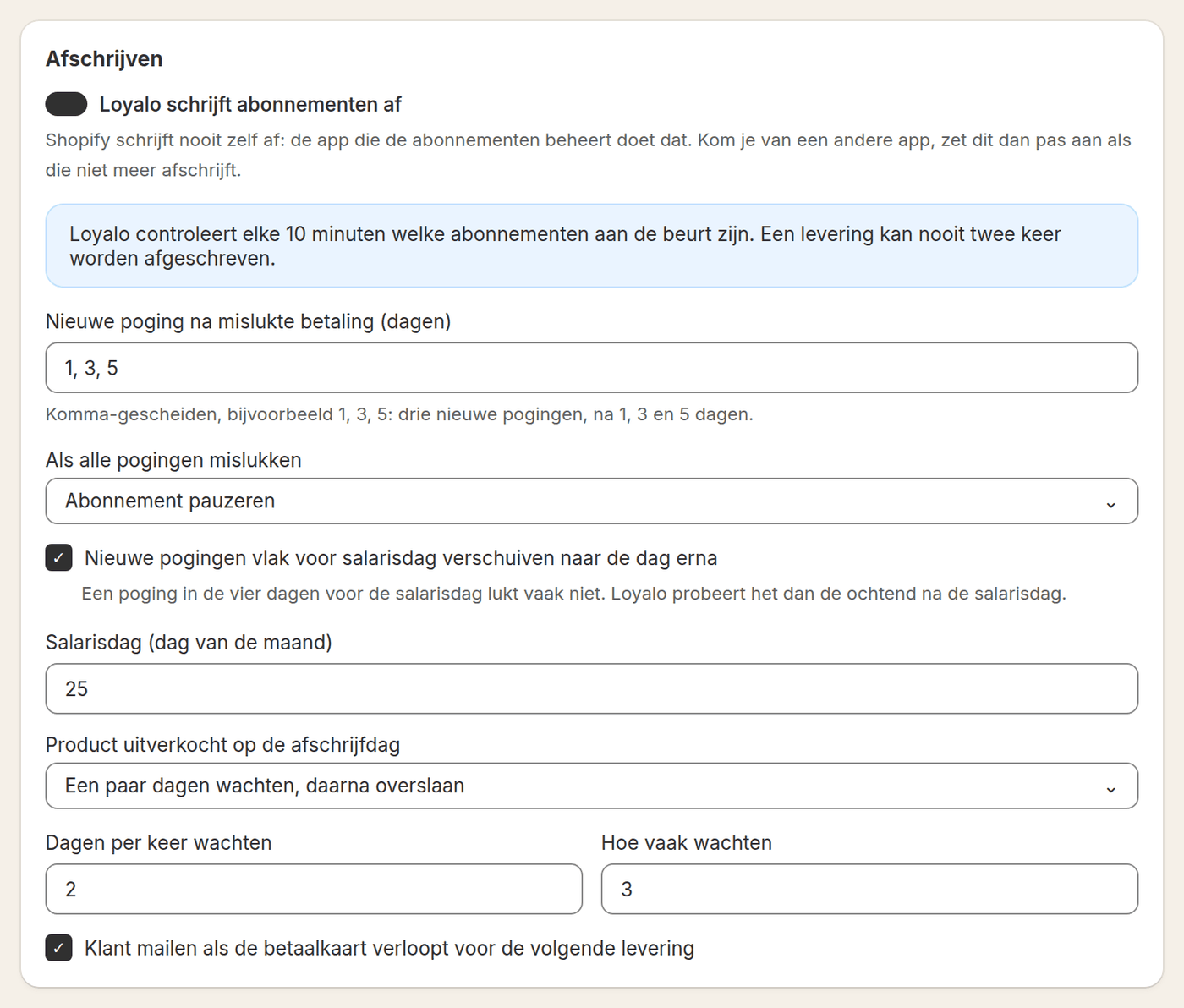
Dunning emails with a payment link
Every failed attempt should trigger an email that doesn't just inform the customer, but also offers an immediate solution: a payment link they can use to settle the outstanding amount themselves, outside the automatic schedule. That's often faster than waiting for the next automatic attempt, especially if the customer knows the issue is on their end (an expired card, for example). Make sure these emails match your own branding, are short and clear about what happened and what to do, and mention a concrete deadline in case the subscription is paused otherwise.
When to stop trying
A dunning schedule without a clear cutoff leads to confusion and unnecessary irritation. Decide upfront after how many attempts (for example three) and over what period (for example a week) you stop retrying automatically. After that, pausing is the logical next step: the subscription stays in place, but no further automatic charges are attempted until the customer grants a new mandate or the issue is resolved. This prevents permanently losing customers over something that might have been easily fixed, while also avoiding repeated attempts against an account that structurally doesn't work.
| Status | Meaning | Action for the customer |
|---|---|---|
| Active | Last charge succeeded | No action needed |
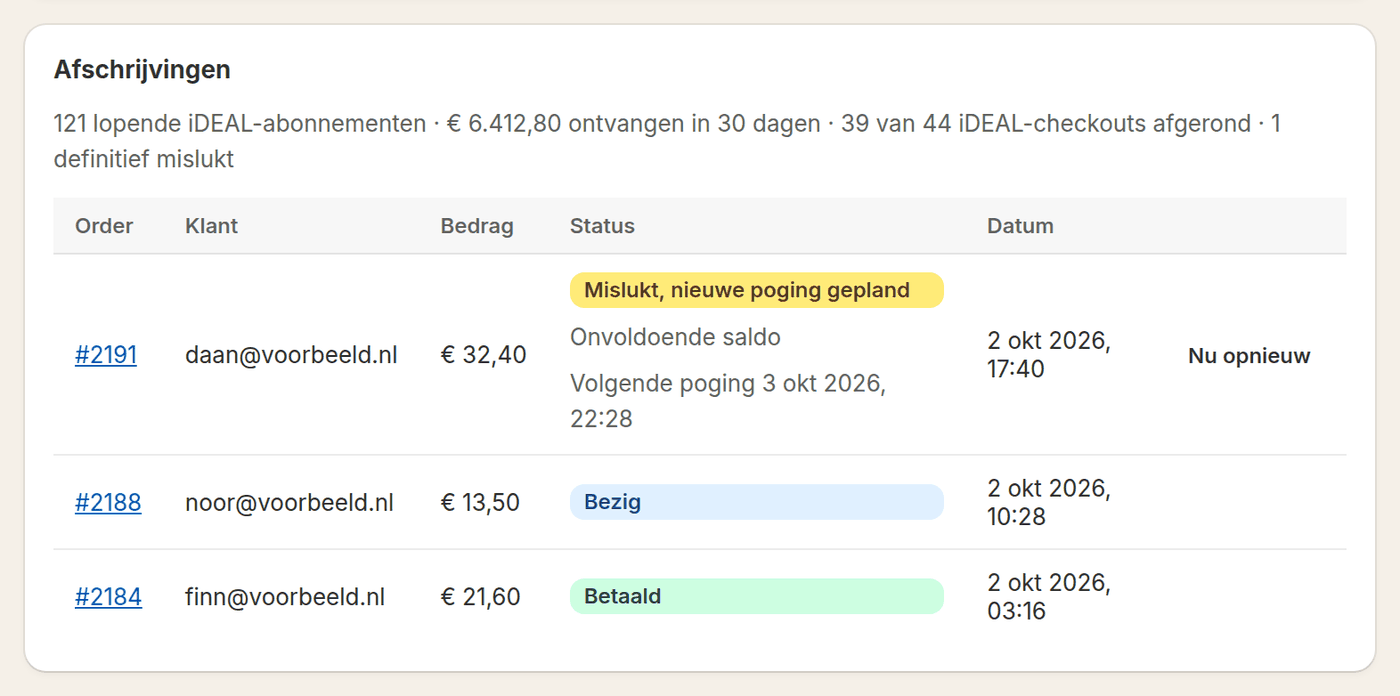
| In retry | One or more attempts failed, schedule still running | Use the payment link or wait for the next attempt |
| Paused | Schedule finished without a successful payment | Grant a new mandate through the customer portal |
| Cancelled | Customer or merchant ended the subscription | No action, optionally resubscribe |
Monitoring and manual retries
In the subscription list the subscriptions with a failed payment are at the top, with the error and the date of the next attempt. That lets you step in proactively: reach out personally for a high-value order, or start a retry yourself with 'Retry now' on the subscription once you know the underlying issue is fixed (for example after contacting the customer). Manual retries are also useful after a temporary outage at Mollie or the bank, so you don't have to wait for the next scheduled attempt.
- Set up a retry schedule with a few attempts spread over roughly a week
- Pair every failed attempt with an on-brand email that includes a payment link
- Decide upfront after how many attempts you pause instead of cancel
- Keep an eye on the status page for subscriptions needing attention
- Use manual retries after contacting the customer or once an outage is resolved
Measuring: which share pays after all
The figure to follow is the share of deliveries that was paid after a failed attempt. An example: of 1,000 collections per month, 40 fail. When 80% of those come in after a new attempt, you save 32 deliveries and lose 8. At € 25 per delivery that is € 800 per month that would have been gone without retries. The numbers are an example; your own figure is in Loyalo under Analytics, as 'Paid after all'.
Frequently asked questions
What does dunning mean?
Dunning is the process of automatically retrying a charge after a failed payment and giving the customer the chance to pay themselves. The word comes from the verb 'to dun': to press someone for payment.
What do you do when a direct debit fails?
Don't cancel the subscription after a single failed attempt. Retry a few times, spread over roughly a week, and send an email with a payment link with every attempt. If it still fails after that, pause the subscription, so the customer can grant a new mandate themselves.
How many attempts are common in a retry schedule?
A schedule with two to three attempts spread over roughly a week is a common balance between giving enough chances and not leaving the customer in limbo too long.
What happens to the subscription if all attempts fail?
You set that yourself: the subscription pauses, is cancelled or stays as it is. Pausing is usually the best choice: the customer can then give a new mandate or update their card in the customer portal.
Can I manually retry a failed payment?
Yes, on the subscription you start a retry yourself with 'Retry now', for example after a customer confirms the issue has been resolved.
Does the customer get an email for every failed attempt?
Yes. For iDEAL it holds a payment link, so the customer can pay outside the schedule too. With a card the customer updates their payment method in the portal.
Can I choose the days of the new attempts myself?
Yes. You enter the days yourself, for example 1, 3 and 5, up to six attempts. You also choose what happens after that.
Do retries work for card subscriptions too?
Yes. Loyalo retries the payment through the payment method stored in Shopify, on the same schedule. The customer gets an email with every attempt and updates their card in the portal.
Reduce revenue lost to failed charges
See in a demo how the retry schedule, the emails and the follow-up in Loyalo's dashboard work.
Request a demo