Why migrating feels risky
Migrating subscriptions from Recharge or Appstle to another app is more delicate than swapping any other app: there are active subscriptions, stored payment details and a billing history riding on it. A poorly executed migration can lead to duplicate invoices, missed charges, or customers suddenly having to re-enter payment details. With a structured plan, that risk is manageable. This article walks through the process step by step: export, column mapping, dry run, re-capturing mandates, communication and post-launch checks.
Step 1: export from Recharge or Appstle
Start with a full export of your current subscription data. Most apps offer a CSV export of customers, active subscriptions, selling plans, next billing date and payment method used. Also request an export of order history so you can reconstruct customer value and lifetime if needed for reporting. Keep the raw exports separate from the files you edit, so you can always go back to the source data.
Step 2: column mapping and cleanup
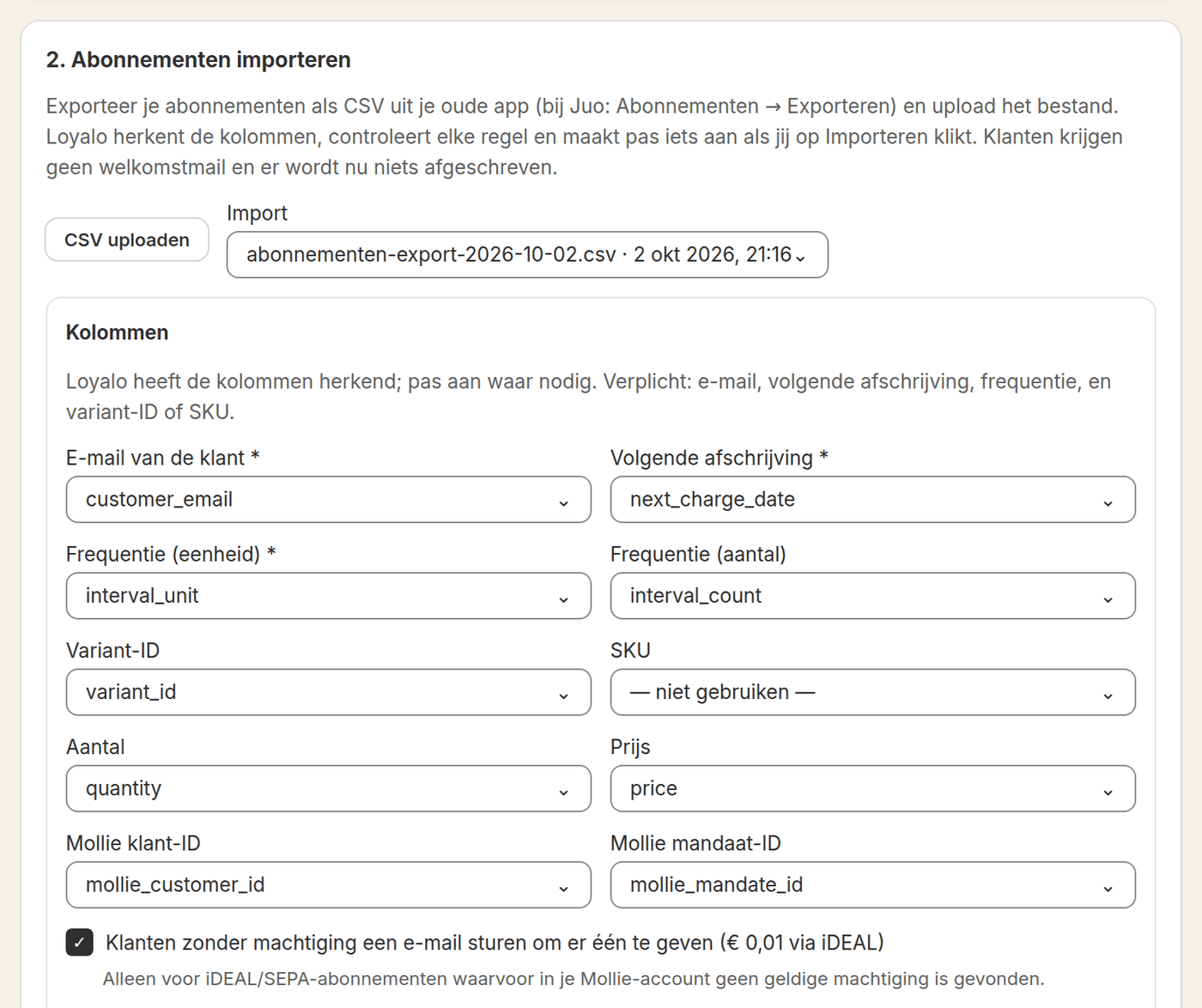
Every app uses its own column names and statuses for subscriptions: active, paused, cancelled, expired. Before importing the data, map the columns from the export to the fields Loyalo expects: customer, product, frequency, next billing date, price and status. Pay extra attention to unusual status values and to subscriptions with a manual discount or custom frequency. These often fall outside the standard pattern and deserve a separate check.
| Source field | What to watch for | Target in Loyalo |
|---|---|---|
| Customer email | Duplicates and outdated addresses | Link to Shopify customer |
| Subscription status | Unusual or custom statuses | Active, paused or cancelled |
| Frequency and price | Manual overrides per customer | Selling plan and price rule |
| Next billing date | Time-zone differences in export | Next charge date |
| Payment method | iDEAL vs card vs other | Reuse the existing mandate or card, otherwise capture a new one |
Step 3: check before you import
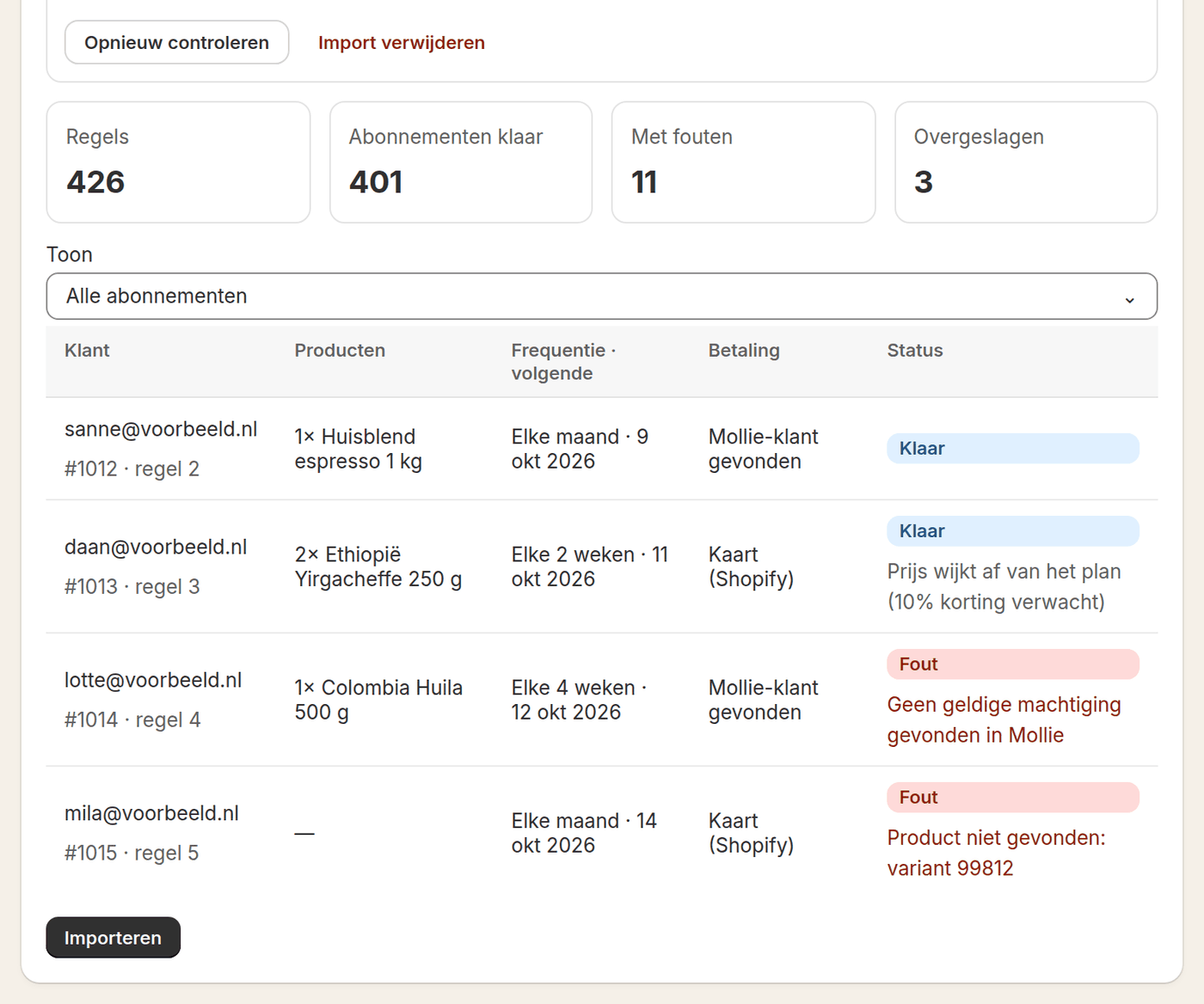
After the upload Loyalo checks every row before anything is created: the product, the plan and, for iDEAL, the mandate. Per row you see what will happen and what is wrong. Also walk through a handful of representative subscriptions yourself: a monthly subscription, one with a discount, a paused one, and one with a recently failed payment. When the next billing date, amount and status are correct, you import.
- Upload and have it checkedUpload the export. Loyalo checks every row and shows the errors, without creating anything.
- Verify the sampleFor a number of subscriptions, compare the source data with what Loyalo will create: date, amount, status, customer details.
- Fix discrepanciesAdjust the column mapping or the source file until the sample checks out, then upload again.
- ImportOnly import once the check passes without discrepancies. The import sends no emails to customers.
Step 4: mandates and payment details
Whether a mandate carries over depends on where it lives. When the iDEAL mandates are in your own Mollie account, Loyalo uses them again and the customer notices nothing. Cards stored in Shopify carry over too. When the mandate is with another party, the customer has to give it once more. Do this with a short, clear flow: one click from an email to a page where the customer captures the new mandate with a payment of € 0.01. The fewer steps, the more customers do it.
- Sample checked before the import, including pauses and discounts
- Column mapping checked for unusual statuses and frequencies
- The email for a new mandate tested with a test customer, if one is needed
- Communication plan ready: pre-announcement, reminder, confirmation
- Support team briefed on common questions during the switch
- Rollback scenario discussed in case the launch needs to be postponed
The order of switching over
Most accidents in a migration come from the order, not from the data. Two apps that both collect give double charges; neither gives a missed delivery. So keep to this order. The import itself collects nothing, so you have time to check.
- Copy the plans firstCopy the subscription plans of your old app, so new subscribers come in through the new app from that moment.
- Import and spot-checkFor a number of customers, compare the product, the price and the next date with your old app.
- Stop the collections in the old appDo that before the next collection date and without the old app sending customers a cancellation email.
- Switch on collecting in the new appFrom that moment every delivery runs through Loyalo. Only clean up the old app when the first round has gone well.
Step 5: communication and post-launch checks
If customers have to give a new mandate, announce that at least a week ahead, explain why, and give a clear deadline. Send customers who haven't responded one more reminder before the first new charge is scheduled.
After launch, closely monitor the first billing cycle: how many charges succeeded and which customers still have to give a mandate. Set up a daily check in the dashboard for the first two to three weeks so you can react quickly to a spike in failed charges or support requests.
Frequently asked questions
Can I automatically transfer payment details?
Partly. Mandates in your own Mollie account and cards stored in Shopify carry over. When the mandate is with another party, the customer gives it once more with a payment of € 0.01.
How much time should I plan for a migration?
The import itself can be done in a day. Expect one or two weeks when customers have to give a new mandate: time for upfront communication and a period of monitoring after launch.
What happens to customers who do not give a new mandate?
Their subscription is in Loyalo all the same. At the next collection they get an email with a payment link; paying through it captures the mandate at once.
Can I bring over historical order data?
Yes, you can export the order history separately and use it for reporting, even if it isn't imported one-to-one into the new subscription.
Do customers get an email from the import?
No. The import sends no welcome email. The only email you can have sent is to customers without a valid mandate, asking them to give one.
Can I migrate in parts?
Yes, when the subscription ID of your old app is in the file. Loyalo uses it to recognise what was imported already and skips it, so you can move part first and the rest later.
Plan a migration without surprises?
Request a demo and discuss the export and migration plan for your current app.
Request a demo