A volume discount is a discount that grows with the quantity: the more a customer orders, the lower the price per item. You know it from wholesale, but it also works in a consumer shop, certainly for products that get used up. This article explains what a volume discount is, how to calculate the steps, what it does to your margin and how to set it up in Shopify. In Dutch it is called staffelkorting.
What is a volume discount?
A volume discount is a discount in steps: each quantity you agree on has a higher percentage, for example 5% from 4 items, 10% from 8 items and 15% from 16 items. When a customer reaches a step, the discount of that step applies. The steps are also called quantity breaks, a term you will see a lot among Shopify merchants. The price list that follows from them, with a price per item at each step, is tiered pricing. The goal is a larger order: the customer has a reason to add a few more, and you ship more in one parcel.
Several terms are used for the same idea. They mean almost the same, with small differences.
| Term | What is meant |
|---|---|
| Volume discount | A percentage off per step, on the normal price |
| Tiered pricing | A fixed price per item per step, for example € 11.25 from 8 items |
| Quantity discount | A discount for a large purchase, often agreed for one order or over a period |
| Bulk discount | A general name for a discount based on quantity or revenue |
Calculating a volume discount
The calculation is short: price per item = normal price × (100% − discount of the step). The total is the quantity times that price. A worked example with a product of € 12.50:
| Quantity | Discount | Price per item | Example |
|---|---|---|---|
| 1 to 3 | None | € 12.50 | 3 items: € 37.50 |
| 4 to 7 | 5% | € 11.88 | 4 items: € 47.50 |
| 8 to 15 | 10% | € 11.25 | 8 items: € 90.00 |
| 16 or more | 15% | € 10.63 | 16 items: € 170.00 |
In this example the discount applies to all items once the step is reached. Someone who orders 8 items pays 8 × € 11.25, not 7 items at the old price and only the eighth cheaper. That is how most online shops do it, and how Shopify calculates it too.
Check for every step that the total at the threshold is higher than just below it. For a product of € 10 with 5% from 5 items and 25% from 10 items, 9 items cost € 85.50 and 10 items € 75.00. The customer then gets an extra item and pays less. Smaller gaps between the steps prevent that.
What does a volume discount do to your margin?
A discount comes out of your margin, not out of your revenue. So work out per step what is left per order. In the example below the cost price is € 6.00 per item; the numbers are a worked example, fill in your own prices.
| Quantity | Price per item | Margin per item | Margin per order |
|---|---|---|---|
| 1 | € 12.50 | € 6.50 | € 6.50 |
| 4 | € 11.88 | € 5.88 | € 23.50 |
| 8 | € 11.25 | € 5.25 | € 42.00 |
| 16 | € 10.63 | € 4.63 | € 74.00 |
You earn less per item and more per order. On top of that come the costs you make per order and not per item: shipping, packing, payment fees. You spread those over more items. So a volume discount is worth it as long as the extra items bring in more than the discount you also give to customers who already ordered that many.
That last part is the risk. If a large share of your customers already orders 8 items, a step at 8 mostly gives discount away. So put the first step just above what customers order on average now.
When does a volume discount work?
- For products that get used up and keep well, such as coffee, care products or pet food. The customer will use them anyway.
- For business customers, who order by the box or pallet and look at the unit price.
- When your shipping costs per order are high and per extra item low.
- When you put several products in one rule, so a customer may mix to reach the step.
It works less well for products a customer needs only once, and for products where your margin is already small. If your product also has a subscription, keep the two apart: a subscription rewards coming back, a volume discount rewards a large order. Giving both at once stacks discount on discount.
Setting up quantity breaks in Shopify: three ways
| Way | How it works | What to watch |
|---|---|---|
| Create automatic discounts yourself | Per step an automatic discount on products with a minimum quantity of items | Every step is a separate discount to maintain. Shopify allows 25 active automatic discounts per shop, and those of apps count as well. The customer does not see the steps on the product page |
| Volume pricing in Shopify B2B | In a B2B catalog you set up to 10 price breaks per product with a fixed price | Only for companies in Shopify B2B. The quantity counts per variant, mixing is not possible |
| An app such as Loyalo | You fill in rules and steps, the app creates the discounts and shows the steps in your shop | For consumers and business customers, with mixing within a rule |
If you create the discounts yourself, make sure the steps do not combine with each other. When more than one discount fits and they may not combine, Shopify applies the best one for the customer. That way someone with 8 items gets the 10% step, not 5% and 10% together.
How it works in Loyalo
In Loyalo you fill in the name, the audience, the products and the steps per rule. Loyalo creates an automatic discount in Shopify for each step and keeps it up to date when you change something. Because they are ordinary Shopify discounts, it works in the cart and at checkout on every Shopify plan.
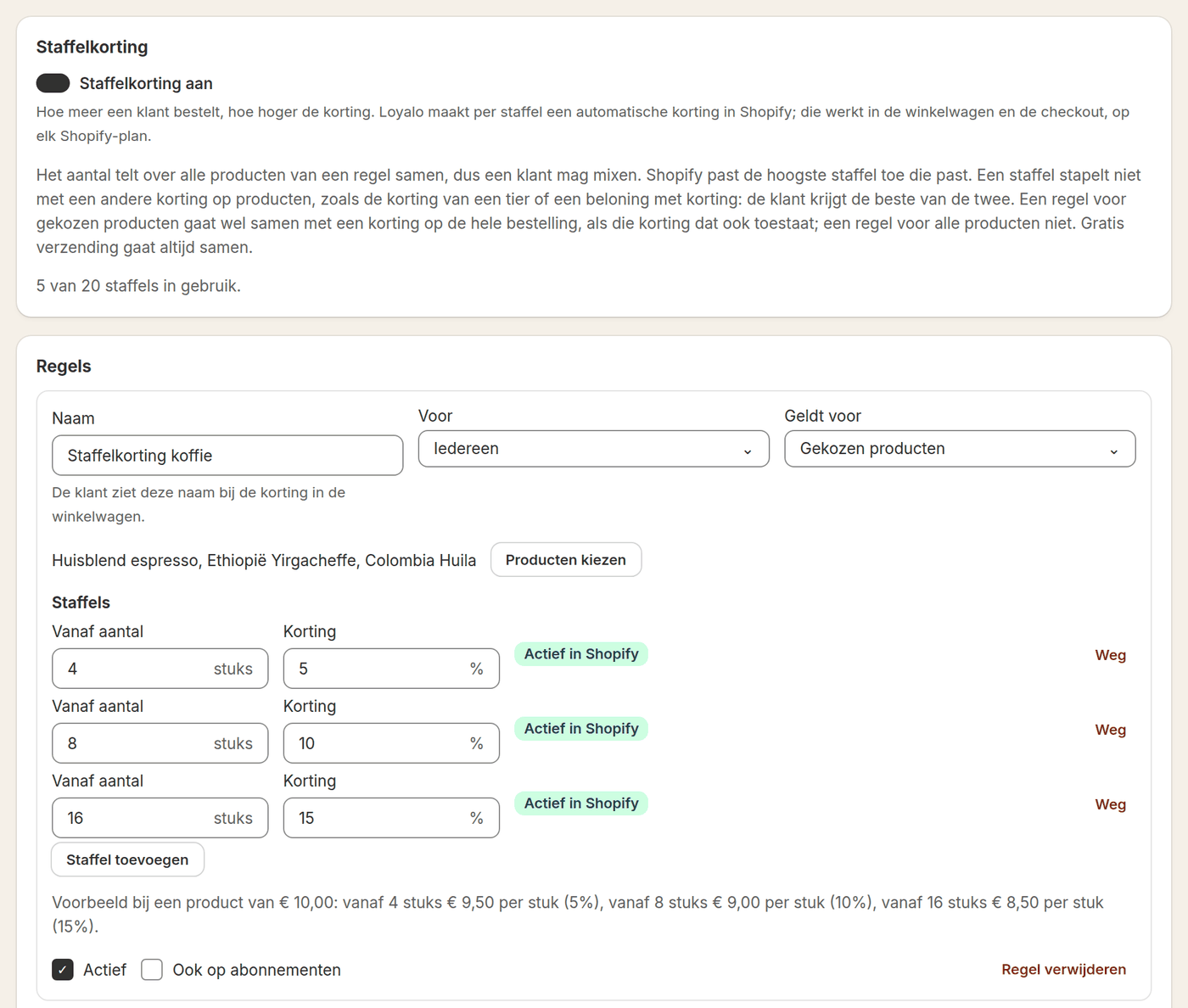
- Up to 6 rules with 20 steps in total, per rule for all or chosen products
- Per rule for everyone, consumers only or business customers only
- The quantity counts across the products of a rule together, so the customer may mix
- Subscriptions are left out by default, unless you switch that on
- For business customers the step comes on top of the catalog price, also for standing orders
Show the price per step on the product page
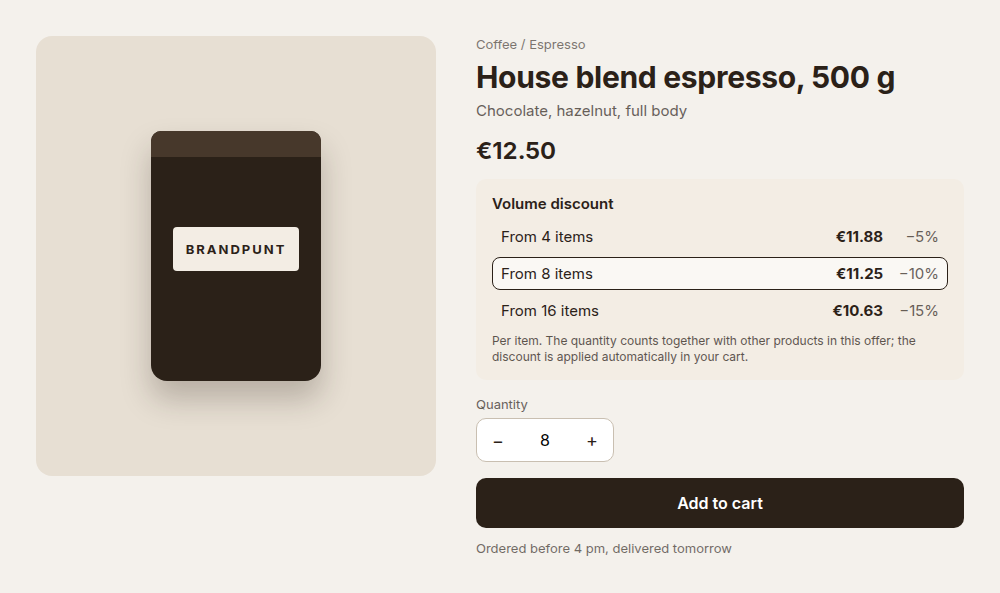
A volume discount only works when the customer sees it before choosing the quantity. In the cart it is too late to add a few more. So put the steps next to the price, with the price per item: an amount says more than a percentage.
Common mistakes
- Too many steps. Three or four is enough; more makes it hard to follow for the customer.
- A first step that almost everyone already reaches. Then you give a discount without anything changing.
- A jump between two steps so large that ordering more becomes cheaper.
- Forgetting that other discounts are running, such as a discount code or a member discount. Decide beforehand what may combine.
- Showing the steps only in the cart, where the customer has already chosen the quantity.
Frequently asked questions
What are quantity breaks?
Quantity breaks are the quantities at which the price per item drops: 4, 8 and 16 items in the example above. Each break has its own discount or its own price. Price breaks and steps mean the same thing.
What is the difference between a volume discount and tiered pricing?
A volume discount gives a percentage off from a certain quantity. Tiered pricing sets a fixed price per item per step. For the customer the result is the same: a lower price per item for a larger order.
What is the difference between a volume discount and a quantity discount?
A volume discount works with fixed steps per order: from a certain quantity a percentage applies. Quantity discount is broader and is also used for a discount on a large purchase over a period, such as an annual agreement with a business customer.
Does the discount apply to all items or only to the extra items?
In an online shop almost always to all items once the step is reached. Shopify's automatic discounts work that way too.
Do I need Shopify Plus for a volume discount?
No. Automatic discounts with a minimum quantity work on every Shopify plan, and Loyalo uses those.
Can a customer combine different products?
That depends on the way. With an automatic discount the quantity counts across the products of that discount together. With volume pricing in a B2B catalog the quantity counts per variant.
Does a volume discount stack with a discount code?
You decide that with the combination settings of the discount in Shopify. In Loyalo a step does not stack with another discount on products: the customer gets the better of the two.
How many steps should I use?
Start with two or three. Put the first just above what customers order on average now and check after a few weeks whether the average quantity per order goes up.
Volume discounts in your own shop
In a demo we show how you set rules and steps and how the steps get onto your product page.
Request a demo