Shopify B2B without Plus has been possible since 2 April 2026. According to the Shopify changelog of that day, shops on Basic, Grow and Advanced can use the built-in B2B features in their admin at no extra cost: company profiles, payment terms, volume pricing and up to 3 active B2B catalogs. A few parts stay with Plus, mainly pricing per customer. Below is what you can and cannot do, and how to set up a shop for business customers with it.
What is Shopify B2B?
B2B in Shopify means selling to companies from the same shop you sell to consumers from. You add a company with one or more locations, decide which prices that company sees and whether it may pay on account. The buyer logs in and orders like a consumer, but on their own terms.
Two things from Shopify's developer documentation are worth knowing. B2B works with the (new) customer accounts. And a business customer chooses which location they are ordering for. A coffee roaster such as Brandpunt Koffie can add a hospitality group with three venues as one company, with its own delivery address for each venue.
What you get without Plus since April 2026
According to the Shopify changelog of 2 April 2026 (Key B2B features now available on non-Plus plans), shops on Basic, Grow and Advanced get these B2B features at no extra cost:
- Company profiles: the company with its details and locations
- Payment terms: the customer pays on account, for example within 30 days
- Volume pricing: a lower price for a larger quantity
- ACH payments, in the United States only
- Vaulted credit cards
- Up to 3 active B2B catalogs, assigned via Markets
Shopify Plus B2B features
The same changelog names four parts that stay exclusive to Plus:
- Unlimited catalogs, for customer-specific pricing
- Assigning a catalog directly to a company or a location
- Partial payments
- Deposits
Basic, Grow and Advanced vs Plus
| B2B feature | Basic, Grow and Advanced | Plus |
|---|---|---|
| Company profiles | Yes | Yes |
| Payment terms | Yes | Yes |
| Volume pricing | Yes | Yes |
| ACH payments (US only) | Yes | Yes |
| Vaulted credit cards | Yes | Yes |
| B2B catalogs | Up to 3 active, assigned via Markets | Unlimited, for customer-specific pricing |
| Catalog assigned directly to a company or location | No | Yes |
| Partial payments | No | Yes |
| Deposits | No | Yes |
Source: Shopify changelog, 2 April 2026. On Basic, Grow and Advanced the B2B features cost nothing on top of your Shopify plan.
Without Plus a catalog is attached to a market rather than to a company, and you have at most 3 active. As a rule, all business customers in the same market therefore get the same prices. If you want to give every customer their own price list, the changelog says you need Plus.
What B2B in Shopify does not do: subscriptions
Shopify's developer documentation says B2B does not support purchase options such as subscriptions, pre-orders and try before you buy. That applies on every plan, Plus included. A subscription app that runs on Shopify subscriptions therefore cannot give a business buyer a subscription.
For many business customers that is exactly what matters most. A café, an office or a salon usually orders the same thing at a fixed moment. That needs a different solution, described further down.
Setting up a Shopify B2B portal
A B2B portal in Shopify is not a separate website. It is your own shop, where the business customer logs in with their customer account and sees their own prices and payment terms. This is how you set it up:
- Decide your price groupsWithout Plus you have up to 3 active B2B catalogs. Choose which price groups you really need, for example hospitality and offices, and work out what you keep per group.
- Add companies and locationsCreate a company per customer with the locations you deliver to. The buyer chooses the location when ordering.
- Agree payment termsDecide which customers may pay on account and within how many days.
- Prepare the customer accountsB2B works with Shopify's customer accounts. That is where the buyer logs in and sees their orders.
- Choose how to reward larger ordersWith volume pricing in the catalog or with a volume discount, the price per item drops for a larger order.
- Sort out recurring ordersIf a customer always orders the same thing, you want it to happen by itself. Because Shopify subscriptions do not work for B2B, you need an app for that.
Shopify B2B apps: standing orders
Loyalo solves the subscription problem with standing orders. On the agreed day Loyalo places a B2B order for the location itself, with that company's price list and payment terms. The price per item and the minimum quantities come from the catalog in Shopify. The order is placed on account and Shopify sends the invoice. No direct debit and no mandate are needed.
A standing order starts in three ways. The buyer chooses to repeat the order in the cart and picks a frequency. They repeat an earlier order from their customer account. Or you create one in the dashboard from an existing order number. You choose which frequencies you offer: every week, every 2, 3, 4, 6 or 8 weeks, or every 1, 2 or 3 months.
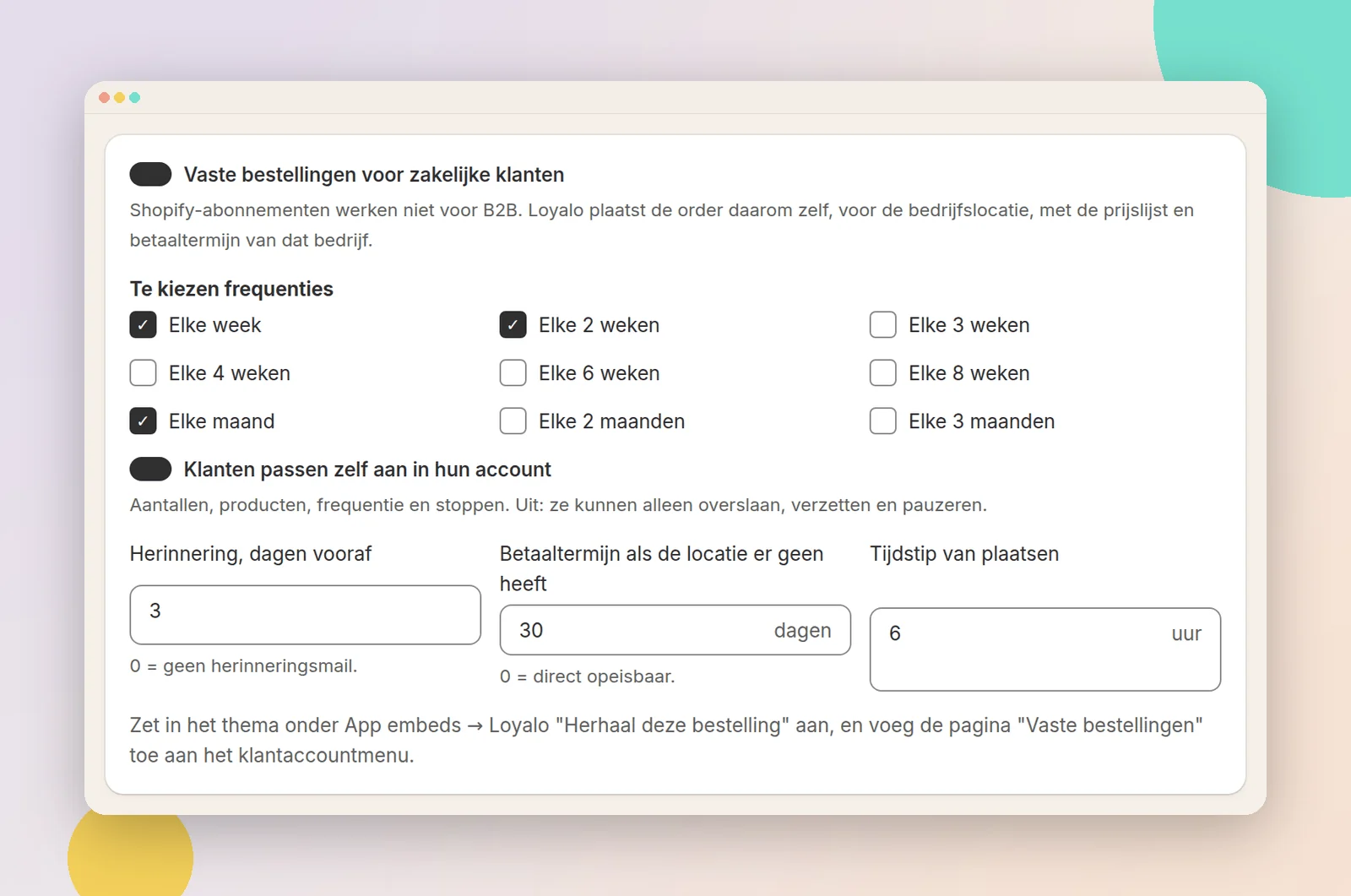
A few days before every order the customer gets a reminder, so they can still change something. Skipping, moving and pausing are always possible. If you switch on letting customers make changes in their account, they can also change quantities, products and the frequency, and stop.
An example: Brandpunt Koffie delivers 8 kilos of espresso beans to a café every week. The café chooses every week with its first order. After that, the order appears in Shopify every week at the hour Brandpunt Koffie has set, at the catalog price and with that location's payment terms.
Standing orders use the building blocks of B2B in Shopify: companies, locations, catalogs and payment terms. Since April 2026 those building blocks exist on every Shopify plan. The price comes from the catalog that applies to that location. Without Plus that is one of your 3 catalogs at most, assigned via Markets, so no separate price list per company.
Volume discounts on every Shopify plan
Next to the volume pricing in your catalog, you can set a volume discount in Loyalo, for example 8% from 24 items and 12% from 48 items. Loyalo creates an automatic discount in Shopify for each step, and those work on every Shopify plan. A rule applies to everyone, to consumers only or to business customers only. For business customers the step comes on top of the price from their catalog, and it also applies to standing orders. Volume discounts are part of every Loyalo plan.
Points for business customers
With the Customer Loyalty add-on, customers earn points per euro. For business customers you set their own rate, or no points. You can also give them their own tiers, for example based on volume. How to keep business customers coming back is covered in the article on B2B customer loyalty, among the related articles below.
What it costs
| Part | Price |
|---|---|
| B2B features in Shopify on Basic, Grow and Advanced | No extra cost, according to the Shopify changelog |
| Loyalo Scale B2B, with standing orders | € 499 a month, no fee per order or per company |
| Volume discounts in Loyalo | In every plan, from Growth at € 99 a month |
| Customer Loyalty, points and tiers | € 199 a month with Scale B2B, € 99 with Growth |
You can try Loyalo free for 14 days. If you only need volume discounts and no standing orders, you do not need Scale B2B.
When Plus is the better choice
Plus is the better choice if you agree a separate price with every business customer and need more than 3 price groups. The same goes if you want to attach a catalog to a single company or location, or if you work with deposits or partial payments. If a few price groups and payment on account are enough, Basic, Grow or Advanced will as a rule take you a long way.
Frequently asked questions
Do I need Shopify Plus for B2B?
Not for the basics any more. Since 2 April 2026 company profiles, payment terms, volume pricing and up to 3 B2B catalogs are also part of Basic, Grow and Advanced, according to the Shopify changelog. Customer-specific pricing and assigning a catalog directly to a company stay with Plus.
What does Shopify B2B cost without Plus?
According to the Shopify changelog, the B2B features cost nothing extra on Basic, Grow and Advanced. You pay your normal Shopify plan. Apps you add have their own price.
How many B2B catalogs do I get without Plus?
Up to 3 active catalogs, assigned via Markets. On Plus there is no limit and you can assign a catalog directly to a company or location.
Can I give each business customer their own price without Plus?
As a rule, no. Without Plus a catalog is attached to a market and you have 3 at most. Unlimited catalogs for customer-specific pricing are exclusive to Plus, according to the changelog.
Do Shopify subscriptions work for B2B customers?
No. Shopify's developer documentation says B2B does not support purchase options such as subscriptions and pre-orders. For recurring business orders you need a different solution, such as Loyalo's standing orders.
How do I build a B2B portal on Shopify?
Your B2B portal is your own shop with customer accounts. Add companies and locations, choose their catalog and payment terms, and let the buyer log in to their customer account. That is where they see their prices and orders.
Can I serve B2B and consumers in the same Shopify shop?
Yes, the B2B features are part of your own Shopify admin. In Loyalo, consumers take out a subscription and business customers a standing order on account. Both are in the same dashboard.
Do volume discounts work without Shopify Plus?
Yes. Loyalo creates the steps as automatic discounts in Shopify, and those work on every Shopify plan. A rule can apply to business customers only and also applies to standing orders.
Standing orders for your business customers
In a demo we show how a standing order starts, how the order arrives in Shopify and what your customer handles themselves.
Request a demo