AI chat is not for sale yet. You can already use it in the 14-day trial, and Loyalo can switch it on for your shop on request. The price will be €49 per month next to a Loyalo plan or €79 per month on its own.
Switch on the chat
- Switch on the chat in LoyaloOpen AI chat › Settings and switch on 'Chat on the online shop'.
- Switch on the chat in your themeIn Shopify go to Online Store › Themes › Customize › App embeds, open 'Loyalo' and switch on 'Chatknop tonen' under 'Chat'. There you also set the title of the window and whether the button sits bottom left or bottom right. The colours come from your house style.
- Fill your knowledge baseThe AI only answers from what you wrote down. Write one article per topic under AI chat › Knowledge base, or let the AI draft a first set from your shop's policy pages.
- Test the AIAt the bottom of the Settings page you ask a question yourself and see the answer a visitor would get.
- Look at the inboxEvery chat is under AI chat › Inbox, including the conversations the AI handles by itself (view 'With the AI').
E-mail and the contact form also work when the chat in the webshop is off. The article about the inbox explains how to connect those channels.
What the AI does
- It answers in Dutch, English or German, in the customer's language.
- It only uses your own information: the text under Settings, the articles in the knowledge base, your points programme and your catalogue.
- For a logged-in customer it looks at that customer's own data: points, subscriptions and the last ten orders with tracking. A visitor who is not logged in never sees a customer's data.
- If the answer is nowhere, it does not guess. It hands the question over to your team and first asks a guest for an e-mail address, so you can reply.
- It also hands over for a complaint, a damaged or missing delivery, or when the customer asks for a person.
What the AI may do by itself
Under 'What the AI may do by itself' you choose between two modes.
| Mode | What happens |
|---|---|
| Look things up and take safe actions | For a logged-in customer the AI can skip or move the next delivery, and pause and resume the subscription. Only what you also let that customer do in the customer portal. |
| Look up and answer only | The AI changes nothing. When a customer asks for a change, it points to the account or hands the question over. |
The AI never does anything that costs money by itself: a refund, cancelling an order, cancelling a subscription, a discount code or extra points. That becomes a proposal in the inbox that you approve or reject with one click. The customer hears that a colleague will confirm it.
How the AI writes
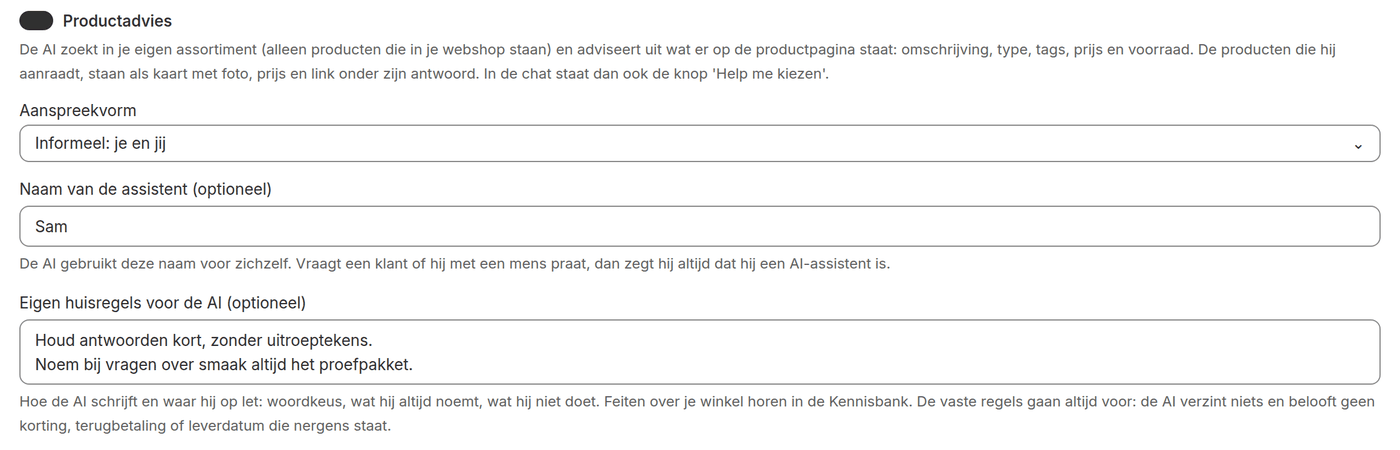
| Setting | What it does |
|---|---|
| Product advice | The AI searches your own catalogue and recommends products. They appear as cards with photo, price and link under its answer. The chat gets the button 'Help me choose'. |
| Form of address | Informal or formal. In Dutch and German that is the difference between je/du and u/Sie. |
| Name of the assistant | The name the AI uses for itself, at most 30 characters. When a customer asks whether they are talking to a person, the AI always says it is an AI assistant. |
| Your own house rules | At most 2000 characters about wording and what the AI pays attention to. For example: 'Keep answers short' or 'Always mention the tasting set for questions about taste'. |
| Greeting | The first line in the chat window, at most 300 characters. Empty is a standard greeting in the visitor's language. |
| What the AI may say about your shop | Short, general information: contact, opening hours, the tone. Longer topics belong in the knowledge base. |
| Handed-over questions to | The e-mail address that gets a notice of a handed-over question. Empty is the reply-to address of your e-mails. |
Use the house rules for how the AI writes, not for what is true. Shipping costs, return periods and product information belong in the knowledge base. The fixed rules always win: the AI invents nothing and promises no discount, refund or delivery date that is not written down.
Test the AI
At the bottom of AI chat › Settings you find 'Test the AI'. Type a question as a visitor would. You see the answer, which products would be shown as cards and whether the AI would hand the question over. The test uses the settings as they are in the form, also when you have not saved them yet. That way you try another house rule before customers notice it.
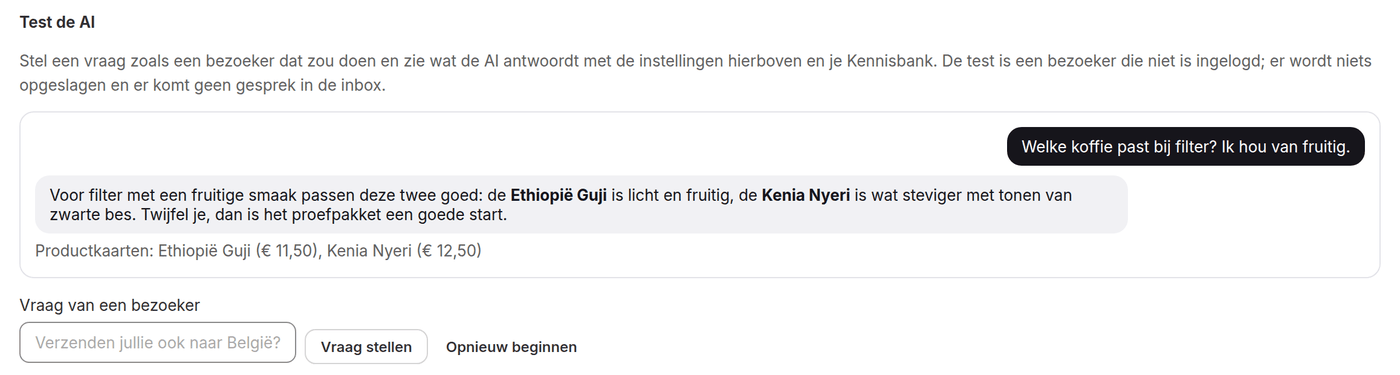
- The test is a visitor who is not logged in. So you cannot use it to mimic questions about someone's own orders or points.
- If the AI would hand over because the answer is nowhere, you see which question that is. Write an article about it in the knowledge base and test again.
Opening hours and notifications
Under 'Your team's opening hours' you fill in per day when someone is there. Outside those hours a customer hears after a handover when your team is back, for example 'Monday from 09:00'. The AI and the buttons in the chat always keep working.
A handed-over question reaches you by e-mail. If you connect a channel's webhook under 'Slack', the notice appears there too.
Does the AI cost extra per conversation?
No. AI chat gets a fixed price per month, with no price per conversation or per team member.
What if the AI is unavailable for a moment?
Then the question goes straight to your team in the inbox. Nothing gets lost.
Can I switch the AI off?
Yes. Switch off 'AI answers first' and every question goes straight to your team. The buttons in the chat keep working.
Does the AI see other customers' data?
No. The AI only looks at the data of the customer who is logged in to your webshop at that moment.
How many messages can a visitor send?
A message is at most 1000 characters and a visitor can send 40 messages per day.
Knowledge base: where the AI gets its answers
Write articles the AI answers from, see which questions it could not answer and show your articles on a help page in your webshop.
Buttons in the chat and product advice
What customers arrange themselves in the chat: tracking an order, changing the subscription, reporting a problem and asking for product advice.
Inbox: answering conversations
Work in one inbox for chat, e-mail and contact form: views, assigning, macros, an AI draft, actions for the customer and proposals by the AI.