Creating a box
- Open Box builderBox builder has its own place in the menu of the dashboard. Switch on 'Box builder on'.
- Add a boxClick 'Add box' and give the box a name. The customer sees that name above the box and next to the discount in the cart. Until you save the box the address follows the name; you can change it yourself.
- Choose the collectionClick 'Choose collection' and search for the collection the customer chooses from. The products are shown on the box page in the order of the collection.
- Fill in the sizesFor each size the number of products and the discount in whole percents. A size without a discount gets 0. A larger box cannot give less discount than a smaller one.
- Choose how you sell the boxAs a subscription and one-time, as a subscription only, or one-time only. For a subscription you choose the plan; the customer chooses from the frequencies of that plan.
- SaveLoyalo creates the discounts in Shopify. Each size shows its status: 'Discount active in Shopify', 'Updating', 'No discount', 'Same discount as the size below', or 'Not active' with the reason Shopify refuses the discount.
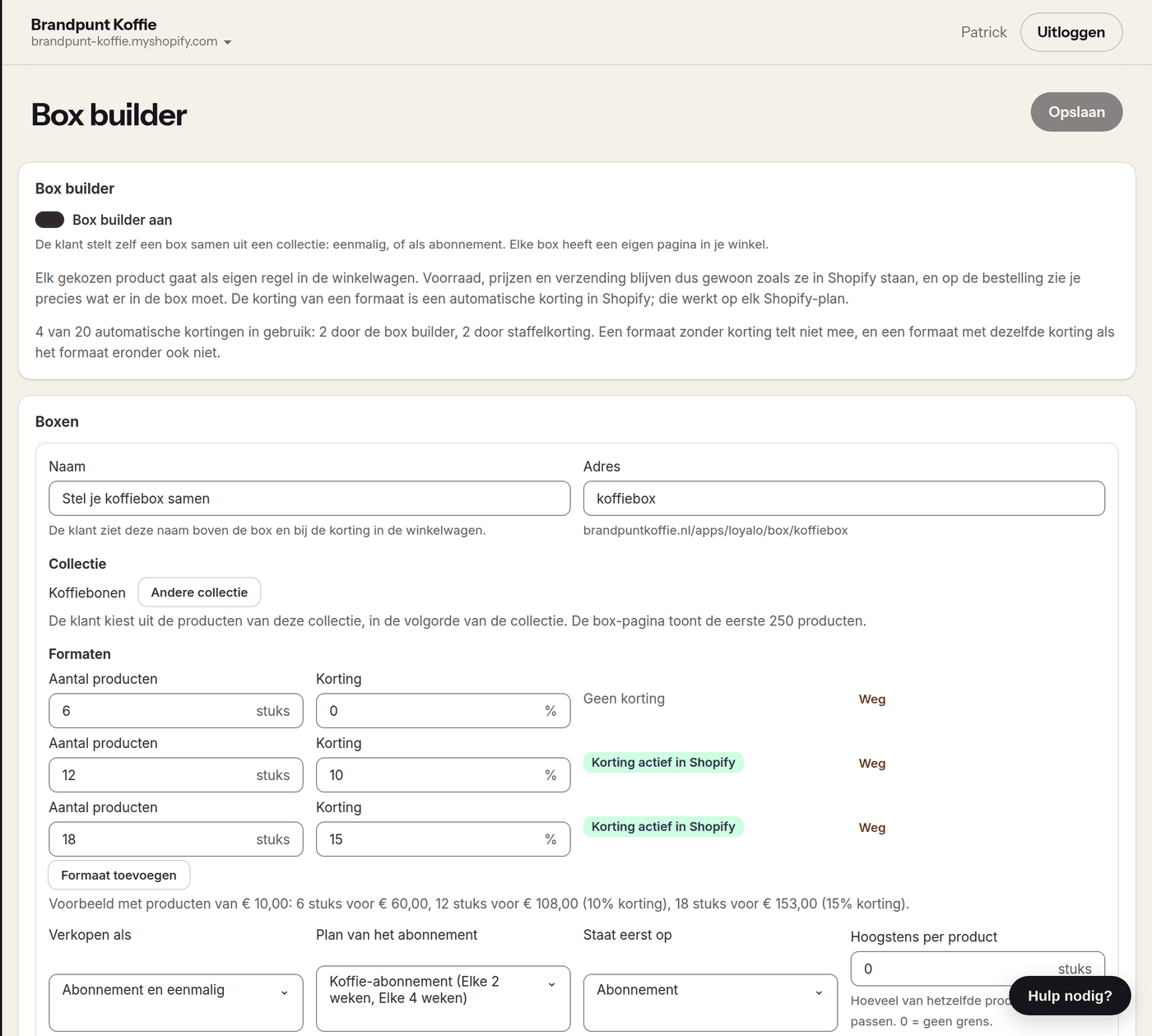
What you set per box
| Setting | What it does |
|---|---|
| Name | The name above the box and next to the discount, up to 60 characters. Every box has its own name |
| Address | The last part of the address of the box page: yourshop.com/apps/loyalo/box/address |
| Collection | The products the customer chooses from. The box page shows the first 250 products of the collection, as far as they are published in your online store |
| Sizes | Up to 4 sizes per box, each 2 to 48 products, with a discount of 0 to 90% |
| Sell as | Subscription and one-time, subscription only or one-time only |
| Subscription plan | The plan the frequencies come from. You create a plan under Subscriptions › Plans |
| Initially set to | Whether the box page opens on subscription or on one-time, when you sell both |
| Maximum per product | How many of the same product fit in one box. 0 means no limit |
| After 'Add to cart' | To the cart or straight to the checkout |
| Description above the box | One or two sentences under the name, up to 300 characters |
You can create up to 8 boxes. With more than one active box, yourshop.com/apps/loyalo/box shows an overview of your boxes.
The box in your shop
Every box has its own page in your shop, in the style of your theme. The address is shown with the box in the dashboard. Put it in your menu, on a banner or in an email. The buttons take the colour and the corner radius of your brand settings. Font and text colour come from your theme, unless you filled in a font under Brand.
Want the box on a page of its own or on the homepage? Add the block 'Loyalo box builder' in the theme editor and fill in the address of the box.
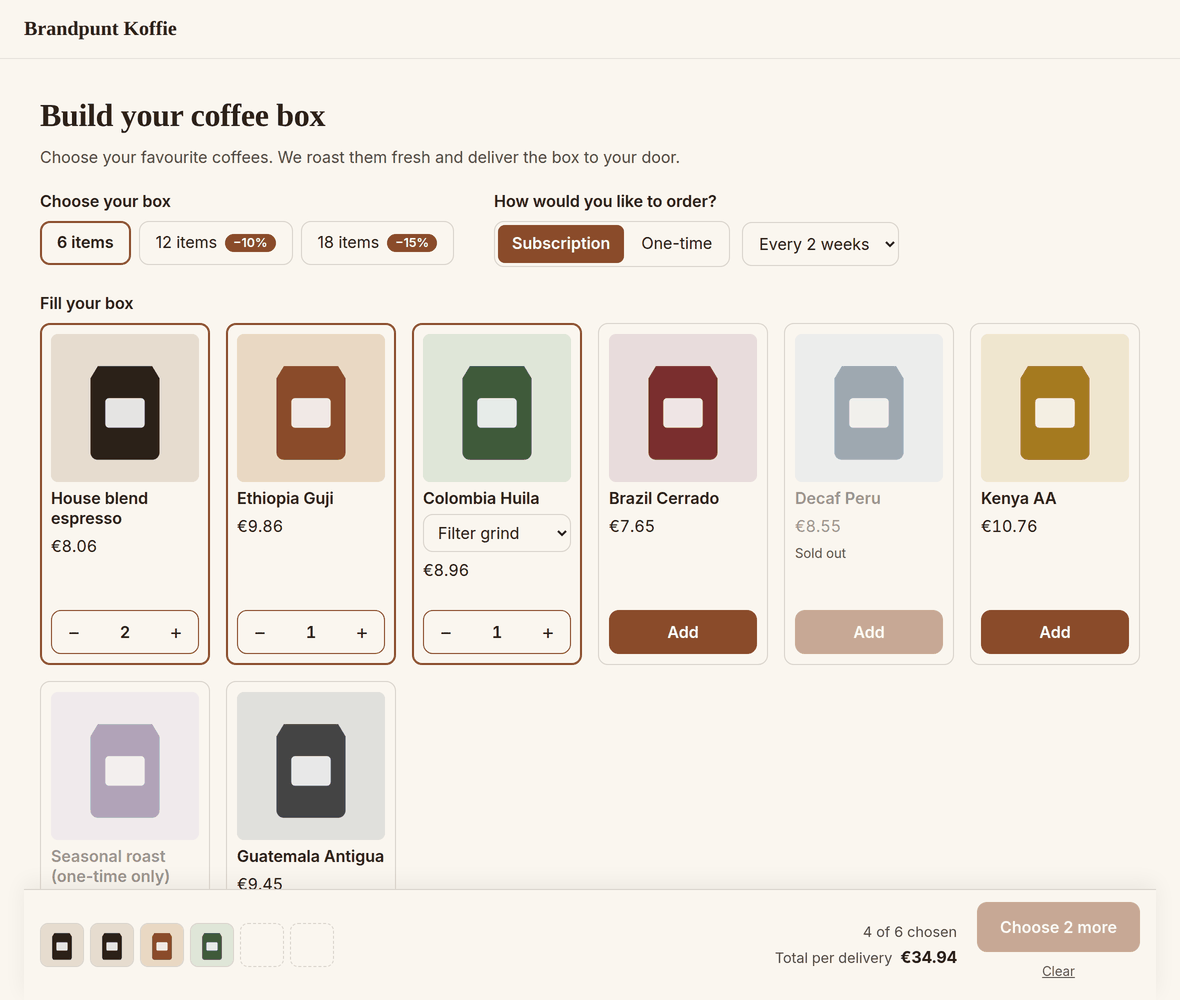
- The customer chooses a size. A size with a discount shows the percentage.
- If you sell the box both ways, the customer chooses between subscription and one-time, and for a subscription the frequency.
- They add a product with 'Add' and then with plus and minus. If a product has variants, they choose the variant on the card.
- The bar at the bottom shows what is in the box, how many are still needed and the total. A tap on a product in the bar takes it out of the box.
- When the box is full and a larger size gives more discount, the bar offers that size.
- A sold-out product cannot be chosen. For a subscription the same goes for a product that is not in the plan, and for a one-time purchase for a product you only sell as a subscription.
- If no product of the collection is in the plan, the box page does not offer a subscription. If you sell the box as a subscription only, the page says the box cannot be ordered right now.
The texts of the box page itself (buttons, counters, messages) are in Dutch, English and German and follow the language of your shop. In any other language the customer sees the English texts. The name and the text above the box are not translated.
What goes into the cart and onto the order
Every chosen product goes into the cart as its own line, with the chosen quantity. On the order each line carries the property 'Box' with the name of the box, so you can see what belongs to the box when packing. Stock, tax and shipping costs work as for any other product.
The discount of a size
- For each size with a discount Loyalo creates an automatic discount in Shopify. That works on every Shopify plan.
- The discount applies as soon as the cart holds at least as many products from the collection as the size, bought in the way you sell the box. That is also the case when a customer puts those products in the cart one by one, without the box page. With two boxes in one cart the total counts.
- Subscription products chosen outside the box page get the discount on the first order only. The lasting discount is for products chosen through the box page.
- The discount does not stack with another discount on products, such as a volume discount or the discount of a tier. The customer gets the best of the two.
- The discount of the subscription plan does count: it is already in the price of the product.
- Box builder and volume discount share 20 automatic discounts between them. A size without a discount does not count, and two sizes of the same box with the same discount count as one.
A box as a subscription
With a box as a subscription, every product becomes a line of the same subscription. The first order gets the discount in the checkout. For the deliveries after that, Loyalo puts the same discount on the subscription, on the products of the box.
A product that is not in the plan of the box cannot be chosen for a subscription box. The dashboard tells you which products those are. 'Add to the plan' puts them in in one go. After that they can also be bought as a subscription on their own product page.
In 'My subscription' the customer sees the box with the number of products and the discount. With 'Change box' they choose new contents or another size of the same box; the discount follows the size. This also works in the Shopify customer account. The change applies from the next delivery.
- 'Change box' is available as long as 'Swap product or variant' is on under Subscriptions › Settings. The customer must be logged in: it does not work through the link in an email. It is also not available for a prepaid subscription.
- The customer chooses from the products of the collection that are published in your online store and are in the plan. What is already in the box may stay, also when you take it out of the collection; the discount stays as well.
- The products of a box cannot be swapped or changed in quantity one by one. That way the box keeps a size that exists.
- If you change the discount of a size or remove a size, running box subscriptions follow: from their next delivery they get the discount that now goes with their number of products.
- If you remove or deactivate a box, customers with that box keep their products and their discount. They can then no longer change the contents themselves.
If you use the button 'Pay with iDEAL' for subscriptions (through Mollie), it also works for a box as a subscription. The box discount is then part of the price of the first order and is shown per product on the order as 'Boxkorting'; later deliveries get the discount on the subscription. The button is in the cart: keep the setting "After 'Add to cart'" on 'To the cart'. A box that is bought one-time is paid with the payment methods of your checkout.
Numbers per box
Every saved box shows the numbers of the last 30 days: visits of the box page, how often the box was put in the cart (and how often as a subscription), orders with the box and their revenue. Deliveries of a box subscription count as an order. You also see how many subscriptions with the box are running or paused now.
Frequently asked questions
Do I need Shopify Plus?
No. The box builder uses Shopify's cart and automatic discounts, and those work on every Shopify plan.
Is the box builder in my plan?
The box builder is part of the plans Growth, Scale and Scale B2B (and the old Starter plan), and of the trial. It is not part of a standalone package of AI chat only or Product reviews only.
Can I charge a fixed price per box?
No. The price of a box is the sum of the chosen products, minus the discount of the size. The discount is a whole percentage.
Can the customer choose fewer or more than a size?
Not on the box page: the 'Add to cart' button only works when the box is full. In 'My subscription' the total must also be a size of the box.
What does the customer see when a product sells out?
On the box page the product cannot be chosen. In a running subscription it stays in the box until the customer takes it out; what happens with a sold-out delivery is set under Subscriptions › Settings.
I gave the collection another name or handle in Shopify. Does the box still work?
Another name changes nothing. After another handle the box page shows no products until you open the Box builder page in the dashboard: Loyalo then reads the collection from Shopify again and takes over the new handle. The discount keeps working in the meantime.
Setting up selling plans
Create subscription plans with frequencies, discounts and products. Loyalo puts them on your products as native Shopify Selling Plans.
Setting up volume discounts
Give a discount that grows with the quantity: set rules and steps, choose who they apply to and show the steps on your product page.
Customer portal
Customers manage their subscription and points themselves: in the Shopify customer account, by login link or on your own address. You decide what they may do.