Product reviews cannot be bought yet. You can already use them in the 14-day trial. The price will be € 29 per month next to a Loyalo plan, or € 49 per month on their own.
Switching collecting on
- Open the settingsGo to Product reviews › Settings.
- Switch on 'Collect reviews'After a paid order the customer gets an invitation by e-mail, once the order has shipped.
- Choose the timing'Invitation after': the number of days after payment, 7 by default. 'Reminder after': 7 days later by default, 0 means no reminder. 'At most one invitation every': 60 days by default, so subscribers do not get an e-mail after every delivery.
- SaveFrom now on an invitation is planned for every new order. You see them under Product reviews › Invitations.
- Only customers with an order can write a review: through the link in the e-mail, or logged in to your webshop.
- No invitation goes out for a product the customer already reviewed.
- Every invitation by Loyalo has a link to unsubscribe; after that the customer gets no more review requests.
- You switch the invitation and the reminder on or off under Settings › Emails. They come in Dutch, English and German.
Choosing what happens to a new review
| Setting | What it does |
|---|---|
| Publish reviews straight away | On: a review appears on the product page right away. Off: every review waits for your approval. |
| Check reviews with photos first | A review with photos waits for you, also when reviews are published right away. |
| Customers can add photos | Up to 4 photos per review. They are made smaller in the customer's browser. |
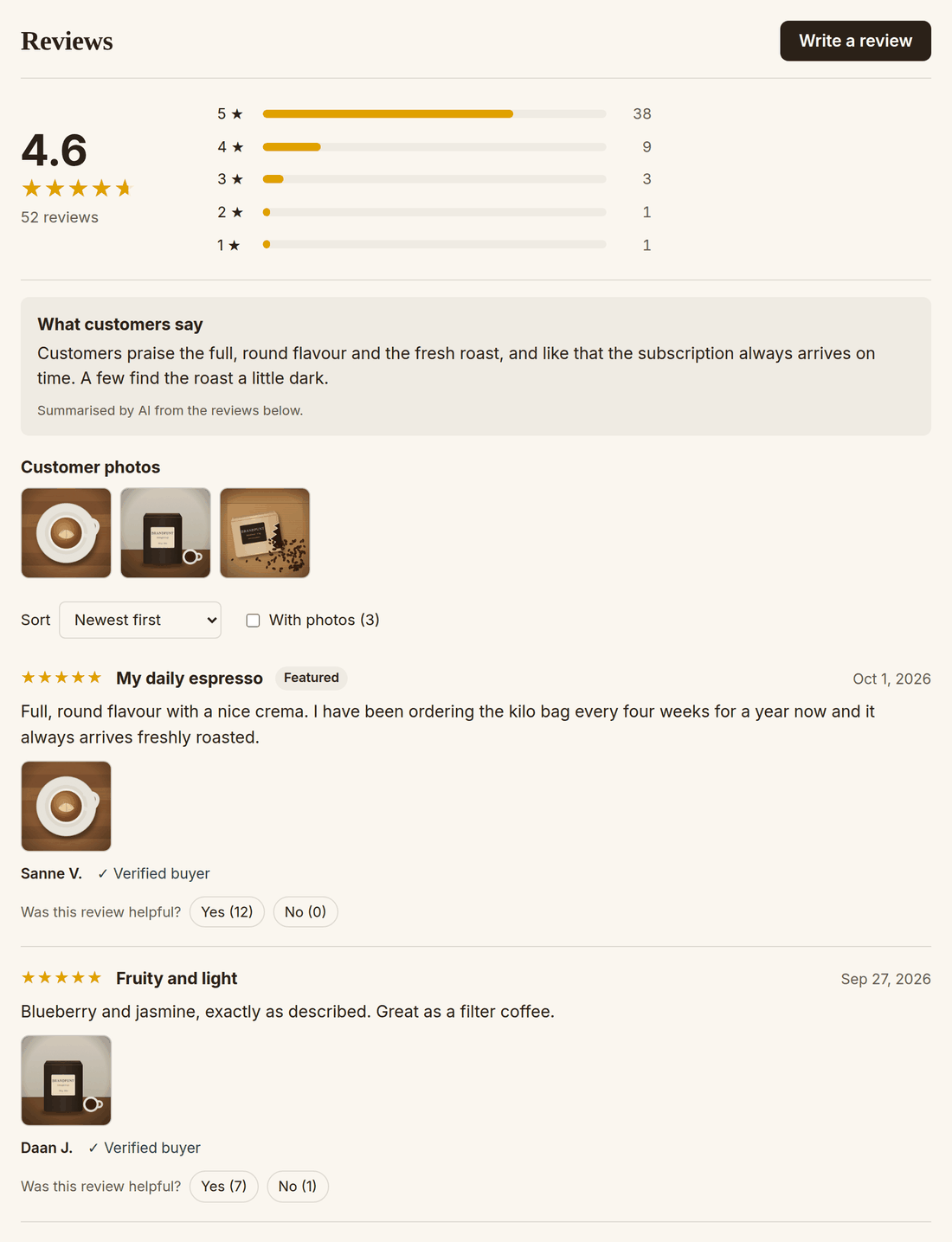
| Show "Was this review helpful?" | Visitors vote Yes or No and can sort by 'Most helpful'. |
| AI summary above the reviews | From 5 reviews with text the AI writes per product, in a few sentences, what customers say, including criticism that several customers mention. |
| Visitors can report a review | Every review has 'Report'. A reported review stays; you decide. |
| Message on a low rating | An e-mail (and Slack, if you connected it under AI chat) at the number of stars you choose or fewer. |
When the text has a link or e-mail address in it, the review waits for your approval, whatever you have set. Only hide reviews that are offensive or not about the product: leaving out critical reviews is misleading.
Placing the blocks in your theme
Product reviews › Display lists what there is to place, with a button to the theme editor. In the editor choose Add block › Apps.
| Block | Where | What it shows |
|---|---|---|
| Loyalo reviews | Product template | The average, the spread of the stars as a filter, customer photos, sorting, your replies and, if you switch it on, the Questions tab. |
| Loyalo reviewsterren | Product template, under the title | The stars with the number of reviews. |
| Loyalo review-carrousel | Homepage or another page | Featured reviews first, then the newest with text. You choose from how many stars and how many reviews. |
- You choose the colour of the stars per block in the theme editor; the colour of the button in the Loyalo reviews block.
- Stars on product cards in collections: Loyalo puts the average in Shopify's standard fields for product ratings. Themes that use those, such as Dawn, show the stars when you switch on the product rating setting of the product grid.
- Page with all reviews: a page on your own domain with your shop's average and all reviews. The address is under Display; put it in your menu or footer.
Stars in Google
The Loyalo reviews block puts the rating in your product page as structured data; with that Google can show stars with your search result. For stars in Google Shopping you sign up for product ratings in Merchant Center and give it the feed listed under Display. Whether and when Google shows stars is up to Google.
Frequently asked questions
In which languages does my customer see the reviews?
The review block, the form and the e-mails come in Dutch, English and German. The text of a review itself is not translated.
Who may change the settings?
An Administrator. A Team member can publish, hide, feature and answer reviews.
What happens when I switch 'Collect reviews' off?
No more invitations go out and customers can no longer write a review. The Loyalo reviews block, the carousel and the page with all reviews then show no reviews; the stars of the Loyalo reviewsterren block and on product cards stay. Your reviews are kept: switch it on again and they are back.
Importing reviews from another app
Bring your reviews along from Judge.me, Loox, Stamped, Yotpo, Okendo or Shopify Product Reviews: export a CSV, check the columns and import.
Managing and answering reviews
Publish, hide and feature reviews, reply with a draft by the AI, handle reports and read the figures of your product reviews.
Invitations and a reward for a review
Follow every review invitation, invite customers of earlier orders and thank customers with points or a discount code for their review.