Product reviews cannot be bought yet. You can already use them in the 14-day trial. The price will be € 29 per month next to a Loyalo plan, or € 49 per month on their own.
The Invitations page
Product reviews › Invitations lists every invitation with the customer, the order and the status. At the top you see which share of the invitations sent led to a review.
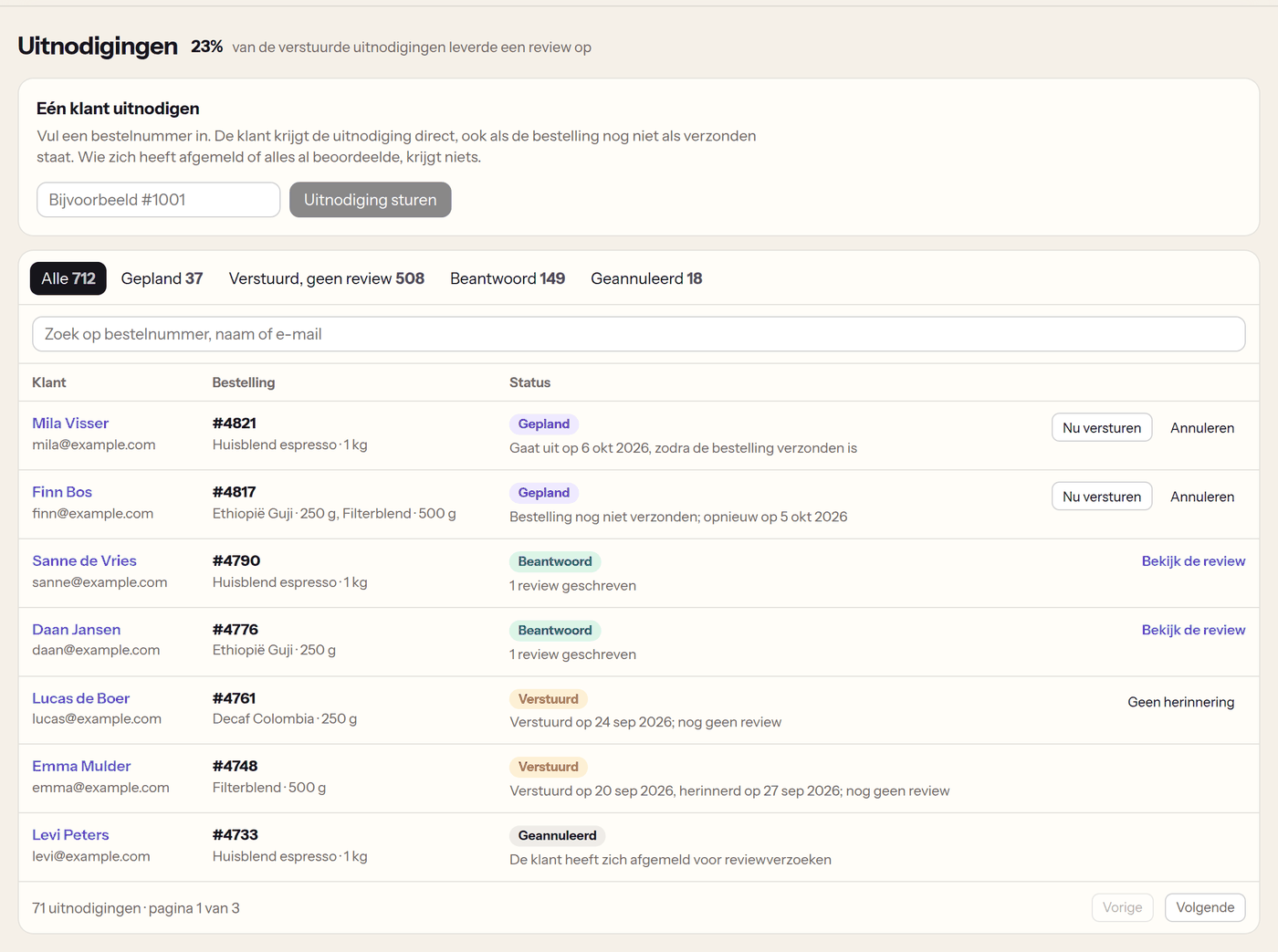
| Status | What it means | What you can do |
|---|---|---|
| Planned | The invitation goes out on the date shown, once the order has shipped. If the order has not shipped by then, Loyalo tries again later. | 'Send now' or 'Cancel' |
| Sent | The customer received the e-mail and has not written a review yet. | 'No reminder', as long as the reminder has not been sent |
| Answered | The customer wrote a review. | 'View the review' |
| Cancelled | Cancelled by you, the customer unsubscribed, the order was cancelled, or the order had not shipped after about a month. | - |
| Not needed | The customer had already reviewed everything; nothing was sent. | - |
Inviting one customer
Under 'Invite one customer' fill in an order number. The customer gets the invitation right away, also when the order is not marked as shipped yet. Whoever unsubscribed or already reviewed everything gets nothing.
Inviting customers of earlier orders
When you have just started, your customers of the last weeks have not had an invitation. Under Product reviews › Settings › Invite customers from earlier orders you choose how many days to go back (30, 60, 90 or 180 days, up to 3,000 orders). Loyalo plans an invitation for the paid and shipped orders of that period.
- The invitations go out spread, about a hundred a day, so you do not get all replies at once.
- The same rules apply: one invitation per customer per period, nothing for what was already reviewed, nothing after unsubscribing.
- You can start this once a day.
Points for a review
If you have Customer Loyalty, you give points under Loyalty › Points, in 'More ways to earn', with 'Points for a review': a number of points per review, extra points for a photo and a maximum per customer per month. The customer gets the points once the review is published. The form and the invitation say how many points a review earns.
A discount code as a thank-you
- Open Product reviews › SettingsUnder 'Reward: discount code after a review' switch on 'Give a discount code as a thank-you'.
- Choose the discountA percentage or a fixed amount. Under 'With a photo' you give a higher value for a review with a photo; 0 means the same.
- Choose the conditionsHow many days the code is valid, from which order amount it works and how many codes a customer gets per month at most.
- SaveThe customer gets the code by e-mail once their review is on the product page.
- The code is personal, works once and cannot be combined with other discount codes (it can with free shipping).
- One code per customer per product: writing the review again does not give a second one.
- The code goes by e-mail. When the e-mail 'Reviews: discount code as a thank-you' is off under Settings › Emails, no code is made, unless Klaviyo receives the event 'Loyalo Review Rewarded'.
- You can use points and a discount code side by side.
- Imported reviews do not earn a code.
Loyalo gives the reward for a published review, whatever the rating, up to the maximum per customer per month you set, and says under the reviews that customers get a reward. Rewarding only positive reviews is misleading and not allowed.
Frequently asked questions
Can I change the text of the invitation?
The e-mail uses your brand (logo and colours) and the name of your shop; the text itself is fixed. If you want your own e-mail, switch off 'Reviews: invitation after delivery' and 'Reviews: reminder' under Settings › Emails and send them from Klaviyo: Loyalo sends the events 'Loyalo Review Requested' and 'Loyalo Review Reminder' with the link and the products. Add a way to unsubscribe to your own e-mail yourself.
Why has an invitation been on Planned for days?
The order has not been marked as shipped in Shopify. Loyalo tries again every three days, ten times at most; after that the invitation is cancelled. 'Send now' sends it anyway.
How do I see what the discount codes bring in?
The number of codes sent is under Product reviews › Statistics. What they bring in as revenue you see in Shopify under Discounts.
Setting up product reviews
Switch product reviews on, choose when the invitation goes out, decide whether reviews wait for you first and place the blocks in your theme.
Managing and answering reviews
Publish, hide and feature reviews, reply with a draft by the AI, handle reports and read the figures of your product reviews.
Setting up points and bonus points
Switch on the points programme, choose how many points a euro earns, set expiry and give bonus points for an account, birthday, review or referral.