Product reviews cannot be bought yet. You can already use them in the 14-day trial. The price will be € 29 per month next to a Loyalo plan, or € 49 per month on their own.
How to import
- Export your reviewsMake a CSV export in your current review app.
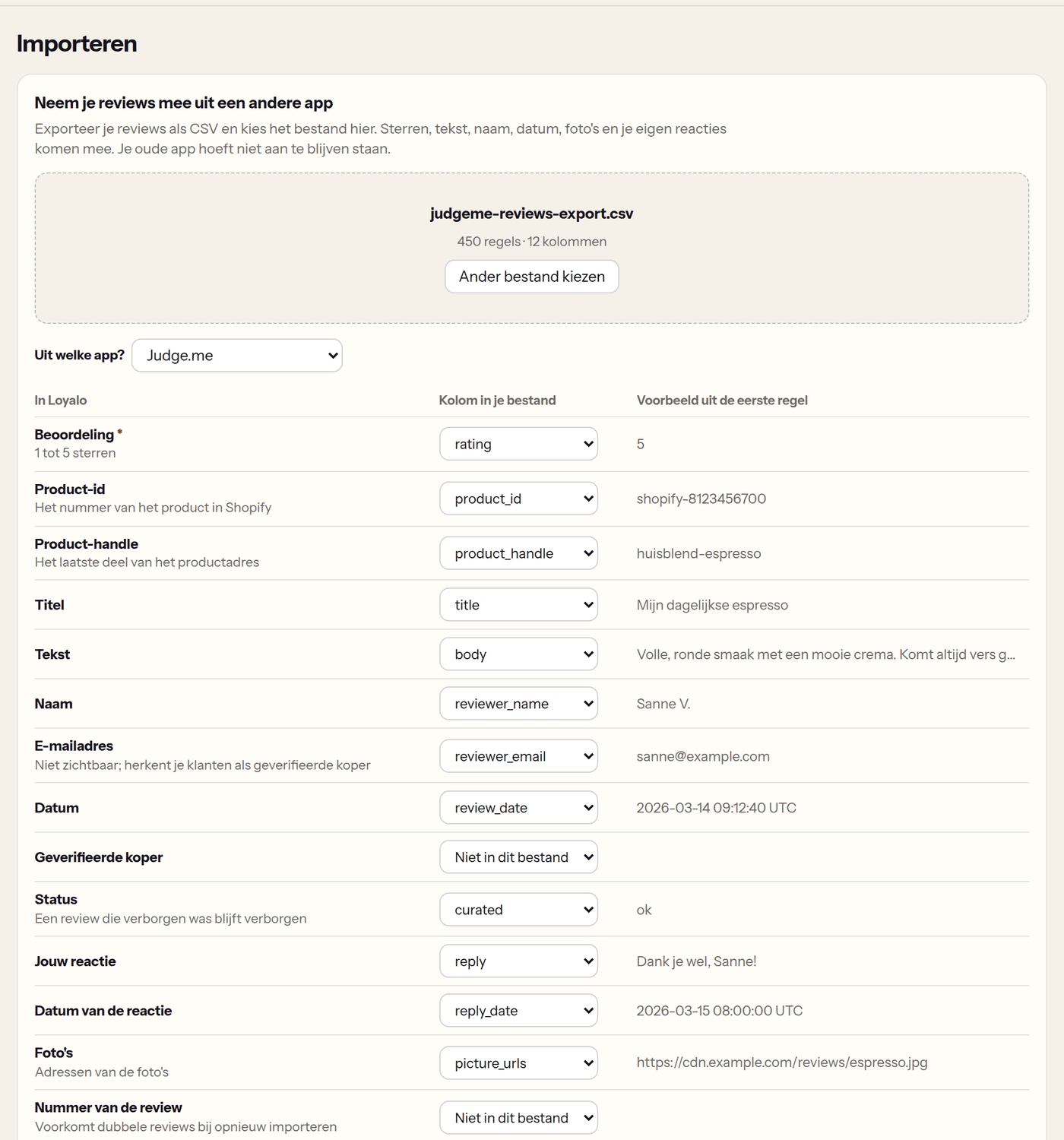
- Choose the fileGo to Product reviews › Import and choose the file. Loyalo reads it in your browser and shows the number of rows and columns.
- Check the columns'From which app?' says which export Loyalo recognised. Per field you see which column is used, with an example from the first row. You can change every column.
- Look at the previewUnder 'This is how the first reviews come in' you see the first reviews as they will be imported.
- Choose 'Publish immediately' or notOn: the reviews appear on your webshop right away. Off: they all wait for your approval. A review that was hidden in your old app stays hidden.
- Start the importLeave the page open until the import is done. After that the stars on your product pages are updated and the photos are copied to Loyalo; that can take a few minutes.
Which files work
- The export of Judge.me, Loox, Stamped, Yotpo, Okendo and Shopify Product Reviews is recognised.
- Any other CSV works too, as long as there is a column with the rating and one with the product: the product id from Shopify or the handle (the last part of the product address).
- When the file has marks up to 10, they are converted to stars: an 8 becomes 4 stars.
- A review of a product that is not (or no longer) in your shop is skipped. After the import you see the first 100 skipped rows and why.
What you should know
- Imported customers get no points and no e-mail.
- A review by someone who is a customer in Loyalo gets the label 'Verified buyer'; also when the file marks it as verified.
- Importing the same file again updates the reviews; there will be no doubles.
- For a product a customer already reviewed in your old app, they get no invitation from Loyalo.
- Photos are copied from the address in the file. That only works when the address can be reached publicly; a photo that could not be copied keeps loading from the old address.
Undoing an import
'Earlier imports' lists every import with the number of new, updated and skipped reviews. 'Undo' removes the reviews that import added. Reviews that were already there and were only updated stay.
Importing and undoing an import need the role Administrator.
Frequently asked questions
Does the import stop when I close the page?
Yes. The reviews that are already in stay. Choose the file again to continue: what is already there is updated instead of doubled.
Do my replies to reviews come along?
Yes, when the export has a column with your reply. A reply you already wrote in Loyalo is not overwritten.
Can I export again later?
Yes. On the Reviews page 'Export' downloads all your reviews as CSV, in the same columns the import reads.
Setting up product reviews
Switch product reviews on, choose when the invitation goes out, decide whether reviews wait for you first and place the blocks in your theme.
Managing and answering reviews
Publish, hide and feature reviews, reply with a draft by the AI, handle reports and read the figures of your product reviews.