Product reviews cannot be bought yet. You can already use them in the 14-day trial. The price will be € 29 per month next to a Loyalo plan, or € 49 per month on their own.
The list
At the top there are views with the number of reviews in each: All, Awaiting approval, Needs a reply, Published, Hidden and, once a visitor has reported something, Reported. Below them you filter on stars, with or without a reply, origin (written in Loyalo or imported), photos and featured, and search on product, text, name or e-mail address.
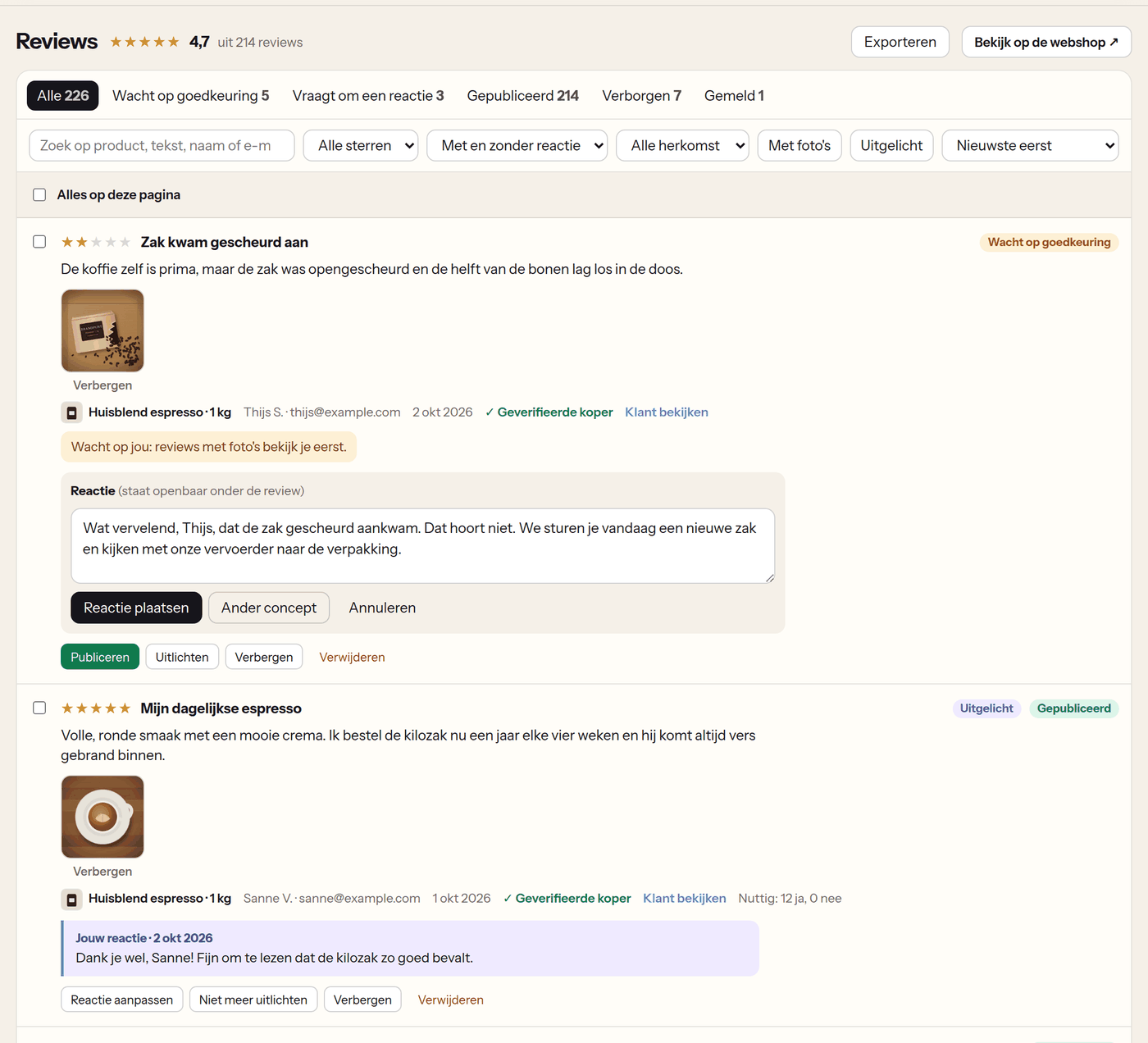
| Action | What happens |
|---|---|
| Publish | The review appears on the product page. The customer now gets their points or discount code, if you set those up (not for imported reviews). |
| Hide | The review disappears from your webshop. It stays in the list under Hidden. |
| Feature | The review is shown first on the product page and first in the carousel. |
| Reply | Your reply is shown publicly under the review. The customer gets one e-mail about it. |
| Hide a photo | Every photo has 'Hide' under it: that photo disappears, the review stays. |
| Delete | The review is gone. Only an admin can do this. |
With the checkboxes in front of the reviews you handle several at once: publish, hide, feature, stop featuring or delete.
Why a review waits for approval
- It has a link or e-mail address in it. Such a review always waits.
- The review has photos and 'Check reviews with photos first' is on.
- 'Publish reviews straight away' is off: you approve everything yourself.
- The review says which of the three it is.
Replying with a draft by the AI
- Click 'Reply'A text field opens under the review.
- Click 'AI draft'The AI writes a reply in the language of the review, in the form of address you chose under AI chat. If you first type a few keywords, for example 'apologies, send a new bag', the button reads 'AI draft from my keywords' and it writes the reply from those.
- Check and change itThe draft is never posted by itself. 'Another draft' asks for a new version.
- Click 'Post reply'The reply is shown under the review and the customer gets an e-mail.
This view shows published reviews of three stars or fewer that you have not replied to yet. Your other visitors read a reply to a critical review too.
A message on a low rating
Under Product reviews › Settings › Notifications to you, you choose from how many stars or fewer you get a message, and at which e-mail address. If you connected Slack under AI chat, the message arrives there too. The review itself is handled like any other.
Reported reviews
When 'Visitors can report a review' is on, every review has 'Report' under it. A visitor can add a reason. The review stays. The view Reported shows the number of reports and the reasons; you hide the review or clear the report.
Figures
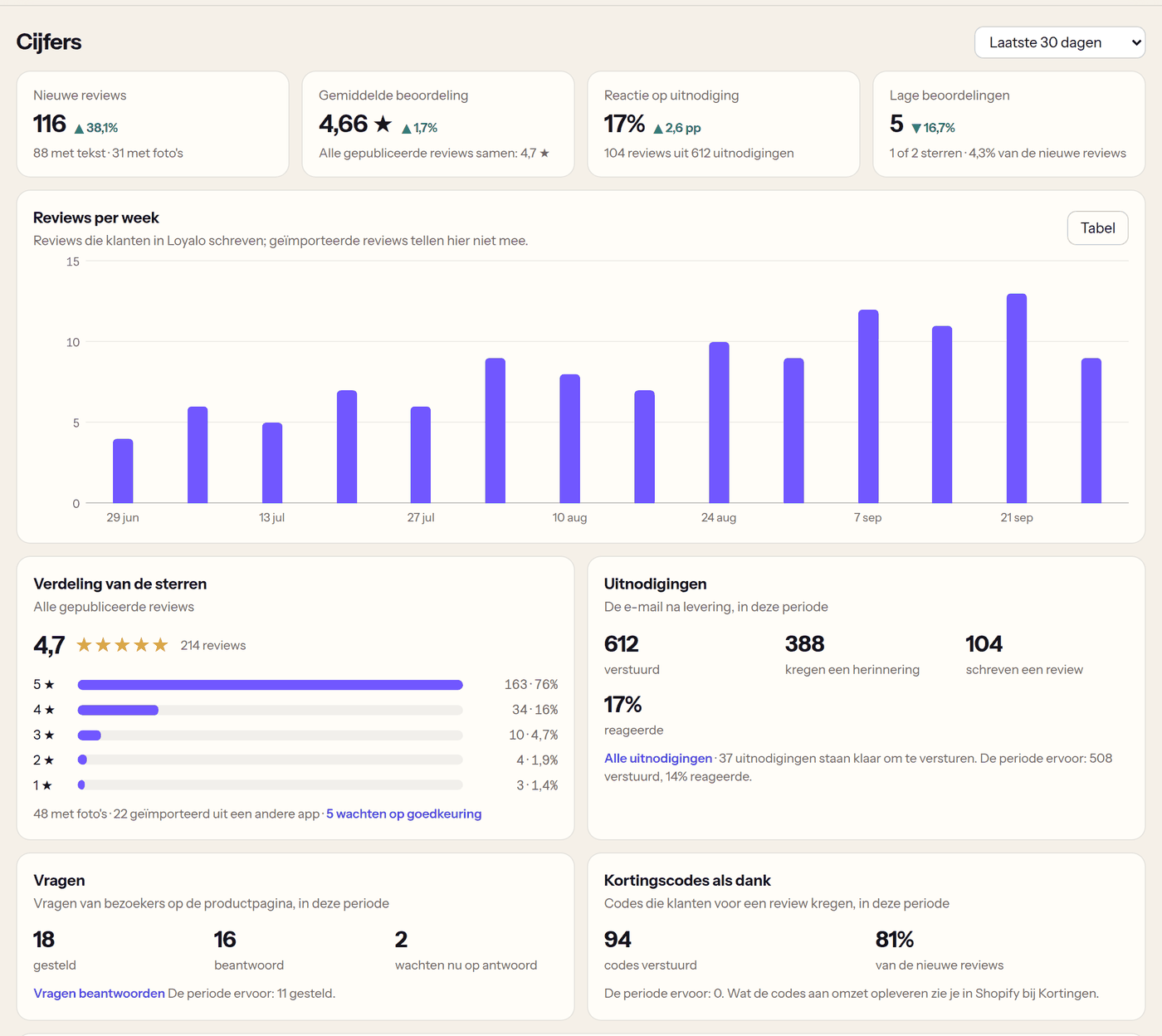
Product reviews › Statistics shows, over the chosen period, the new reviews, the average rating, the response to your invitations and the number of low ratings, next to the period before. Below that: reviews per week, the spread of the stars, questions from visitors, discount codes sent and your products with the number of reviews and the average.
Exporting and roles
- 'Export' on the Reviews page downloads all your reviews as CSV. Only an admin can do that, because it holds the customers' e-mail addresses.
- A team member can publish, hide, feature, reply and handle reports.
- Deleting, importing and the settings are for an administrator.
Frequently asked questions
Can a customer change their review?
Yes, through the same link or logged in to your webshop. A review you have hidden stays hidden, also after the change.
Does the customer get an e-mail every time I change my reply?
No, once: at your first reply to the published review.
What happens to the reviews when a customer asks for their data to be removed?
Their reviews and their questions are removed, including imported reviews with the same e-mail address.
Setting up product reviews
Switch product reviews on, choose when the invitation goes out, decide whether reviews wait for you first and place the blocks in your theme.
Questions and answers on the product page
Let visitors ask a question on the product page, answer it in the dashboard with a draft by the AI and show the answer to everyone.
Invitations and a reward for a review
Follow every review invitation, invite customers of earlier orders and thank customers with points or a discount code for their review.