AI chat is not for sale yet. You can already use it in the 14-day trial, and Loyalo can switch it on for your shop on request. The price will be €49 per month next to a Loyalo plan or €79 per month on its own.
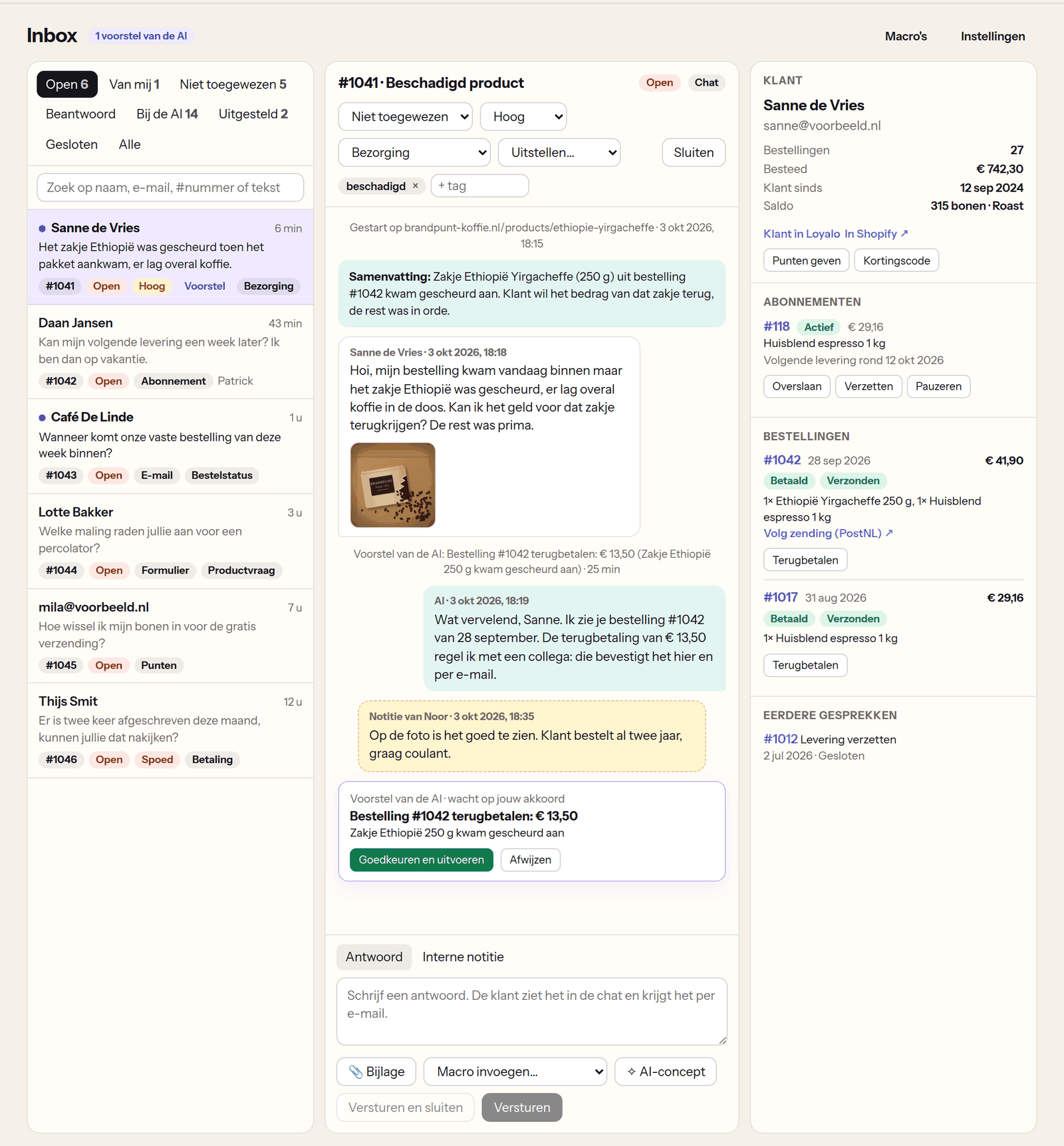
Views and status
| View | What is in it |
|---|---|
| Open | Conversations waiting for your team |
| Mine | Open conversations assigned to you |
| Unassigned | Open conversations without a team member |
| Answered | Conversations where your team replied last |
| With the AI | Conversations the AI handles by itself; you can read along and take over |
| Snoozed | Conversations you put away until later |
| Closed and All | The archive and everything together |
With the search field you find a conversation by number, name, e-mail address or a word from a message. A conversation with a new message from the customer is marked bold until someone of your team opens it.
Handling a conversation
- Assign it to a team member, choose a priority (low, normal, high, urgent) and set a topic.
- Add tags to find and count conversations.
- Snooze until tomorrow 9:00, in three days or in a week. The conversation then returns to 'Open' by itself, or earlier when the customer replies.
- Close it, or send and close in one go. When the customer replies later, the conversation opens again.
Replying
| Tool | What it does |
|---|---|
| Reply | The customer sees your reply in the chat and gets it by e-mail when their address is known. For an e-mail or contact form the reply goes by e-mail. |
| Internal note | For your team only. The customer never sees a note. |
| Attachment | Add up to three photos or PDFs to your reply, a return label or a photo of the right product for example. The customer sees them in the chat and gets them as attachments with the e-mail. An internal note cannot carry an attachment. |
| Macros | Fixed replies with placeholders such as [voornaam], [bestelnummer], [volglink], [volgende_levering] and [punten]. Loyalo fills them in with this customer's data. A macro can set tags and close the conversation. |
| AI draft | The AI writes a draft reply from the conversation, the customer's data and your knowledge base. If there is text in the field already, it uses that as an instruction. You read it and send it yourself. |
You make macros under AI chat › Macros. The AI draft follows the form of address and the house rules from your settings.
Photos a customer sent in the chat or with a problem report are shown as thumbnails with their message. A click enlarges the photo.
The customer next to the conversation
On the right is what you know about the customer: since when they are a customer, the number of orders and what they spent, the points balance and the tier, the running subscriptions, the latest orders with payment status, shipping status and tracking, and earlier conversations. For a guest without an account, that is stated.
From that panel you arrange things directly:
- skip or move a delivery, pause or resume the subscription
- refund an order (partly or fully) or cancel it, with or without a refund
- give points, with a reason the customer sees
- make a discount code
Every action is kept in the conversation, with who did it.
Proposals by the AI
When a customer asks the AI for something that costs money, the AI does not do it by itself. The conversation shows 'Proposal from the AI · waiting for your approval' with what would happen and why. You approve or reject it with one click. It is only carried out after your approval.
E-mail and the contact form
- E-mailUnder AI chat › Settings you find your shop's inbox address once receiving e-mail has been set up for your shop. Forward the mail of your customer service address to it automatically. Every e-mail becomes a conversation; your reply goes out in your shop's name and the customer's answer lands in the same conversation.
- Contact formIn the theme editor add the block 'Loyalo contactformulier' to your contact page. Every message becomes a conversation. The customer gets a confirmation and your reply by e-mail.
- You download attachments of an e-mail from the message.
- By default e-mails and form messages go straight to your team, with a summary and a topic by the AI. With 'AI also answers email and the contact form' the AI replies by e-mail itself.
- By e-mail the AI never changes anything by itself. It only uses a customer's data when the sender's address has been verified.
Do I get a notice of a new conversation?
Yes. A handed-over question arrives by e-mail at the address under 'Handed-over questions to', and in Slack when you connected it.
Can I take over a conversation from the AI?
Yes. Open the conversation in the view 'With the AI' and reply. From that moment the conversation belongs to your team.
Does the AI still answer after a handover?
In the chat the AI answers new questions it can answer itself, until someone of your team has replied. It leaves the handed-over question to your team.
Who can use the inbox?
Owners, admins and staff of your team in Loyalo. A viewer can read but change nothing. You manage team members under Settings › Team.
Set up AI chat
Switch on the chat in your webshop, decide what the AI may do by itself and how it writes, and test its answers before customers see them.
Rules, ratings and figures
Let conversations be tagged, assigned and answered by themselves, ask customers for a rating and see what the AI solves and how fast your team replies.
Buttons in the chat and product advice
What customers arrange themselves in the chat: tracking an order, changing the subscription, reporting a problem and asking for product advice.