AI chat is not for sale yet. You can already use it in the 14-day trial, and Loyalo can switch it on for your shop on request. The price will be €49 per month next to a Loyalo plan or €79 per month on its own.
Rules
A rule looks at a conversation at the moment it reaches your team: a chat the AI hands over, an e-mail or a message from the contact form. You make rules under AI chat › Rules, 30 at most.
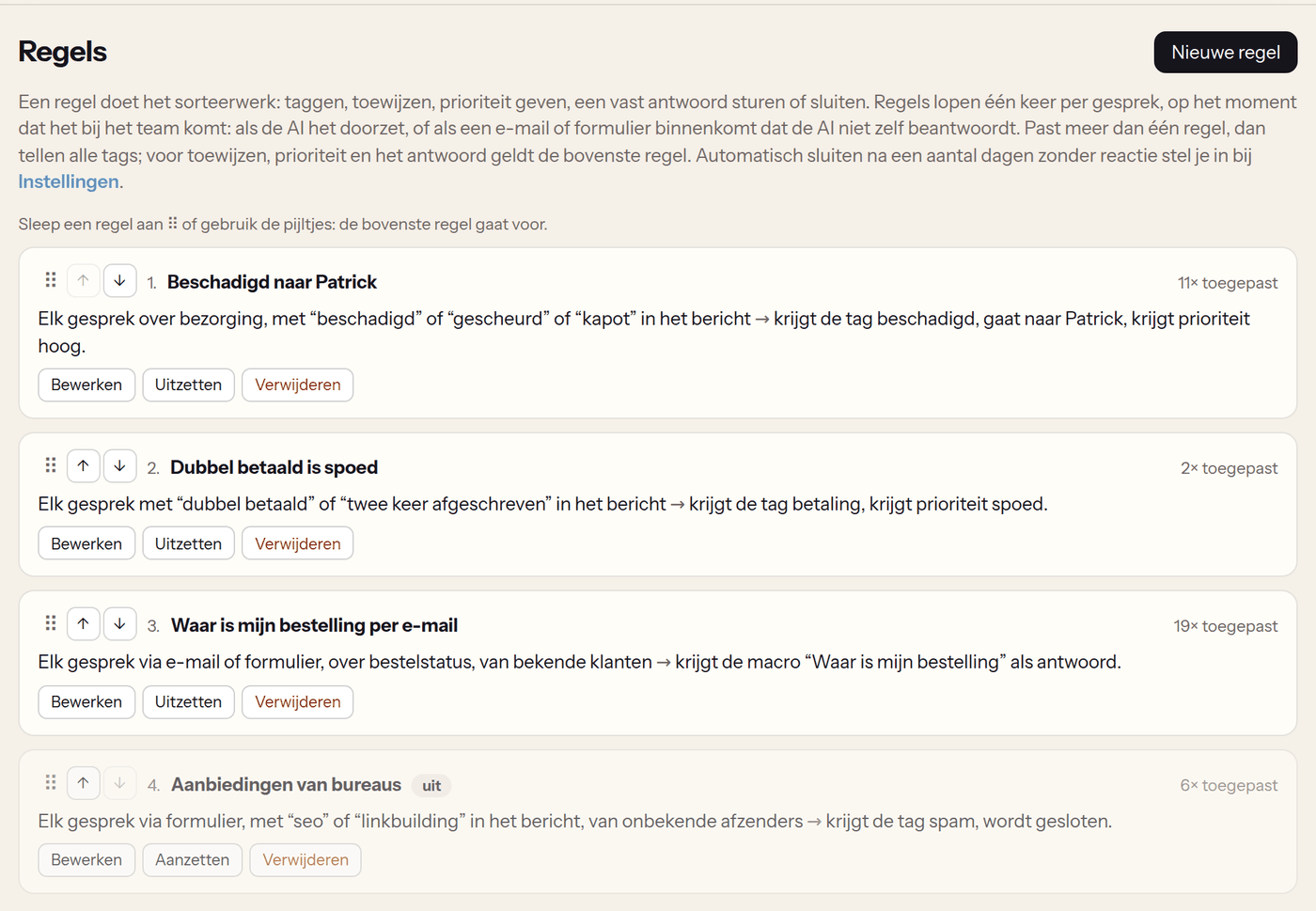
| If the conversation… | Choices |
|---|---|
| comes in via | Chat, e-mail or contact form. Nothing chosen means every channel. |
| is about | The topic: order status, delivery, return or refund, subscription, payment, product, loyalty, account, complaint or other. |
| contains one of these words | Words or phrases in the subject or the customer's messages, 20 at most. |
| comes from | Everyone, a known customer, a guest or a subscriber. |
| Then… | What happens |
|---|---|
| add tags | Up to six tags per rule. |
| assign to | A member of your team. |
| priority | Low, normal, high or urgent. |
| reply automatically with a macro | The macro goes to the customer as a reply, with the placeholders filled in. |
| close the conversation | For spam through the contact form, for example. |
- A rule runs once per conversation.
- When several rules match, all tags count. For assigning, priority and the automatic reply, the first rule that says something about it wins.
- You change the order by dragging a rule by the handle on the left, or with the arrows next to it. The new order is saved at once.
- If a placeholder in the macro cannot be filled in, for example [bestelnummer] for a guest without an order, the automatic reply is not sent. The conversation shows why.
- The conversation shows which rule did what.
A customer reports a damaged order in the chat. The conversation gets the topic 'Delivery'. A rule with that topic and the words 'beschadigd, kapot, gescheurd' sets the tag 'beschadigd', assigns the conversation to the colleague who handles claims and sets the priority to high.
Opening hours
Under AI chat › Settings › 'Your team's opening hours' you fill in per day when someone is there, in your shop's time zone. Outside those hours the customer hears after a handover when your team is back. Under Statistics the first response time then counts working hours: a question from Friday evening that you answer on Monday morning counts as minutes, not as a weekend.
Closing automatically
A conversation your team answered closes by itself when the customer no longer replies: after 2, 3, 7, 14 or 30 days, or never. A conversation the AI handled closes after a day without a new message. When the customer replies later after all, the conversation opens again.
Ratings
- After closing, Loyalo asks for a score from 1 to 5, with a remark if the customer wants to add one.
- In the chat the question appears in the chat window.
- When a team member replied and there is an e-mail address, one e-mail with five buttons goes out half an hour after closing. The link works for 30 days.
- The score and the remark are shown in the conversation and under Statistics.
- You switch this on or off with 'Ask the customer for a rating'.
Figures
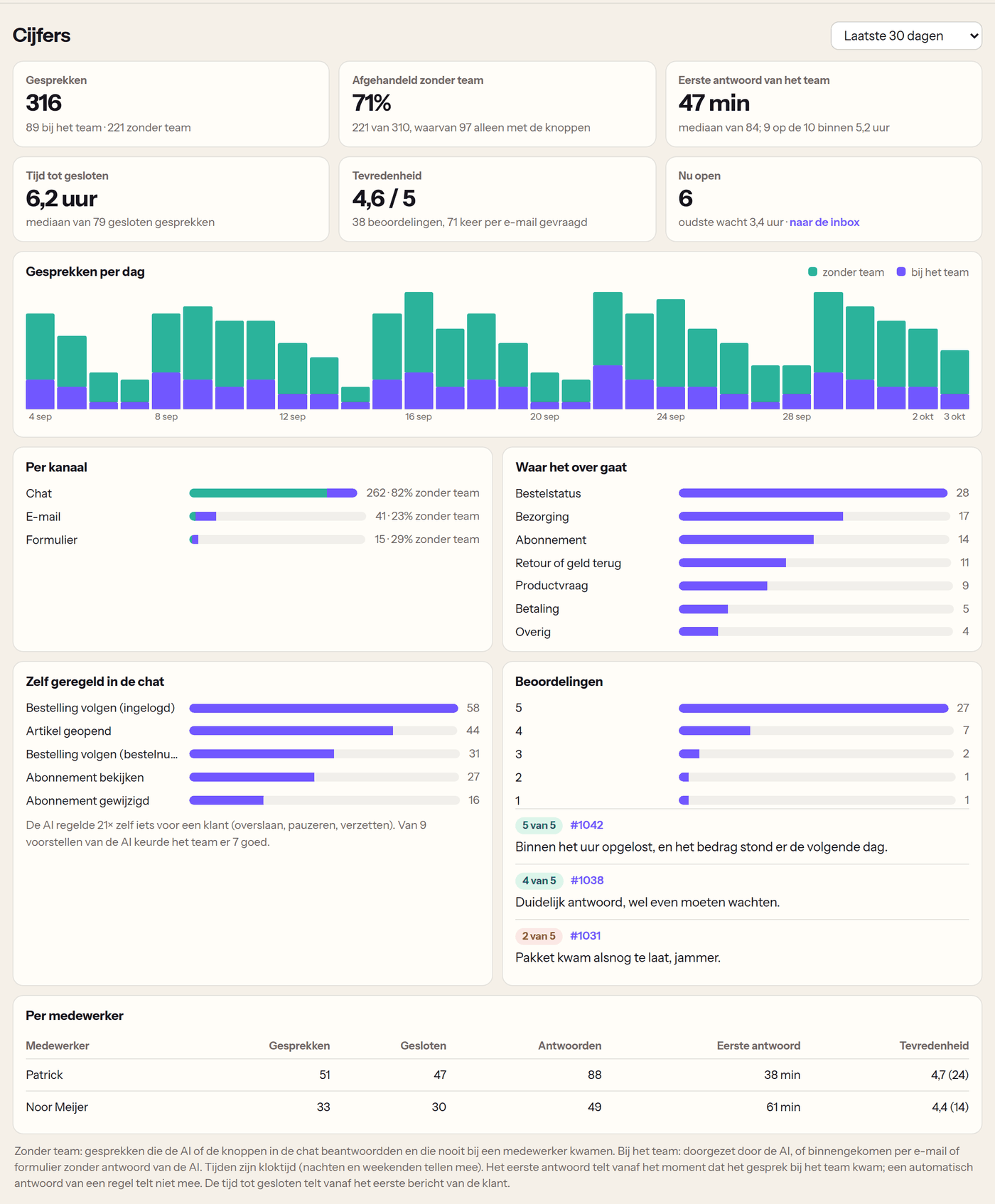
Under AI chat › Statistics you choose the last 7, 30 or 90 days or the last 12 months.
| Figure | What it tells you |
|---|---|
| Conversations | How many conversations came in, per day and per channel. |
| Handled without the team | The share the AI and the buttons in the chat handled without a person having to reply. |
| First reply from the team | The time between the moment a conversation reached your team and the first reply by a person: the median and the slowest ten percent. |
| Time to close | How long a conversation of your team stayed open. |
| Satisfaction | The average score, the spread from 1 to 5 and the latest remarks. |
| What it is about | The topics of the conversations that reached your team. |
| By team member | Conversations, replies, response time and rating per team member. |
| Self-service in the chat | How often each button was used: tracking an order, subscription, articles and reported problems. |
Do rules also run on conversations the AI handles by itself?
No. A rule only runs when a conversation reaches your team.
Does a rule's automatic reply count as the first reply?
No. The first response time only counts replies by a person.
Can a customer change their rating?
Yes. As long as the link works, the customer can pick another score or add a remark.
How do I raise the share 'without the team'?
Write articles for the questions under 'The AI did not know the answer here' in the knowledge base, switch on the buttons in the chat and let the AI do safe subscription actions by itself.
Inbox: answering conversations
Work in one inbox for chat, e-mail and contact form: views, assigning, macros, an AI draft, actions for the customer and proposals by the AI.
Knowledge base: where the AI gets its answers
Write articles the AI answers from, see which questions it could not answer and show your articles on a help page in your webshop.
Set up AI chat
Switch on the chat in your webshop, decide what the AI may do by itself and how it writes, and test its answers before customers see them.